Watching TV
21
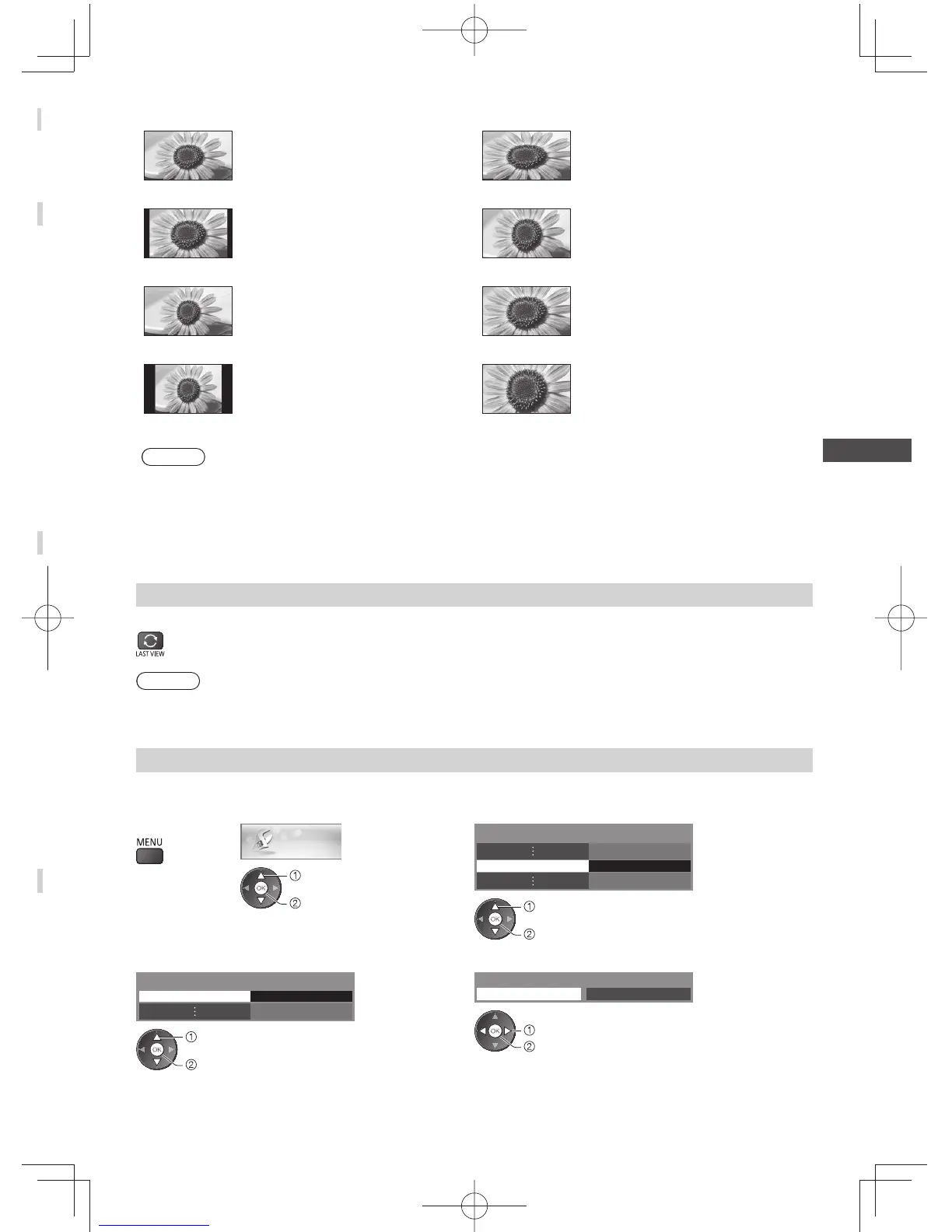
[16:9] [4:3 Full]
Directly displays the image at 16:9
without distortion (anamorphic).
Displays a 4:3 image enlarged
horizontally to fit the screen.
●
For Digital TV or HD signal
[14:9] [Zoom1]
Displays the image at the standard
14:9 without distortion.
Displays a 16:9 letterbox or 4:3 image
without distortion.
[Just] [Zoom2]
Displays a 4:3 image full-screen.
Stretching is only noticeable at the left
and right edges.
Displays a 16:9 letterbox (anamorphic)
image full-screen without distortion.
[4:3] [Zoom3]
Displays the image at the standard 4:3
without distortion.
Displays a 2.35:1 letterbox
(anamorphic) image full-screen without
distortion.
At 16:9, displays the image at its
maximum (with slight enlargement).
Note
●
For HD signal in Digital TV, only [16:9] and [4:3 Full] are available.
●
For SD signal in Digital TV, only [16:9], [4:3], and [4:3 Full] are available.
●
Only [16:9] and [4:3] are available in PC input mode.
●
Aspect cannot be changed in 3D mode.
●
Aspect mode can be memorised separately for SD (Standard definition) and HD (High definition) signals except in
Digital TV.
Last view
Switch to previously viewed channel or input mode easily
●
Press again to return to the current view.
Note
●
Switching channel is not available while the recording of Timer Programming or One Touch Recording is in progress.
●
Watching less than 10 seconds is not regarded as the previously viewed channel or input mode.
Change OSD language
You can change language for on-screen displays.
1 Display the
menu
2 Select [Setup]
Setup
select
access
3 Select [Language]
Language Access
select
access
4 Select [OSD Language]
OSD Language Access
Language
select
access
5 Select the language and set
中⽂
OSD Language
English
select
set




 To Next Page