Child Lock
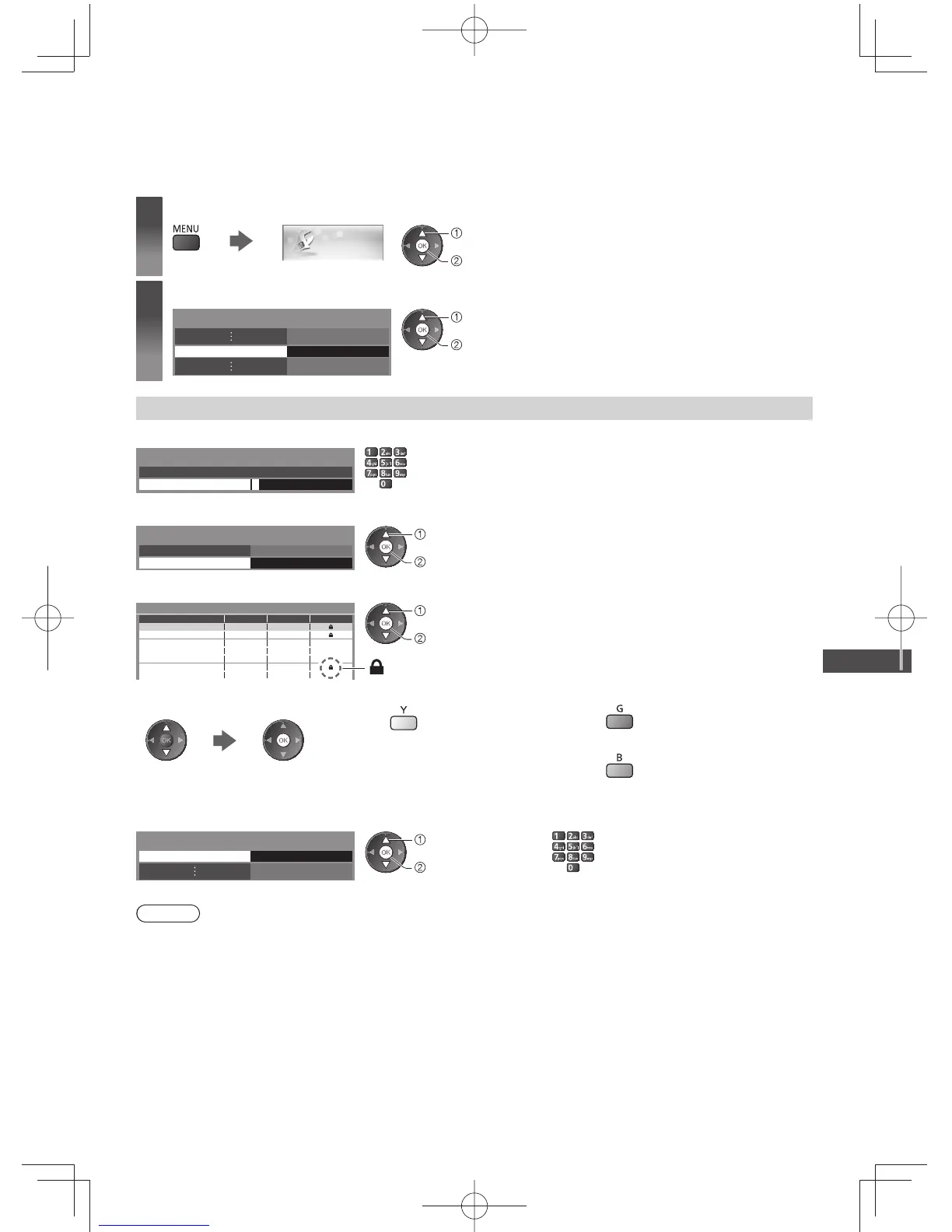
You can lock specific channels / AV input terminals and control who watches them.
When the locked channel / input is selected, a message appears. Enter the PIN number to watch.
1
Display the menu and select [Setup]
Setup
select
access
2
Select [Child Lock]
Child Lock Access
select
access
Control channel audience [Child Lock]
1 Enter the PIN number (4 digits)
* * * *
Please enter new PIN
PIN
Child Lock-PIN Entry
●
Enter the PIN number twice at first setting.
●
Make a note of the PIN number in case you forget it.
2 Select [Child Lock List]
Change PIN
Child Lock List
Child Lock
Access
select
access
3 Select the channel / input to be locked
101 BBC 1 Wales
7 BBC THREE
14 E4C
1 BBC1
2 *****
Child Lock List - TV and AV
Name Input
Digital TV
Digital TV
Digital TV
Analogue TV
Analogue TV
Analogue TV
External
Type
Digital TV
Digital TV
Digital TV
Analogue TV
Analogue TV
Analogue TV
Lock
: Appears when the channel / input is locked
AV
AV 1
VCR
select
lock
●
To cancel
Select the locked channel / input
●
To cancel all locks
●
To lock all
●
To jump to the top of the next input
■ To change the PIN number
1. Select [Change PIN] 2. Enter a new PIN number twice
Change PIN
Child Lock
Access
select
access
Note
●
Setting [Shipping Condition] (p. 46) erases the PIN number and all settings.






 To Next Page