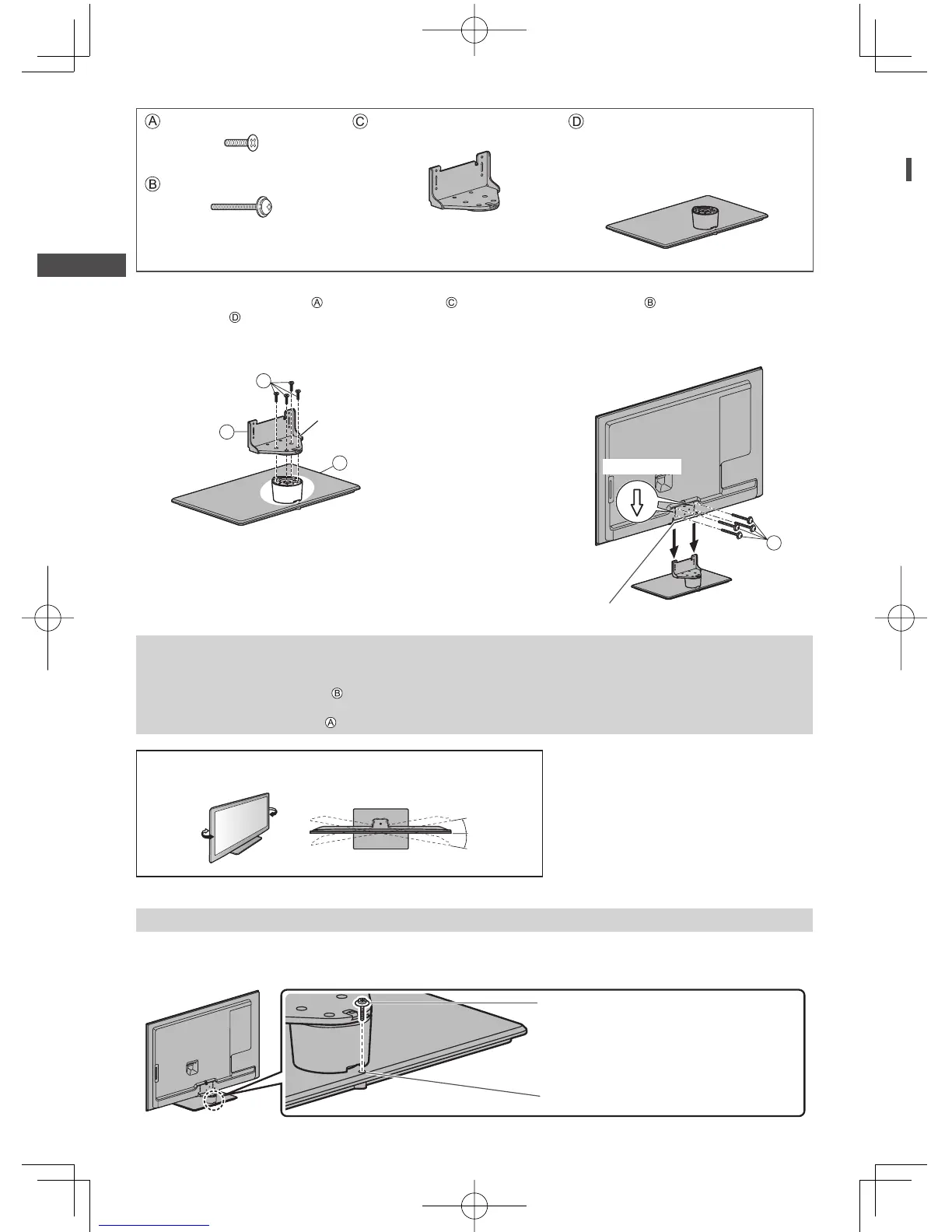
Accessories / Options
8
Assembly screw (4)
M5 × 16
Bracket
●
TBL5ZA32281
Base
●
TBL5ZX04161
(42” class)
●
TBL5ZX03881
(47” class)
Assembly screw (4)
M4 × 25
1
Assembling the pedestal
Use the assembly screws to fasten the bracket
to the base securely.
●
Make sure that the screws are securely tightened.
●
Forcing the assembly screws the wrong way will
strip the threads.
2
Securing the TV
Use the assembly screws to fasten securely.
●
Tighten the four assembly screws loosely at first, then
tighten them firmly to fix securely.
●
Carry out the work on a horizontal and level surface.
B
Arrow mark
Hole for pedestal installation
D
C
A
Front
Hold the bracket
not to fall over
Removing the pedestal from the TV
Be sure to remove the pedestal in the following way when using the wall-hanging bracket or repacking the TV.
1 Remove the assembly screws
from the TV.
2 Pull out the pedestal from the TV.
3 Remove the assembly screw from the bracket.
Adjusting the panel to your desired angle
●
Do not place any objects within the full rotation range.
15°
15°
(View from the top)
Preventing the TV from falling over
Using the fall-prevent screw hole and a screw (commercially available), securely fix the body of the pedestal to the
installation surface.
●
The place where the pedestal is to be fixed should be thick enough and made of hard material.
Screw (not supplied)
Diametre: 3 mm
Length: 25 - 30 mm
Screw hole




 To Next Page