External Equipment
84
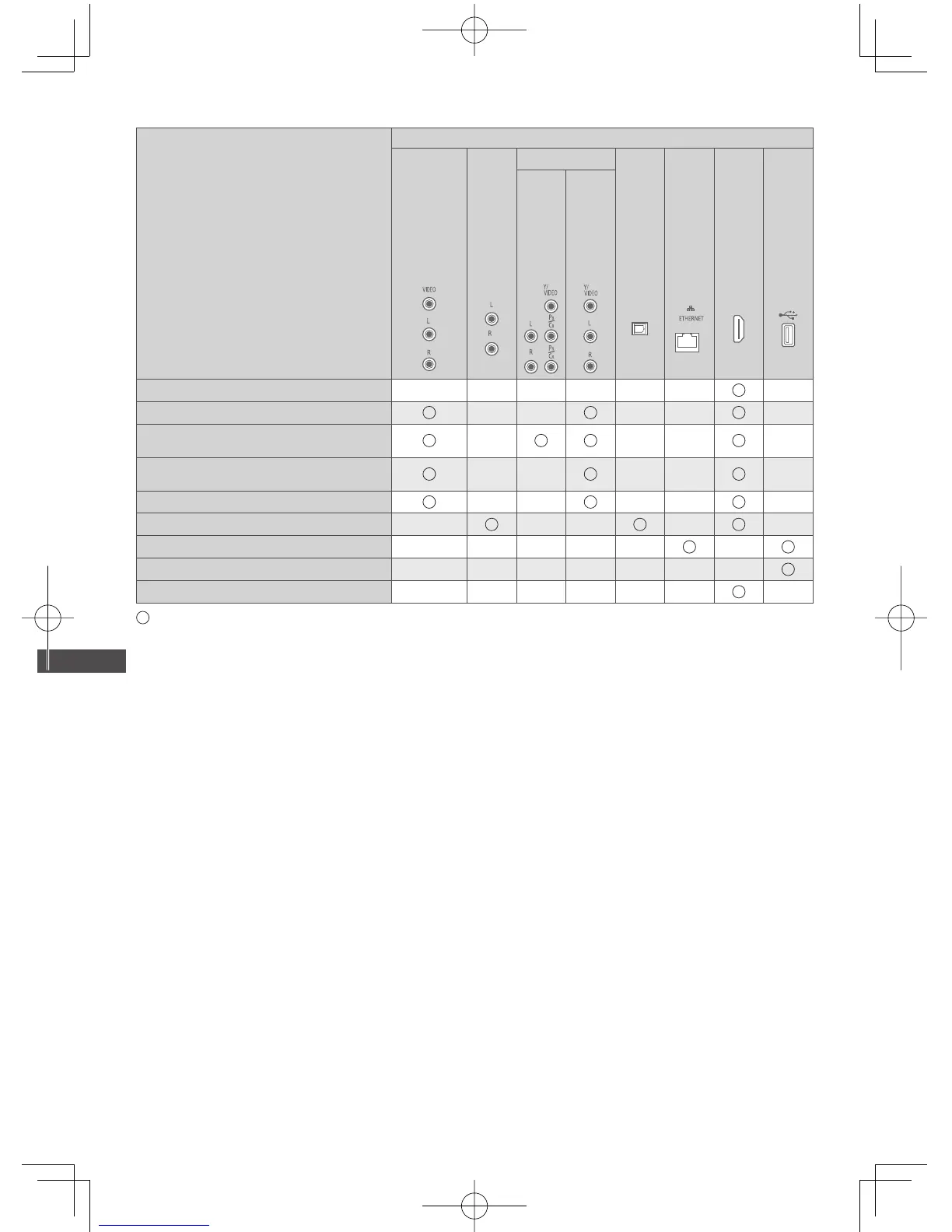
Types of connectable equipment to each terminal
Features
Terminal
AV1 IN
∗
1
AUDIO OUT
∗
1
AV2 IN
∗
1
DIGITAL
AUDIO OUT
ETHERNET
HDMI 1 - 4
USB 1 - 3
COMPONENT
VIDEO
To watch 3D contents (Blu-ray Disc Player)
To watch satellite broadcasts (Set top box)
To watch videocassettes / DVDs
(VCR / DVD player)
To watch camcorder images
(Video camera)
To play games (Game equipment)
To use amplifier with speaker system
∗
2
To use network services
∗
3
USB HDD Recording
∗
4
VIERA Link
: Recommended Connection
∗
1: To connect the equipment, the terminal adaptor (supplied) is necessary.
∗
2: Use HDMI2 for connecting an amplifier. This connection is applicable when using an amplifier that has ARC (Audio
Return Channel) function.
∗
3: Use USB 2 port for connecting the Communication Camera.
∗
4: Use USB 1 port for connecting the USB HDD.




 To Next Page