
 Need help?
Do you have a question about the Panasonic VL-VF580 and is the answer not in the manual?
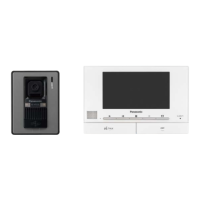
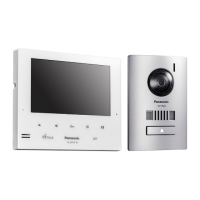
Describes the VL-SF70 system components, monitor and door station.
Lists and illustrates the accessories included with the video intercom system.
Explains how the VL-SF70 can be used in basic and expanded system configurations.
Outlines the primary functionalities of the video intercom system, such as answering calls.
Provides critical warnings and precautions for safe installation and operation of the product.
Advises users to consider others' privacy and rights regarding image capture.
Covers general notes on product use, power failure, and data loss.
Details recommended and prohibited locations and methods for installing the system.
Step-by-step instructions for mounting and connecting the door station.
Step-by-step instructions for mounting and connecting the indoor monitor unit.
Instructions for installing the switch box, used with optional door stations.
Visual representation of system wiring connections for basic and expanded configurations.
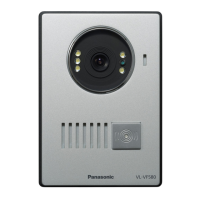
Identifies and explains the buttons and indicators on the outdoor door station unit.
Identifies and explains the buttons and indicators on the indoor monitor unit.
How to respond to and conduct conversations with visitors at the door station.
Instructions on how to view the area around the door station.
Guide to modifying brightness, contrast, and other visual parameters on the monitor.
How to select and set different ringtone options for incoming calls.
Instructions on accessing and reviewing captured images of visitors.
Procedure for erasing stored images from the system's memory.
How to remotely operate an electric door lock connected to the system.
Instructions for initiating calls between multiple monitors within the system.
Technical details including power, dimensions, weight, and operating environment for the monitor.
Technical details including power, dimensions, weight, and operating environment for the door station.
Technical details including power, dimensions, weight, and operating environment for the switch box.
The Panasonic VL-SF70 Series is a comprehensive video intercom system designed for enhanced home security and communication. It comprises a monitor (VL-MF70) and a door station (VL-VF580), with options for system expansion to include additional monitors and door stations. This manual serves as a guide for all three models, ensuring users can effectively set up and operate their intercom system.
The primary function of the VL-SF70 Series is to facilitate secure and convenient communication between residents and visitors. When a visitor presses the call button on the door station, the monitor inside the home rings, allowing residents to see and speak with the visitor before granting access. This enhances security by enabling visual verification of visitors.
The system also supports monitoring the outside area through the door station's camera, providing real-time visual surveillance. This feature is particularly useful for checking on activity outside the home without having to open the door.
A key security feature is the automatic recording of images. The system captures still images when a visitor presses the call button or when the outside area is monitored. These recorded images, up to a maximum of 50, are stored for later review, providing a visual log of visitors and events. When the maximum storage capacity is reached, the oldest images are automatically overwritten to make space for new recordings.
For homes equipped with an electric lock, the VL-SF70 Series integrates with this feature, allowing residents to unlock the door directly from the monitor. This adds a layer of convenience and control, eliminating the need to physically go to the door to unlock it.
In expanded systems with multiple monitors, the intercom facilitates internal communication. Users can call other monitors within the system, enabling inter-room or inter-floor communication.
The VL-SF70 Series is designed for user-friendly operation with intuitive controls and clear displays.
Answering Calls: When a call comes in from the door station, the monitor rings. Users can answer the call by pressing a dedicated button, initiating a hands-free conversation with the visitor. The system allows for alternate speaking, ensuring clear communication. If a call goes unanswered, it stops ringing after approximately 30 seconds. The maximum talking time for a single conversation is about 120 seconds.
Monitoring the Outside: To view the outside area, users simply press the monitor button. This activates the door station camera, displaying the live feed on the monitor. Monitoring can be stopped by pressing the same button again. In systems with multiple door stations, the monitor automatically displays the feed from the door station that was last used. The maximum monitoring time is approximately 180 seconds.
Viewing Recorded Images: Recorded images can be accessed when the monitor is idle. By pressing the play button, users can browse through the stored images. The display shows the current image number out of the total, and an asterisk indicates unviewed images. Users can scroll up or down to navigate through the images, viewing the date and time of each recording.
Unlocking Electric Locks: If an electric lock is connected, a dedicated door key button appears on the monitor when there is an incoming call or during monitoring/talking. Pressing this button will unlock the connected electric lock.
Calling Other Monitors: In multi-monitor setups, users can initiate a call to another monitor when their monitor is idle. To answer an internal call, the recipient monitor also uses the answer button.
Adjusting Display Settings: The monitor allows for customization of display settings. Users can adjust brightness, contrast, and chroma to optimize image quality based on their preferences and ambient lighting conditions.
Changing the Ringtone: The system offers multiple ringtone options. Users can select their preferred ringtone from a set of available choices, allowing for personalization of the incoming call alert.
Setting Date and Time: The date and time displayed on the monitor can be easily set and adjusted. This ensures accurate timestamps for recorded images and general system operation.
The VL-SF70 Series incorporates features and guidelines to ensure its longevity and proper functioning.
Deleting Recorded Images: To manage storage and maintain privacy, users can delete all recorded images from the monitor's memory. This is particularly useful before disposing of, transferring, or returning the product to protect private information.
Installation Guidelines: The manual provides detailed instructions for installing both the door station and the monitor, including recommended locations and distances to prevent malfunctions and communication disturbances. It advises against installing the devices in areas with excessive vibration, dust, high temperatures, direct sunlight, or near strong electrical fields. Proper wiring connections are emphasized, with warnings against incorrect wiring that could cause severe damage.
Power Management: The system uses an AC adaptor as the main disconnect device, highlighting the importance of easy access to the power outlet. Users are advised to unplug the product if it will be unused for a long period or during electrical storms. Regular cleaning of the AC adaptor is recommended to prevent insulation defects.
Safety Precautions: The manual outlines crucial safety information, including warnings against disassembling the product, touching the AC adaptor with wet hands, or using the product near water. It also provides guidelines for secure installation to prevent the devices from falling off walls.
Privacy Considerations: Panasonic emphasizes the importance of considering privacy rights when installing and using the intercom system. Users are reminded of the "rights of portrait" and the need to respect individuals' privacy regarding their images.
By adhering to these usage and maintenance guidelines, users can ensure the optimal performance, security, and longevity of their Panasonic VL-SF70 Series video intercom system.
 General
| Type | Video Intercom System |
|---|---|
| Camera | Yes |
| Wiring | 2-wire |
| Electric Lock Support | Yes |
| Mounting Style | Wall-mounted |
| Camera Sensor | CMOS |
| Operating Temperature | -10°C to +50°C |
| Display | LCD |
| Night Vision | Yes (IR LEDs) |
| Power Supply | AC 100-240V |


 To Next Page