
 Need help?
Do you have a question about the Panasonic VL-SV70 and is the answer not in the manual?
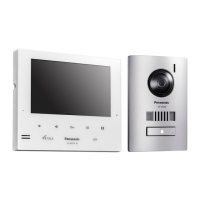
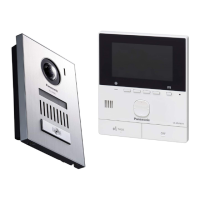
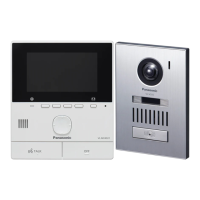
Describes the composition of the video intercom system with main monitor and door station.
Details accessories for installing the main monitor and doorphone.
Provides general advice, regional product differences, and design change notices.
Explains the meaning of various graphical symbols used on the product and in the manual.
Explains the meaning of symbols, expressions, and styles used within the document.
Mentions software basis and other trademarks.
Crucial safety instructions to prevent severe injury, fire, and electric shock.
Basic safety precautions for reducing risk of fire, electric shock, or injury.
Guidelines for optimal product performance regarding environment and placement.
Covers power plug usage, privacy rights, personal information handling, and disposal advice.
Details hazardous constituents and E-waste management rules specific to India.
Instructions on returning the product for recycling and authorized disposal methods.
Instructions on how to clean the product safely.
Identifies and describes the controls on the doorphone and main monitor units.
Explains the display screen, status icons, and soft key icons on the main monitor.
Step-by-step guide to configure language, date, and time settings on the main monitor.
How to receive and answer calls from the doorphone using the main monitor.
Instructions on how to monitor the doorphone’s camera and audio feed.
Explains automatic image recording when a call is received, even if unanswered.
How to manually record images while monitoring the doorphone feed.
Guide on how to play back recorded still images of visitors.
Steps to configure and connect an electric lock to the main monitor.
How to unlock an electric lock remotely using the main monitor.
Instructions for connecting and configuring a doorbell with the main monitor.
How to change settings like ringtone and connected devices for personalized use.
Detailed technical specifications for the main monitor and doorphone units.
This document serves as an Important Information and Quick Guide for the Panasonic Video Intercom System, model VL-SV70. It provides essential details for safe operation, basic functions, and maintenance, ensuring users can effectively utilize the system.
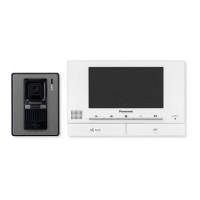
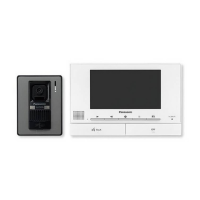
The Panasonic Video Intercom System, VL-SV70, is designed to enhance home security and communication by allowing users to monitor and interact with visitors at their door. The system comprises a Main Monitor Station (VL-MV70) and a Door Station (VL-V522L). The main monitor acts as the central control unit, featuring a display for viewing images from the door station and various buttons for operation. The door station, equipped with a camera, LED lights, microphone, speaker, and a call button, is installed at the entrance to capture images and facilitate two-way communication with visitors.
The core function of the VL-SV70 system is to provide visual and audio communication with visitors before granting them access. When a visitor presses the call button on the door station, the main monitor rings and displays the visitor's image. Users can then answer the call by pressing the TALK button, enabling two-way communication. This allows for a secure interaction, as users can identify and speak with visitors without opening the door.
Beyond answering calls, the system offers a monitoring feature, allowing users to proactively view the outside area through the door station's camera at any time. This is particularly useful for checking on suspicious activity or simply observing the surroundings. During monitoring, users can also initiate communication with anyone visible at the door.
A significant security feature is the automatic recording of doorphone images. The main monitor can store still images from up to 50 doorphone calls or monitoring sessions. Each session records a set of up to four images. When a visitor calls, the system automatically records four images, starting approximately two seconds after the call is received, regardless of whether the call is answered. If a call is missed, the recorded images are saved as "unplayed images," and a play lamp illuminates to notify the user. The system employs an auto image updating mechanism, where new recordings overwrite the oldest images once the memory is full, even if those older images are unplayed. Manual recording is also possible while monitoring, allowing users to capture images on demand.
For enhanced access control, the VL-SV70 supports connection to a commercially available electric lock. This integration enables users to unlock the door directly from the main monitor during an incoming call, while talking to a visitor, or during monitoring, providing convenience and security. The system also allows for the connection of a doorbell, which will ring the main monitor when pressed, offering an alternative notification method for visitors.
The VL-SV70 is designed for user-friendly operation. The main monitor's display provides clear visual information, including status icons that indicate whether the monitor is on a call, monitoring, recording images, if the doorphone's LED lights are on, if "Press-to-talk" mode is active, or if the voice changer is engaged. Soft keys, whose functions are indicated by corresponding icons on the display, simplify navigation and control.
Setting up the system involves configuring basic parameters such as language, date, and time. The play lamp on the main monitor serves as an indicator if these settings have not been configured. The interface guides users through selecting desired options using intuitive button presses.
Playing back recorded images is straightforward. When new images are available, the play lamp illuminates. Users can access a "Recorded image list" screen to view "Unplayed images" or "Played images." The system allows browsing through image sets and individual images with controls for continuous playback, skipping between image sets, and pausing.
Configuring electric locks and doorbells involves navigating through the main monitor's menu. Users can specify connected devices, set the unlocking time for electric locks, and enable doorbell functionality, ensuring the system integrates seamlessly with other security components.
Proper maintenance is crucial for the longevity and optimal performance of the VL-SV70 system. The document emphasizes the importance of reading the "For your safety" section to prevent severe injury, property loss, fire, and electric shock. This includes using only the specified power source, avoiding disassembly or modification, not touching the power plug with wet hands or during an electrical storm, and keeping the product away from rain, moisture, steam, oily smoke, or excessive dust. Users are also advised to ensure power cables are not obstructed or damaged and to avoid overloading power outlets.
Regular cleaning of the product is recommended using a soft, dry cloth. For excessive dirt, a cloth slightly dampened with fresh water can be used. However, it is critical to avoid cleaning products containing alcohol, polish powder, powder soap, benzine, thinner, wax, petroleum, or boiling water, as these can cause changes in color or quality. Spraying the product with insecticide, glass cleaner, hair spray, or wall paint is also prohibited.
In case of malfunction, such as smoke emission, abnormal smell, unusual noise, or physical damage, users are instructed to unplug the product immediately and contact an authorized service center. The document also provides guidance on environmental considerations, advising users to keep the unit away from electrical noise-generating devices, direct sunlight, extreme temperatures, and damp basements to prevent condensation and ensure stable operation.
For privacy and data security, the main monitor's internal memory records personal information (image recordings). Before disposing of, transferring, or returning the product for repair, users are advised to initialize the main monitor to erase all recorded images and settings. This can be done through the "Factory Setting" option in "Initialize settings." If the main monitor cannot be operated correctly, pressing the RESET button with a pointed object can reset the unit without affecting recorded images or configured settings.
The document also includes general information regarding compliance with EU regulatory directives and Ecodesign requirements, providing links to relevant Panasonic websites for further details. For India-specific environmental information, it outlines hazardous constituents and compliance with E-Waste (Management) Amendment Rules, emphasizing proper disposal through authorized recyclers and service centers, and prohibiting disposal with municipal waste or donation of old electronic items.
 General
| Type | Video Intercom System |
|---|---|
| Camera | Yes |
| Connectivity | Wired |
| Wireless Connectivity | No |
| Display | 7-inch LCD |


 To Next Page
