EasyManua.ls Logo

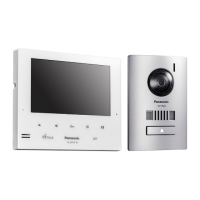
Panasonic VL-V522LCE - User Manual

Panasonic VL-V522LCE
128 pages
Print Icon
To Next Page IconTo Next Page
Loading...
© Panasonic Corporation 2019
Unauthorized copying and distribution is a violation
of law.
ORDER NO. KMA1611091CE
Wireless Video Intercom System
Model No. VL-SWD272BX
VL-SWD272CX
VL-SWD272CX1
VL-SWD272AZ
Model No. VL-SVD272BX
VL-SVD272CX
VL-SVD272AZ
Model No. VL-MWD272BX
VL-MWD272CX
VL-MWD272CX1
VL-MWD272AZ
Model No. VL-V522LCE
Model No. VL-WD613BX
VL-WD613CX
VL-WD613CX1
VL-WD613AZ
(BX: for Asia, Middle Near East and Africa)
(CX: for Middle East and Africa, Hong Kong, Singapore)
(CX1: for UAE)
(AZ: for Australia and New Zealand)
[Version 2.0]

Table of Contents

Questions and Answers

  • S
    shafferdeborahAug 6, 2025
    How to fix a duplicated IP address on my Panasonic VL-V522LCE?
    • S
      Steven BrownAug 6, 2025
      If the IP address is duplicated on your Panasonic Intercom System, it means that the same IP address of the main monitor is being used by another device. To resolve this, confirm the current IP address of the main monitor and reconfigure it so that it does not overlap with other IP addresses.
  • G
    Gina JonesAug 10, 2025
    What to do if my Panasonic VL-V522LCE Intercom System cannot connect to the server?
    • R
      Ryan DuranAug 10, 2025
      If your Panasonic Intercom System cannot connect to the server, it might be due to incorrect email server settings. Double-check the configured contents and correct any errors. Alternatively, the wireless router may not be connected to the Internet. Ensure your wireless router is properly connected to the network.
  • D
    Darren HamptonAug 14, 2025
    Why does my Panasonic Intercom System have a connection failure?
    • C
      Christina MiddletonAug 14, 2025
      If you are experiencing a connection failure with your Panasonic Intercom System, it could be due to a problem with the wireless network connection. Try moving closer to the wireless router and attempt connecting again. Another reason could be that the setting procedure was not completed within the specified time. Make sure to have all the necessary information ready and complete the settings promptly.
  • R
    Rachel WilsonAug 18, 2025
    What causes an authentication failure on a Panasonic VL-V522LCE Intercom System?
    • C
      Christopher DelacruzAug 18, 2025
      An authentication failure on your Panasonic Intercom System can occur due to several reasons. First, the security setting type (“TLS”, “SSL”, or “None”) might be incorrectly set; correct this in “Security type.” Second, the SMTP authentication setting may be incorrect; adjust it in “SMTP authentication.” Finally, the SMTP authentication setting (“Account name” or “Password”) could be wrong; ensure it's correctly set in “SMTP authentication.”
  • M
    Matthew KerrAug 23, 2025
    Why is the network not available on my Panasonic VL-V522LCE Intercom System?
    • T
      Tracy Hamilton DDSAug 23, 2025
      If the network is not available for your Panasonic Intercom System, it's possible that your wireless router is not working properly. Confirm that your wireless router is turned on.
  • M
    Michael MarshallAug 27, 2025
    What to do if I cannot register my Panasonic Intercom System?
    • K
      Kimberly WelchAug 27, 2025
      If you cannot register your Panasonic Intercom System, it might be because the registering procedure was not completed within the specified time. To resolve this, ensure that the wireless router is turned on and that both the main monitor and your mobile device are connected to your wireless router, then try again.
  • M
    Marcus ChapmanAug 31, 2025
    Why can't I register my Panasonic VL-V522LCE's email notification address?
    • R
      Rebecca BarberAug 31, 2025
      To register your Panasonic Intercom System, ensure that “Email server registration” is set, as the “Email notification address” cannot be configured without it.

Summary

Safety and Warnings

Specifications

Main Monitor Station (VL-MWD272) Specs

Power, dimensions, environment, display, and installation specs for the main monitor.

Sub Monitor Station (VL-WD613) Specs

Power, dimensions, environment, display, and operational specs for the sub monitor.

Door Phone (VL-V522 L) Specs

Power source, dimensions, environment, lighting, and viewing angle for the door phone.

Technical Descriptions

Block Diagram

Visual representation of the video intercom system's signal flow and component connections.

Troubleshooting Guide

Door Station Operation Check

Flowchart for troubleshooting door station operation issues, referencing signal routes.

Main Monitor Station Operation Check

Flowchart for checking the operation of the main monitor station and its related functions.

Communication Defects: Main Monitor & Extension

Troubleshooting for communication issues between main and extension monitors.

Video Recording Defects: Extension Monitor

Troubleshooting flowchart for issues with video recording on the extension monitor.

Power Supply Defects: Main Monitor Station

Troubleshooting flowchart for main monitor station power supply problems.

RF Communication Defects: Main Monitor Station

Troubleshooting flowchart for RF communication issues with the main monitor station.

Transmission Defects: Main Monitor Station

Troubleshooting flowchart for transmission problems from the main monitor station.

Reception Defects: Main Monitor Station

Troubleshooting flowchart for reception issues on the main monitor station.

Video Recording Defects: Main Monitor Station

Troubleshooting flowchart for main monitor station video recording failures.

Communication Defects: Main Monitor & Door Station

Troubleshooting for communication issues between the main monitor and door station.

Communication Defects: Extension Monitor & Door Station

Troubleshooting for communication issues between extension monitor and door station.

Wireless Monitor Station Operation Check

Flowchart for checking the operation of the wireless monitor station.

Power Supply Defects: Wireless Monitor Station

Troubleshooting flowchart for wireless monitor station power supply problems.

LCD Defects: Wireless Monitor Station

Troubleshooting flowchart for issues with the wireless monitor station's LCD display.

Radio Communication Defects: Wireless Monitor Station

Troubleshooting flowchart for radio communication problems with the wireless monitor station.

Transmission Defects: Wireless Monitor Station

Troubleshooting flowchart for wireless monitor station transmission failures.

Reception Defects: Wireless Monitor Station

Troubleshooting flowchart for wireless monitor station reception issues.

Charging Defects: Wireless Monitor Station

Troubleshooting flowchart for wireless monitor station charging problems.

Disassembly and Assembly Instructions

Measurements and Adjustments

Main Monitor Station Connections & Adjustments

Connections and procedures for measurements and adjustments on the main monitor station.

Factory Mode Operations

Procedures for entering and exiting the factory mode for adjustments.

Exploded Views and Parts Lists

Panasonic VL-V522LCE Specifications

General IconGeneral
CameraYes
Night VisionYes
ConnectivityWired
TypeVideo Intercom
WaterproofYes
AudioTwo-way communication

Related product manuals