EasyManua.ls Logo

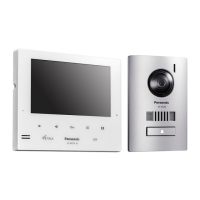
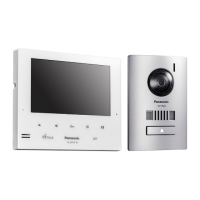
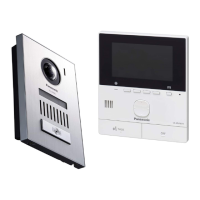
Panasonic VL-MV26 - User Manual

Panasonic VL-MV26
18 pages
Print Icon
To Next Page IconTo Next Page
Loading...
Operating Instructions
Thank you for purchasing a Panasonic product.
Please read this manual before using the product and save it for future reference.
Installation Guide is supplied separately.
This system is an auxiliary system; it is not designed to provide complete protection from property loss. Panasonic will not be
held responsible in the event that property loss occurs while this system is in operation.
VL-MV26
© Panasonic Corporation 2016
PNQX8102WA C0416HH2037
1006, Oaza Kadoma, Kadoma-shi, Osaka 571-8501, Japan
http://www.panasonic.com
Model name
Model No.
Main Monitor Station

Other manuals for Panasonic VL-MV26

Questions and Answers

  • J
    Jason GreenAug 14, 2025
    How to reset the Panasonic VL-MV26 when it's not working properly?
    • A
      Allison ChandlerAug 14, 2025
      If the Panasonic Intercom System isn't working correctly, try pressing the MRESETN button on the bottom side of the main monitor using a pointed object. Note that recorded images and configured settings will not be affected.
  • K
    Kathryn Johnston DDSAug 17, 2025
    What to do if my Panasonic Intercom System main monitor doesn't work?
    • J
      John WeberAug 18, 2025
      If your Panasonic Intercom System's main monitor isn't displaying anything, the ringtone isn't sounding, and voices can't be heard, and the power is on, it could indicate an issue with the electrical wiring. In this case, it's best to contact an authorized service center for assistance.
  • J
    Jacqueline TaylorAug 21, 2025
    Why are the images on my Panasonic VL-MV26 dirty or unclear?
    • H
      hgonzalezAug 21, 2025
      If images on your Panasonic Intercom System appear dirty or unclear, it might be due to dirt or condensation on the lobby station's lens. Try wiping the lens with a soft, dry cloth. If there's water condensation, wait for it to evaporate.
  • J
    Jennifer Wells MDAug 25, 2025
    Why doesn't the ringtone sound on my Panasonic VL-MV26 lobby station?
    • J
      julie19Aug 25, 2025
      If the ringtone for the lobby station on your Panasonic Intercom System isn't sounding, the ringtone volume may be muted. Try to activate the sound for the ringtone.
  • W
    Walter LangAug 28, 2025
    Why are people's faces dark on my Panasonic VL-MV26 Intercom System images?
    • J
      James ShieldsAug 28, 2025
      If the images of people's faces appear dark on your Panasonic Intercom System, especially when there's strong sunlight or backlight around the lobby station, use the backlight compensation function.
  • J
    Jesse RiceAug 31, 2025
    Why are there white lines on my Panasonic Intercom System display?
    • J
      James GallegosAug 31, 2025
      If images on your Panasonic Intercom System are white, or show white lines or circles, strong light, like sunlight, might be shining into the lobby station's lens. To resolve this, try moving the lobby station away from direct sunlight or adjusting its angle.
  • A
    Ashley HallSep 3, 2025
    How to fix white or black images on my Panasonic VL-MV26?
    • C
      Catherine VasquezSep 3, 2025
      If the images on your Panasonic Intercom System are white or black, it could be due to the display brightness not being correctly adjusted. Adjust the brightness while images are displayed.
  • T
    Todd MasseySep 6, 2025
    Why are night images dark on my Panasonic VL-MV26?
    • C
      cgreeneSep 6, 2025
      If images at night on your Panasonic Intercom System are dark and faces are hard to identify, even with the lobby station's LED lights on, it's because the LED light cannot illuminate the edges of the visible area. It's recommended to install extra lights around the lobby station.
  • A
    Andrew HernandezSep 10, 2025
    Why is my Panasonic Intercom System image in black and white?
    • A
      Amanda MolinaSep 10, 2025
      If the image of the subject is displayed in black and white (or bluish-purple) on your Panasonic Intercom System, it may be because it is night or there is poor lighting around the lobby station. Turn on the LED lights when it is dark.

Summary

Important Information

For Your Safety

Critical safety instructions to prevent injury, electric shock, fire, and property damage during product use.

Preparation

Operations

Answering Calls

Detailed procedures for answering calls from lobby stations and extension telephones.

Monitoring the Outside with the Lobby Station or Camera

Instructions for viewing live video feeds from lobby stations or connected cameras.

Emergency Calls

How to use the emergency call feature to alert facility staff to critical situations.

Recording Images

Details on automatic and manual recording of still images from calls and monitoring sessions.

Lobby Station Controls;Operations

Controls

Identifies and explains the buttons, display, speaker, and other controls on the lobby station unit.

Calling a Resident

Procedures for initiating calls to residents by entering room numbers or searching by name.

Troubleshooting

Monitor Display (Lobby Station Images)

Troubleshooting common issues with distorted, color, or unclear images from the lobby station.

Others

Addresses general operational problems like the product not working, no display, or no sound.

Error Messages

Explanation of common error messages displayed during device usage or registration.

Panasonic VL-MV26 Specifications

General IconGeneral
BrandPanasonic
ModelVL-MV26
CategoryIntercom System
LanguageEnglish

Related product manuals