EasyManua.ls Logo

Panasonic VL-MWD272 - User Manual

Panasonic VL-MWD272
40 pages
Print Icon
To Next Page IconTo Next Page
Loading...
Operating Instructions
Thank you for purchasing a Panasonic product.
Please read this document before using the product and save it for future reference.
Installation Guide is supplied separately.
This system is an auxiliary system; it is not designed to provide complete protection from property loss. Panasonic will not be
held responsible in the event that property loss occurs while this system is in operation.
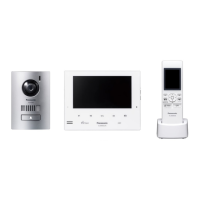
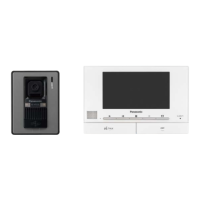
VL-MWD272
VL-SWD272
VL-SVD272
Model Name
Model No.
Video Intercom System
Wireless Video Intercom System
Main Monitor Station

Table of Contents

Other manuals for Panasonic VL-MWD272

Questions and Answers

  • R
    Ronald EvansSep 9, 2025
    Why doesn't the charge indicator turn off on my Panasonic Intercom System?
    • J
      James TaylorSep 9, 2025
      If the charge indicator on your Panasonic Intercom System doesn't turn off after charging the batteries for about 8 hours: * Ensure the main monitor is turned on and charge the sub monitor nearby. The charging time may increase if the sub monitor is picked up or used during charging, or if the main monitor is turned off.
  • H
    Heather RodriguezAug 23, 2025
    How to fix dirty or unclear images on Panasonic Intercom System?
    • E
      elittleAug 23, 2025
      If the images on your Panasonic Intercom System are dirty, unclear, or out of focus: * Wipe the lens with a soft, dry cloth if there is dirt. * Wait for the condensation to evaporate if there is water condensation.
  • C
    Cindy YoungAug 25, 2025
    What to do if my Panasonic Intercom System main monitor does not work?
    • A
      Ann WestAug 25, 2025
      If the main monitor of your Panasonic Intercom System isn't working properly, showing nothing on the screen, not sounding the ringtone, or not transmitting voices, check the power connection. If the power is connected, there may be a problem with the electrical wiring.
  • C
    Craig FloresAug 27, 2025
    Why does the ringtone for my Panasonic Intercom System doorphone not sound?
    • J
      Jessica PattersonAug 27, 2025
      If the ringtone for the doorphone on your Panasonic Intercom System doesn't sound, make sure the ringtone volume isn't muted and that the sub monitor's batteries are charged. Activate the sound for the ringtone, and charge the batteries, if needed.
  • P
    Patrick PadillaAug 27, 2025
    How to stop sound from cutting out on Panasonic Intercom System?
    • A
      Angela StewartAug 27, 2025
      If you're experiencing sound cutting in/out or fading on your Panasonic Intercom System: 1. Try using the "Press-to-talk" mode if the area is noisy. 2. Ensure you're not covering the top of the sub monitor (where the antenna is located). 3. Move the sub monitor closer to the main monitor, or to an area without obstructions like concrete walls. 4. Consider installing a repeater to improve the signal.
  • T
    theresa48Aug 29, 2025
    How to adjust brightness on Panasonic Intercom System if images are white or black?
    • J
      Jose BonillaAug 29, 2025
      If images on your Panasonic Intercom System are white or black, try adjusting the brightness settings when the images are displayed.
  • J
    James CowanSep 18, 2025
    Why is my Panasonic Intercom System flashing after charging?
    • J
      James ReynoldsSep 18, 2025
      To address the flashing issue on your Panasonic Intercom System's sub monitor after only a few uses post-charge, clean the ends of the batteries with a dry cloth and recharge. If the problem persists, it may be time to replace the batteries.
  • D
    Donald JonesSep 18, 2025
    Why are images distorted on my Panasonic Intercom System?
    • T
      Tammy Morales MDSep 22, 2025
      Images appearing distorted on the Panasonic Intercom System is not a malfunction.
  • N
    Nathan LongSep 8, 2025
    Why won't the charge indicator light up on my Panasonic Intercom System?
    • S
      stacie01Sep 8, 2025
      If the charge indicator doesn't light up when you place the sub monitor on the charger for your Panasonic Intercom System: * Ensure the AC adapter is firmly plugged into the power outlet. * Make sure the sub monitor is securely placed on the charger. * If the batteries are new or discharged, leave the sub monitor on the charger for a few minutes.
  • A
    Amber HallSep 4, 2025
    Why can't the visitor hear me on my Panasonic Intercom System?
    • M
      Michael GrahamSep 4, 2025
      If your voice cannot be heard by the visitor on your Panasonic Intercom System, and you're using the "Press-to-talk" mode, remember that the visitor can only hear you while you are pressing the M N button.

Summary

Important Information

2.1 For Your Safety

Critical warnings and precautions for safe operation to prevent injury or damage.

2.2 Important Safety Instructions

Basic safety precautions to reduce risks of fire, electric shock, or personal injury.

Preparation

3.1 Controls

Identifies and describes the buttons and features of the doorphone and monitors.

Talking and Monitoring

4.1 Answering Doorphone Calls

Procedure for receiving and responding to calls from the doorphone.

Recording and Playing

5.1 Recording Doorphone Images

Methods for automatically or manually recording images from the doorphone.

Using Electric Locks and PBXs

6.1 Using Electric Locks

Configuration and operation of electric locks connected to the main monitor.

Expanding the System

9.1 Registering sub monitors and extension monitors

Procedure for adding and registering sub monitors and extension monitors.

Troubleshooting

11.1 Troubleshooting (Monitor Display Issues)

Resolving problems related to distorted, discolored, or unclear monitor images.

11.1 Troubleshooting (Ringtone and Call Issues)

Solutions for ringtone not sounding or call sound cutting out.

11.1 Troubleshooting (Sub Monitor Charging and Others)

Addresses sub monitor charging problems and other operational issues.

11.2 Error messages - main monitor

Explains error messages displayed on the main monitor and their solutions.

11.3 Error messages - extension monitor

Explains error messages displayed on the extension monitor and their solutions.

11.4 Error messages - sub monitor

Explains error messages displayed on the sub monitor and their solutions.

Panasonic VL-MWD272 Specifications

General IconGeneral
CameraYes
Number of Units1
AudioYes
Power SourceAC Adapter
TypeWireless Video Intercom System

Related product manuals