EasyManua.ls Logo

Panasonic VL-MVN511BX - User Manual

Panasonic VL-MVN511BX
88 pages
Print Icon
To Next Page IconTo Next Page
Loading...
© Panasonic Corporation 2019
Unauthorized copying and distribution is a violation
of law.
ORDER NO. KMA1511067CE
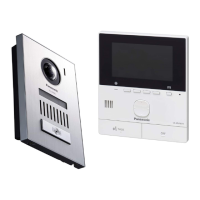
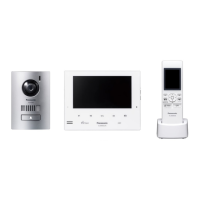
Video Intercom System
Model No. VL-SVN511BX
VL-MVN511BX
VL-V522LCE
VL-RLY1
VL-PS241
Model No. VL-SVN511CX
Model No. VL-SVN511CX1
VL-MVN511BX
VL-V522LCE
VL-RLY1
VL-PS241
(BX: for Asia, Middle Near East and Africa)
(CX: for Middle East and Hong Kong)
(CX1: for UAE)
[Version 2.0]

Table of Contents

Questions and Answers

  • T
    Taylor WeaverAug 6, 2025
    How to fix a duplicated IP address on my Panasonic VL-MVN511BX?
    • S
      Steven OrtizAug 6, 2025
      If the IP address is duplicated on your Panasonic Intercom System, it means that the same IP address of the main monitor is being used by another device. To resolve this, confirm the current IP address of the main monitor and reconfigure it so that it does not overlap with other IP addresses.
  • R
    Robert MurrayAug 9, 2025
    What to do if my Panasonic VL-MVN511BX cannot connect to the server?
    • D
      Darren WrightAug 9, 2025
      If your Panasonic Intercom System cannot connect to the server, it might be due to incorrect email server settings. Double-check the configured contents and correct any errors. Alternatively, the wireless router may not be connected to the Internet. Ensure your wireless router is properly connected to the network.
  • J
    Joshua BishopAug 14, 2025
    Why does my Panasonic Intercom System have a connection failure?
    • D
      Dawn AdamsAug 14, 2025
      If you are experiencing a connection failure with your Panasonic Intercom System, it could be due to a problem with the wireless network connection. Try moving closer to the wireless router and attempt connecting again. Another reason could be that the setting procedure was not completed within the specified time. Make sure to have all the necessary information ready and complete the settings promptly.
  • T
    Tony CraigAug 18, 2025
    What causes an authentication failure on a Panasonic VL-MVN511BX Intercom System?
    • Z
      zchandlerAug 18, 2025
      An authentication failure on your Panasonic Intercom System can occur due to several reasons. First, the security setting type (“TLS”, “SSL”, or “None”) might be incorrectly set; correct this in “Security type.” Second, the SMTP authentication setting may be incorrect; adjust it in “SMTP authentication.” Finally, the SMTP authentication setting (“Account name” or “Password”) could be wrong; ensure it's correctly set in “SMTP authentication.”
  • K
    kevinrichardsAug 22, 2025
    Why is the network not available on my Panasonic Intercom System?
    • T
      tsantosAug 22, 2025
      If the network is not available for your Panasonic Intercom System, it's possible that your wireless router is not working properly. Confirm that your wireless router is turned on.
  • L
    Lauren RichardsAug 27, 2025
    What to do if I cannot register my Panasonic VL-MVN511BX?
    • J
      Jennifer SanchezAug 27, 2025
      If you cannot register your Panasonic Intercom System, it might be because the registering procedure was not completed within the specified time. To resolve this, ensure that the wireless router is turned on and that both the main monitor and your mobile device are connected to your wireless router, then try again.
  • C
    Courtney LewisAug 31, 2025
    Why can't I register my Panasonic Intercom System's email notification address?
    • D
      dave15Aug 31, 2025
      To register your Panasonic Intercom System, ensure that “Email server registration” is set, as the “Email notification address” cannot be configured without it.

Summary

Safety Precautions

1.1 Safety Precautions

General safety guidelines before and after servicing the equipment.

1.2 For Service Technicians

Guidelines for professional repair technicians regarding service procedures.

Warning Information

2.2 Insulation Resistance Test

Procedure for testing insulation resistance to prevent shock hazards.

Product Specifications

3.1 Main monitor station (VL-MVN511)

Technical specifications for the main monitor station.

3.4 Door station (VL-V522 LCE)

Technical specifications for the door station.

Troubleshooting Guide

8.1 Operation Check of the Door Station

Step-by-step guide for checking door station operation.

8.2 Operation Check of the Main Monitor Station

Procedure for verifying the main monitor station's operational status.

8.2.1 Defect of the Main Monitor Station Power Supply

Troubleshooting steps for main monitor station power supply issues.

8.2.2 Defect of the WiFi Communication

Troubleshooting steps for main monitor station WiFi connectivity issues.

Troubleshooting Specific Defects

8.2.3 Defect of the Main Monitor Station Video Recording

Troubleshooting steps for video recording failures on the main monitor.

8.2.4 Defect of the Communication between the Main Monitor Station and the Door Station

Troubleshooting communication failures between main monitor and door stations.

8.2.5 Defect of the Communication between the Door Station and the PBX

Troubleshooting communication issues between door station and PBX.

8.2.6 Defect of the operation of the electric lock

Troubleshooting steps for electric lock operation failures.

Additional Troubleshooting and Error Handling

Disassembly and Assembly Instructions

9.1 Main Monitor Station

Instructions for disassembling and assembling the main monitor.

9.2 Door Station

Instructions for disassembling and assembling the door station.

9.2.2 How to Remove the Main Board and Camera Unit [No.2]

Steps to remove the main board and camera unit from the door station.

Measurements and Adjustments

10.1 Main Monitor Station

Procedures for measurements and adjustments on the main monitor station.

10.1.2 Things to do after replacing IC

Steps for initializing and adjusting after IC replacement.

Schematic Diagrams

Replacement Parts Lists

15.2 Replacement Parts List

List of replacement parts for the main monitor station.

Panasonic VL-MVN511BX Specifications

General IconGeneral
TypeVideo Intercom System
Screen Size5 inches
CameraYes
ConnectivityWired
Wireless ConnectivityNo
DisplayLCD
AudioTwo-way audio communication
ExpandabilitySupports up to 3 monitors
RecordingNo
Night VisionYes

Related product manuals