EasyManua.ls Logo

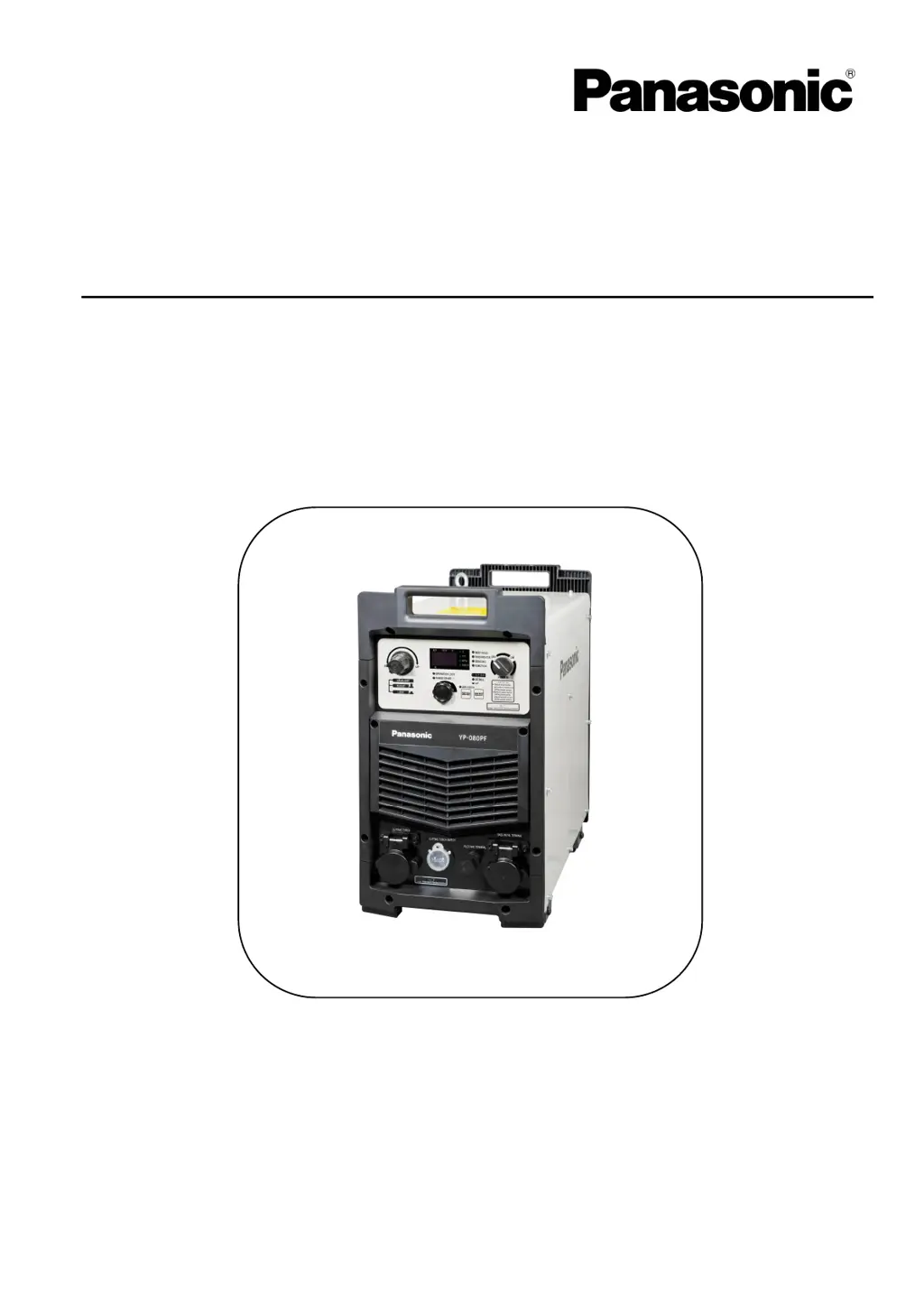
Panasonic YP-060PF - User Manual

Panasonic YP-060PF
72 pages
Print Icon
To Next Page IconTo Next Page
Loading...
Thank you for your purchase of Panasonic cutting power source.
● Before operating this product, please read the instructions carefully and save this manual
for future use. First of all, please read “Safety precautions” or “Safety manual”.
● SPEC. No.YP-060PF3HGF, YP-060PF3HJE, YP-100PF3HGF, YP-100PF3HJE
Panasonic Welding Systems (Tangshan) Co., Ltd.
IGBT Controlled Plasma Arc Cutting Power S
ource
Model N o.
Operating Instructions
TSM50245-02
Y
P
-
060PF
Y
P
-
100PF

Table of Contents

Questions and Answers

  • P
    perkinsjosephAug 17, 2025
    What to do if my Panasonic Portable Generator shows 'Over temperature'?
    • F
      Frank JohnsonAug 17, 2025
      If your Panasonic Portable Generator is showing an 'Over temperature' warning, do not turn off the power until the internal temperature reduces. After the internal parts cool down, the alarm should disappear, and the machine will resume normal operation. The cause might be excessive duty cycle or foreign substances near the side ventilator or the rear air inlet. Remove any obstructions to prevent internal temperature increase.
  • D
    Dr. Alexis Robinson MDAug 20, 2025
    What to do if my Panasonic Portable Generator has low input voltage?
    • A
      Anne CaldwellAug 20, 2025
      If your Panasonic Portable Generator indicates a low input voltage, turn off the power. Adjust the input voltage to stay within ±20% of the rated values, and then turn the power back on.
  • P
    paul57Aug 22, 2025
    What to do if my Panasonic Portable Generator has over input voltage?
    • K
      Kevin JohnsonAug 22, 2025
      If your Panasonic Portable Generator indicates an over input voltage, turn off the power. Adjust the input voltage to stay within ±20% of the rated values, and then turn the power back on.
  • M
    melissapearsonAug 26, 2025
    What to do if my Panasonic Portable Generator experiences an electrode short circuit?
    • A
      Amanda MorseAug 26, 2025
      If there's an electrode short circuit with your Panasonic Portable Generator, replace the cutting tip and electrode with new ones. Remove any spatter from the surface of the electrode and inside the nozzle. Use the specialized hand tool included with the cutting torch to correctly fasten the electrode and cutting tip.
  • C
    Christina CaldwellAug 28, 2025
    What to do if my Panasonic Portable Generator shows 'Arc start failure'?
    • N
      Nancy Reynolds DDSAug 28, 2025
      If your Panasonic Portable Generator shows 'Arc start failure', turn off the power. Then, check the base metal for issues like wire cuts or poor connections and correct them to resolve the problem.
  • C
    Carmen WilsonAug 30, 2025
    What to do if my Panasonic Portable Generator shows abnormity of input air pressure exceeding the recommended range?
    • T
      Thomas LeeAug 30, 2025
      If your Panasonic Portable Generator shows abnormity of input air pressure exceeding the recommended range, adjust the air pressure to stay within the recommended range. Also, check the settings of the submenus “the cutting torch cable length selection (P10)” and “the cutting torch selection (P11)” to ensure the cutting torch length matches the rated specification.
  • K
    Kerry WilsonSep 2, 2025
    What to do if I need a Replacement of the electrode in Panasonic Portable Generator?
    • J
      Jeffrey KerrSep 3, 2025
      If the cutting torch monitoring function is enabled and the set monitoring number of times or duration of the cutting torch reaches the set value on your Panasonic Portable Generator, turn off the power source. Replace the electrode and cutting tip with new ones, then turn the power source back on. Reset the submenu “the cutting torch monitoring warning setting (P06)” again.
  • Y
    yflynnSep 5, 2025
    What to do if my Panasonic Portable Generator shows 'Air pressure abnormity'?
    • R
      Rebecca FitzgeraldSep 5, 2025
      If your Panasonic Portable Generator shows 'Air pressure abnormity', confirm whether a 1.5kw or higher compressor is being used, as the air pressure might be lower than 0.28mpa.
  • K
    Kayla WatsonSep 8, 2025
    What to do if my Panasonic Portable Generator shows '422 Suspension (422 communication abnormity)'?
    • U
      upattersonSep 8, 2025
      If your Panasonic Portable Generator displays a '422 Suspension (422 communication abnormity)' message, cut off the power switch and then restart the device.
  • D
    denisehowardSep 12, 2025
    What to do if my Panasonic Portable Generator experiences an emergency stop?
    • N
      Nicholas GarciaSep 12, 2025
      To address an emergency stop on your Panasonic Portable Generator, resolve the problem causing the emergency stop signal, and then turn on the power switch.

Summary

1 Safety

Signal Words and Safety Symbols

Defines safety signal words and symbols to prevent hazards and damage.

2 Important Safety Items

Cutting Power Source Safety

Instructions to prevent hazards when using the cutting power source.

Electric Shock Prevention

Guidelines to prevent electric shock hazards during operation and maintenance.

Ventilation and Protective Equipment

Safety measures for ventilation and personal protective equipment during cutting.

Fire, Explosion, and Blowout Prevention

Cautions to prevent fires, explosions, or blowouts during cutting operations.

2 Important Safety Items (continued)

Shielding and Environmental Safety

Safety for installation shielding, gas handling, and rotating parts.

Cutting Wire and Insulation Safety

Precautions for cutting wire and preventing insulation deterioration.

3 Rated Specifications

Specifications Table

Detailed technical specifications for YP-060PF and YP-100PF models.

3 Rated Specifications (continued)

Standard Accessories

List and details of standard accessories included with the product.

Dimensions

Physical dimensions of the cutting machine illustrated with diagrams.

3 Rated Specifications (continued)

Rated Duty Cycle

Explanation of the machine's duty cycle performance at different current levels.

3 Rated Specifications (continued)

Thermal Protection

Information on the thermal protection system and conditions for its activation.

Cooling Fan Stop Function

Description of the cooling fan's energy-saving stop function during standby.

4 Installation and Power Supply Facility

Installation Site Requirements

Guidelines for selecting a suitable installation site, considering environment.

4 Installation and Power Supply Facility (continued)

Installation Transportation

Instructions and warnings for safely moving and transporting the cutting machine.

4 Installation and Power Supply Facility (continued)

Power Supply Equipment

Requirements for power supply, generators, circuit breakers, and cables.

5 Configuration

Necessary Cutting Equipment

Overview of essential equipment required for cutting operations.

5 Configuration (continued)

Peripherals: Cutting Torch

Details on various cutting torch models and their specifications.

Peripherals: Cutting Tip and Electrode

Information on different types of cutting tips and electrodes for various applications.

6 Names and Functions

Major Operation Part Names

Identification and location of key components on the front and rear of the machine.

6 Names and Functions (continued)

Power Switch and Cooling Fan

Explanation of the power switch operation and the cooling fan's behavior.

Output Terminal Area

Description of the output terminals for connecting the cutting torch and base metal.

6 Names and Functions (continued)

Operation Area Overview

Detailed explanation of the control panel, displays, and indicators.

6 Names and Functions (continued)

Operation Area Controls and Indicators

Details on the dial, buttons, LEDs, and air pressure adjustment knob.

8 Settings and Operations

Power (ON); (OFF)

Procedure for powering the machine on and off.

Initial Display

Information shown on the digital display immediately after power-on.

8 Settings and Operations (continued)

Setting the Cutting Current

How to adjust and set the cutting current using the dial.

Cutting Navigation Setup

Initial steps to enable and set up the cutting navigation function.

8 Settings and Operations (continued)

Cutting Navigation Parameters

Selecting base metal material, thickness, and cutting mode.

8 Settings and Operations (continued)

Confirming Cutting Navigation

Methods to confirm the cutting navigation settings and conditions.

8 Settings and Operations (continued)

Submenu Overview

Introduction to the submenu for fine adjustment of machine settings.

Direct Setting Method

Procedure for direct setting of certain submenu items.

8 Settings and Operations (continued)

Submenu Settings

Detailed procedure for setting parameters within the submenu.

8 Settings and Operations (continued)

Submenu Contents

Table detailing submenu parameters, setting items, default values, and descriptions.

8 Settings and Operations (continued)

Cutting Torch Monitoring Function

Function to monitor torch usage and provide pre-warning for electrode/tip replacement.

8 Settings and Operations (continued)

Cutting Torch Monitoring Operation

Methods for setting and resetting the cutting torch monitoring function.

8 Settings and Operations (continued)

Confirming Torch Monitoring

How to check the remaining number of times and duration for torch monitoring.

8 Settings and Operations (continued)

Modifying Torch Monitoring Settings

Procedure for modifying the cutting torch monitoring number of times and duration.

8 Settings and Operations (continued)

Precautions for Torch Monitoring

Important considerations when using the cutting torch monitoring feature.

8 Settings and Operations (continued)

Gouging Function

Enabling and using the plasma gouging function.

Air Pressure Warning Settings

Configuring warnings for air pressure outside the recommended range.

8 Settings and Operations (continued)

Operation Locking Function

Enabling and understanding the operation locking feature.

Setting Operation Lock

Procedure for setting the operation lock function.

8 Settings and Operations (continued)

Modifying Operation Lock Password

Steps to change the password for the operation lock.

Resetting Operation Lock Password

Procedure to reset the operation lock password to factory default.

9 Operation Methods

Safety Measures

General safety precautions before operating the machine.

Checking Connections

Ensuring all cable and equipment connections are properly made.

Cutting Torch Confirmation

Safety checks and procedures before confirming the cutting torch.

9 Operation Methods (continued)

Air Confirmation

Procedure for confirming air supply and adjusting air pressure for cutting.

10 The Cutting Technique and Condition

Contact Cutting Technique

Detailed steps and precautions for performing contact cutting.

10 The Cutting Technique and Condition (continued)

Non-Contact Cutting Technique

Detailed steps and precautions for performing non-contact cutting.

10 The Cutting Technique and Condition (continued)

Piercing Technique

Precautions and capacity details for piercing operations.

10 The Cutting Technique and Condition (continued)

Gouging Technique

Guidelines and precautions for plasma gouging operations.

Pulse Cutting Technique

Information on using pulse cutting for thin plate cutting.

10 The Cutting Technique and Condition (continued)

Cutting Condition: Thickness

Table showing maximum cutting thickness for different materials and modes.

10 The Cutting Technique and Condition (continued)

Cutting Condition: Cutting Speed

Guidance on selecting cutting speed for optimal results based on material and thickness.

11 Treatment After Operation

Condensate Water Discharge

Procedure for removing condensate water from the cutting torch.

Turning Off Power Switch

Instructions for safely turning off the machine after use.

12 Maintenance

Daily Spot Check

Daily inspection items for the cutting machine to ensure performance and safety.

12 Maintenance (continued)

Cutting Torch Maintenance

Procedures for checking and replacing cutting torch parts like tips and electrodes.

12 Maintenance (continued)

Periodic Inspection

Scheduled inspection and cleaning procedures for maintaining the machine's condition.

12 Maintenance (continued)

Periodic Inspection Contents

Details of items to check during periodic inspections.

Dust Removal Inside Machine

Steps for cleaning dust and foreign matter from the machine's interior.

12 Maintenance (continued)

Overall and Peripheral Inspection

Inspection of the machine's exterior and overall condition.

Cable and Grounding Wire Inspection

Checking output, base metal, and input cables, plus grounding wire.

Consumable Parts Inspection

Inspection of parts like cooling fans and capacitors considered consumable.

Part Replacement

Guidelines for replacing internal parts, recommending genuine parts.

Insulation Test Precautions

Precautions for performing insulation withstand voltage and resistance tests.

13 Troubleshooting

Error Numbers and Descriptions

List of error codes, their meanings, and recommended corrective actions.

13 Troubleshooting (continued)

Troubleshooting at Initial Stage

Common cutting problems and potential causes not related to the product.

Treatment for Identified Failures

Countermeasures for failures identified in peripheral parts.

14 Circuit Diagram

14 Circuit Diagram (continue)

15 Repair Parts List

16 Table to Adjust Output Current Regulation and Plasma

Panasonic YP-060PF Specifications

General IconGeneral
BrandPanasonic
ModelYP-060PF
CategoryPortable Generator
LanguageEnglish

Related product manuals