User Manual For CYCLONE FX Programmers 34
6 CREATING PROGRAMMING IMAGES
The Cyclone Image Creation Utility is used to create programming images which may be loaded
into the Cyclone. The user creates programming images based on data sets to be programmed
and programming instructions which are all self contained. The next step is to download these
programming images to the Cyclone via the GUI, Console, or SDK. Programming can then be
launched either manually via the button, or automatically via the Console.exe or SDK. Learn about
how to download and launch programming images in CHAPTER 8 - CYCLONE PROGRAMMER
AUTOMATED CONTROL (CYCLONE CONTROL SUITE).
Note: If the user wishes to use a programming image created with an earlier generation Cyclone (such
as the Cyclone PRO or MAX, or the Cyclone for ARM devices Rev. A/B) they should first convert
the image using the conversion utility described in CHAPTER 13 - TROUBLESHOOTING.
6.1 Create A Stand-Alone Programming (SAP) Image
This chapter describes in detail how to configure the CYCLONE FX for stand-alone programming
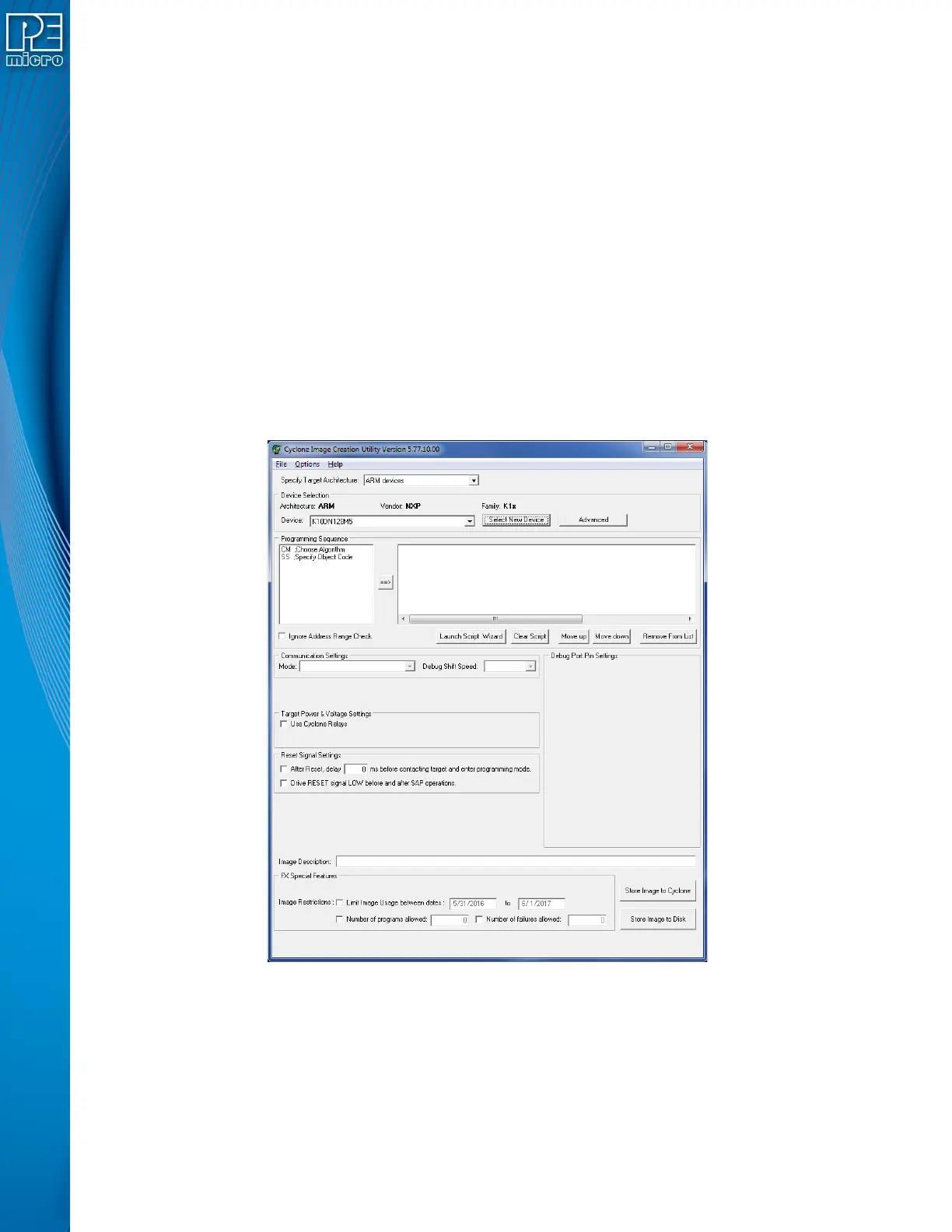
using the Cyclone Image Creation Utility, shown in Figure 6-1. The CYCLONE FX does not
require a target to be connected when it is being configured. However, the power of the CYCLONE
FX must be turned on and one of the communications interfaces must be connected to the
CYCLONE FX if an image is to be stored on it.
Figure 6-1: Cyclone Image Creation Utility
6.1.1 Specify Target Architecture
CYCLONE FX programmers support ARM Cortex devices from several manufacturers** -
including NXP’s Kinetis and LPC devices. If you are using PEmicro Part#
CYCLONE_UNIVERSAL_FX, this Cyclone also supports these 8-16/32-bit architectures: NXP’s
S32, ColdFire® V2/V3/V4, ColdFire+/V1, MPC5xx/8xx, Qorivva® (MPC5xxx), DSC, ARM® Nexus
(MAC7xxx), S12Z, HC(S)12(X), HCS08, HC08, and RS08 devices, as well as STMicroelectronics
SPC5 & STM8 (w/ adapter) devices.


 To Next Page