User Manual For CYCLONE FX Programmers 40
6.1.3.6 Program Bytes
Prompts for a starting address, which must be in the module. You are then asked to enter in
hexadecimal a byte to be programmed into the current location. Clicking the OK button will
automatically advance to the next data byte location.
6.1.3.7 Program Words
Prompts for a starting address, which must be in the module. You are then asked to enter, in
hexadecimal, a word to be programmed into the current location. Clicking the OK button will
automatically advance to the next data word location.
6.1.3.8 Program Module
This command will program the selected S-record file into EEPROM/flash. For this command to
work, you must have previously selected an S-record file.
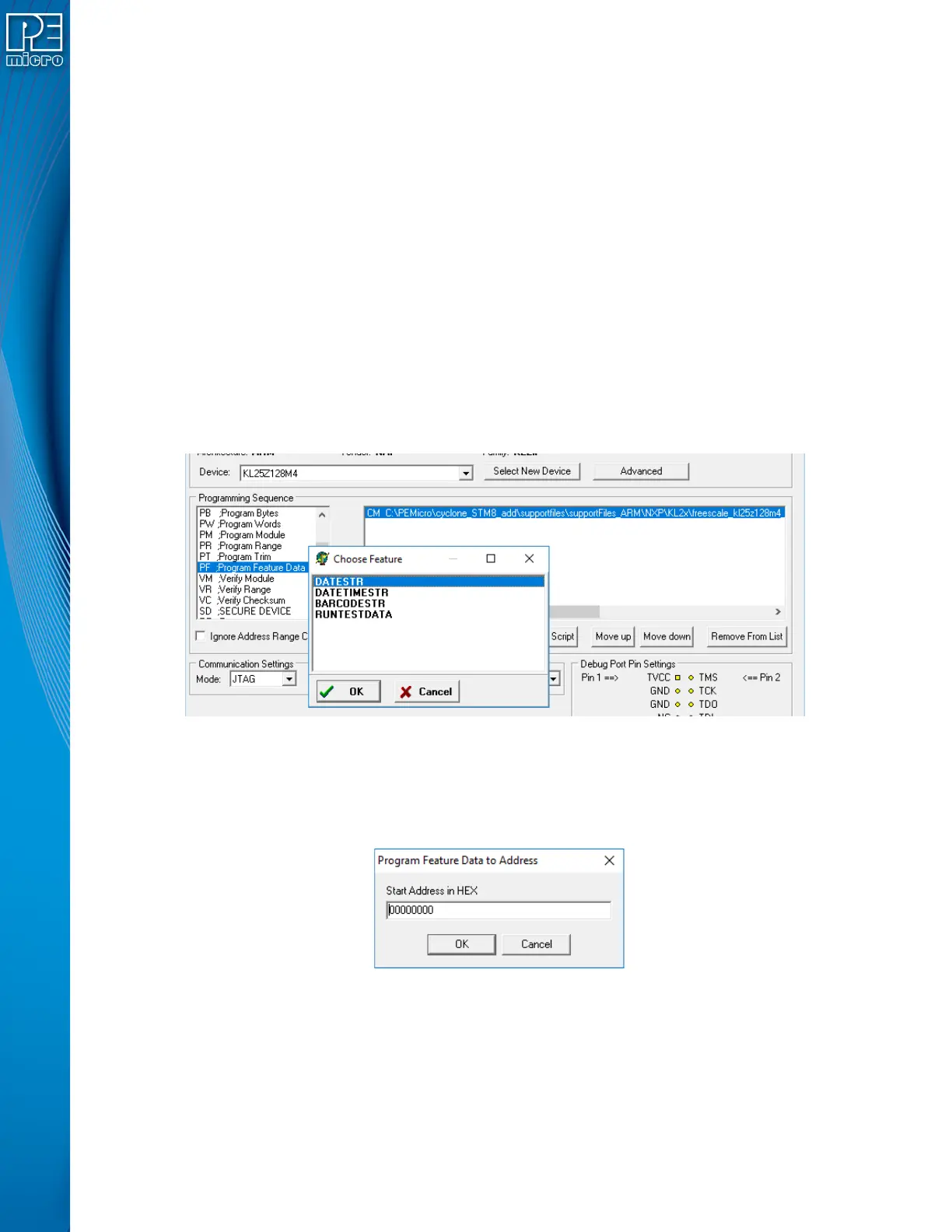
6.1.3.9 Program Feature Data
The Program Feature Data option on the Cyclone Image Creation Utility gives the user more
options to program dynamic data programming on the target device. To use Program Feature Data
select the "PF" command when creating a programming image. A window will show you the
options for feature data to program.
Figure 6-10: Using PF Command (Dynamic Data)
The options can be 1) a string of the current date (YYYY-MM-DD), 2) a string of the current date
and time, 24-hour clock (YYYY-MM-DD HH:MM:SS), 3) run test data. To 4) program the barcode
into the flash of the target device, BARCODESTR should be selected. The next window contains
the hex address of where the dynamic data will be stored:
Figure 6-11: Program Feature Address Dialog (Hex)
6.1.3.10 Verify Module
This command will verify that the selected S-record file was programmed into the EEPROM/flash.
For this command to work, you must have previously selected an S-record file.
6.1.3.11 Verify Checksum
This command verifies the module content via a CRC calculation. This command is typically much


 To Next Page