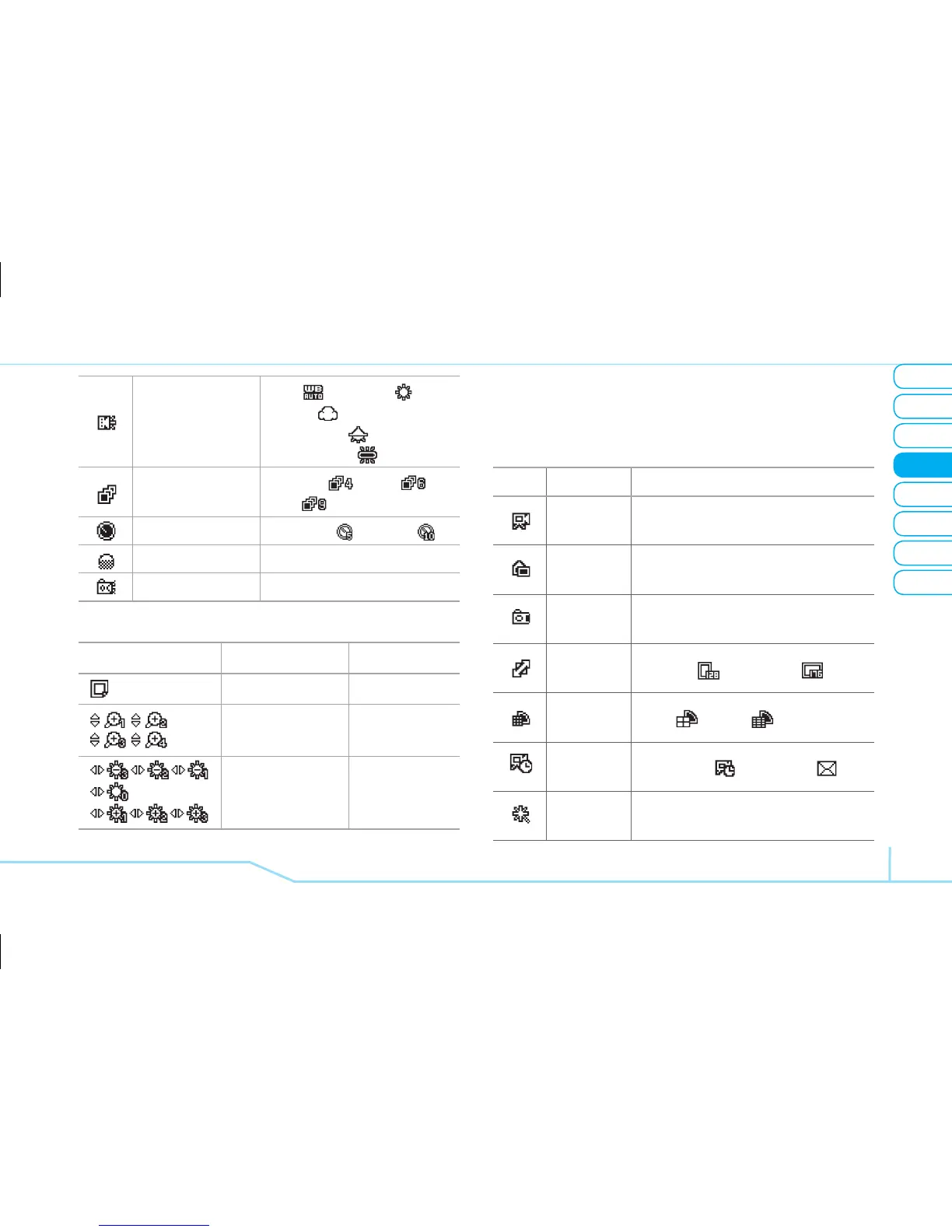
White Balance
Auto ( ), Sunlight ( ),
Cloudy ( ),
Fluorescent ( ),
Incandescent ( )
Multi-shot
Off, 4EA ( ), 6EA ( ),
9EA ( )
Self Timer Off, 5Sec ( ), 10Sec ( )
Display Icons On, Off
Shutter Sound On, Off
Icons for camera
Icon Name Description
Remain Picture
Zoom
x1, x2,
x3, x4
Brightness
-3, -2, -1
0
+1, +2, +3
note:
Zoom tool is disabled when the picture size
set for 640x480.
In options menu for video camera
Icons Name Description
Take a
Video
View
Videos
Take a
Photo
Video
Size
128x96
( )
, 176x144
( )
Image
Quality
Low
( )
, High
( )
Record
Type
Unlimitied
( )
, For Msg
( )
Effects
Nomal, Sepia, Monochrome,
Nagative, Embossing



 To Next Page