8
9
02
03
04
05
06
07
01
1
4
5
6
2
3
7
8
9
10
11
14
17
16
18
19
15
12
13
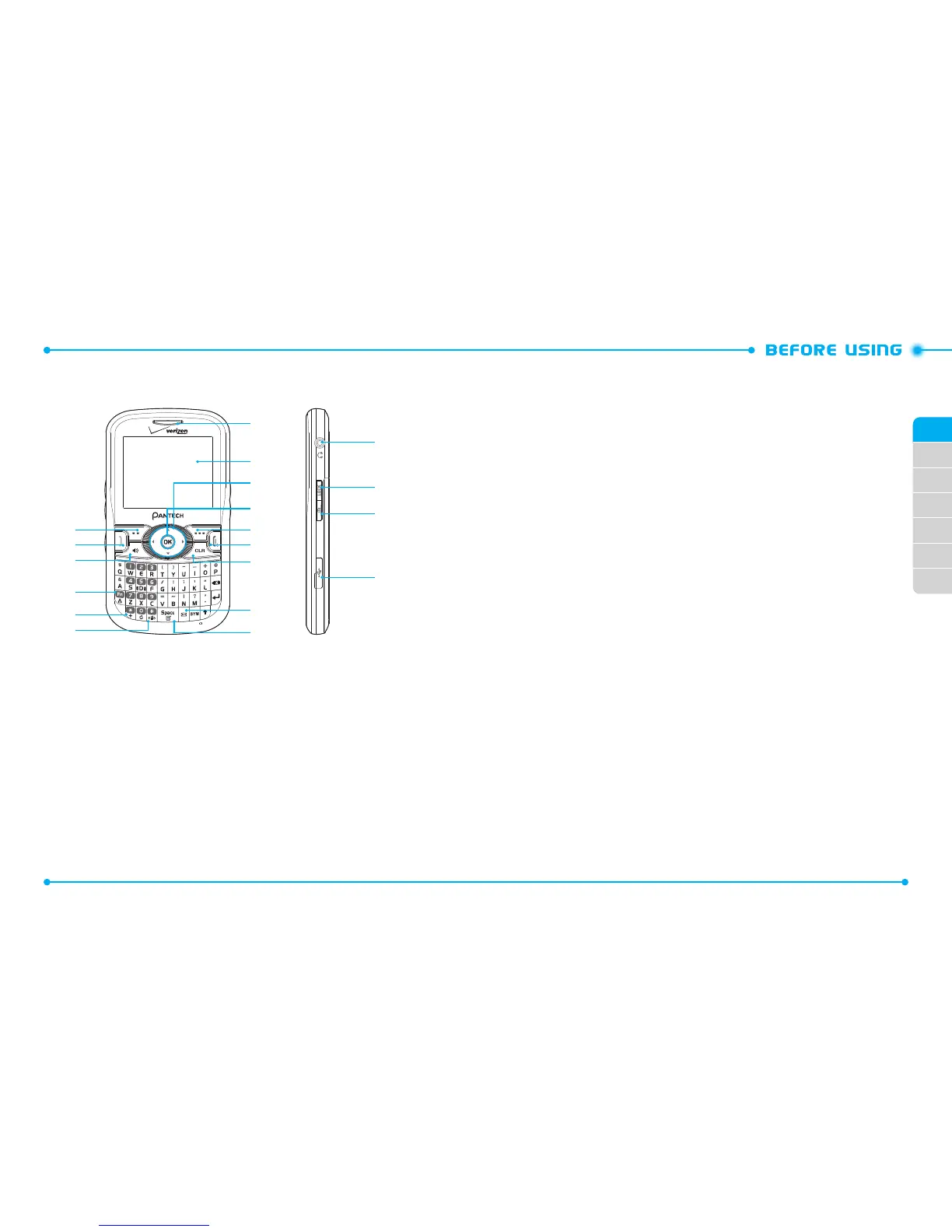
HANDSET DESCRIPTIONS
1.
L e f t S o f t K e y:
From the home screen, press to display the Message menu or
access the function listed above the key.
2. SEND Key:
Press to make or receive a call. From the home screen, press to
access the All Calls list.
3. Speakerphone Key:
Press to turn Speakerphone On or O.
4. Favorites/Mode Change Key:
Press to access the Favorites menu.
In text entry mode, press to change the character input type.
5. International Dial Key:
Press to enter an asterisk (*) character for calling
features. Press and hold to display the plus sign (+) for international dialing.
6. Vibration Mode Key:
Press and hold to turn Vibration Mode on or o.
7. Notepad
+
Key/Space Key:
Press to access the Notepad menu or to add a
space between characters.
8. TXT Composer Key:
Press to access the New TXT Message screen.
9. CLR Key:
Press to clear a character from the display. Press and hold to clear all
characters. Within a menu, press to return to the previous menu.
10. END Key:
Press to end calls or close applications. Press and hold to power your
phone on or o.
11. Right Soft Key:
Press to display the Contact List or access the function listed
above the key.
12. OK Key:
Press to access the menu screen. It also allows you to accept choices
when navigating through a menu.
13. Directional Key:
Press to scroll through phone menu options. Provides a
shortcut to phone functions from the home screen.
14. Display Screen:
Displays the digital clock, messages, phone status and
indicator icons.
15. Earpiece:
Allows you to hear the other caller.
16. 2.5mm Headset Jack:
Plug in an optional headset here for convenient,
hands-free conversations.
17. Lock/Unlock Key:
Press and hold to lock/unlock the keypad.
18. Camera Key:
Press to access the built-in camera.
19. Charging/Data Jack:
Connects the phone to the Wall Charger, or other
compatible accessories.



 To Next Page