12
13
02
03
04
05
06
07
01
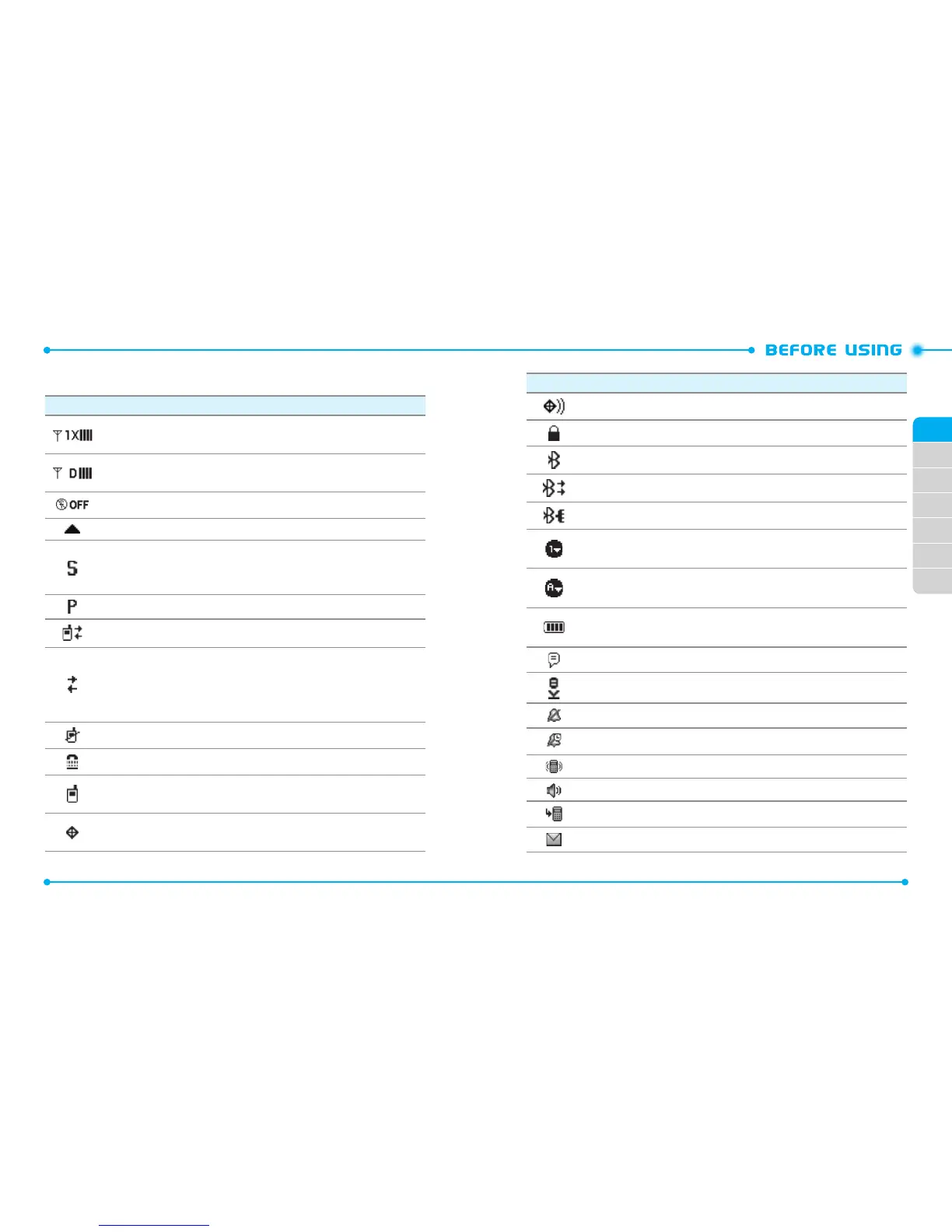
DISPLAY INDICATORS
Icon Icon Descriptions
1X Signal Strength:
Indicates your phone is in the CDMA 1X network.
More bars indicate a stronger signal.
D Signal Strength:
Indicates your phone is receiving digital data. More
bars indicate a stronger signal.
Airplane Mode:
Transmitting and receiving information is restricted.
Roaming: The phone is outside of the home service area.
SSL (Secured Socket Layer):
Indicates that secure communication
between client and server has been established during data
communication using encryption.
Voice Privacy:
Indicates Voice Privacy mode is active.
Data Call:
Indicates a Data Session is in progress.
Dormant:
Indicates phone is in a dormant state during a data call. Phone
reverts to Dormant mode when there hasn't been activity on a page for
some time - the connection is still active and you can make and receive
calls.
No Service:
Phone cannot receive signal from the system.
TTY:
TTY mode is active.
Voice Call:
A call is in progress.
* No icon indicates the phone is in from the home screen.
E911:
Global Positioning Service (GPS) for E911 is set to On for emergency
calls only.
Icon Icon Descriptions
Location On:
GPS is set to On for Location Service and E911 calls.
Keypad Lock:
Indicates the keypad and external keys are locked.
Bluetooth On:
Indicates Bluetooth® mode.
Bluetooth Active:
Indicates Bluetooth Active mode.
Bluetooth Connected:
Indicates a Bluetooth Device is connected.
Numeric Entry mode:
Enter numbers by pressing the corresponding key
on the keypad.
Alphabetical Entry Mode:
Enter characters by pressing the key with the
desired characters.
Battery Level:
Battery charging level - the more blocks, the stronger
the charge.
AVR Active:
AVR mode is active.
AVR Listening:
Indicates AVR listening.
All Sounds O:
All sounds are set to o.
Alarm Only:
Phone will alert you only with an alarm tone.
Vibrate Only:
Indicates the Ringer Volume is set to Vibrate On.
Speakerphone:
Speakerphone mode is active.
Missed Calls:
Indicates you have missed calls.
Message:
Indicates you have new messages.



 To Next Page