88
02
03
01
04
05
06
07
08
89
TAKING A PHOTO
1. Unlock the screen and press the Camera Key
to turn on the camera.
2. Rotate the phone counter-clockwise to landscape view, if necessary.
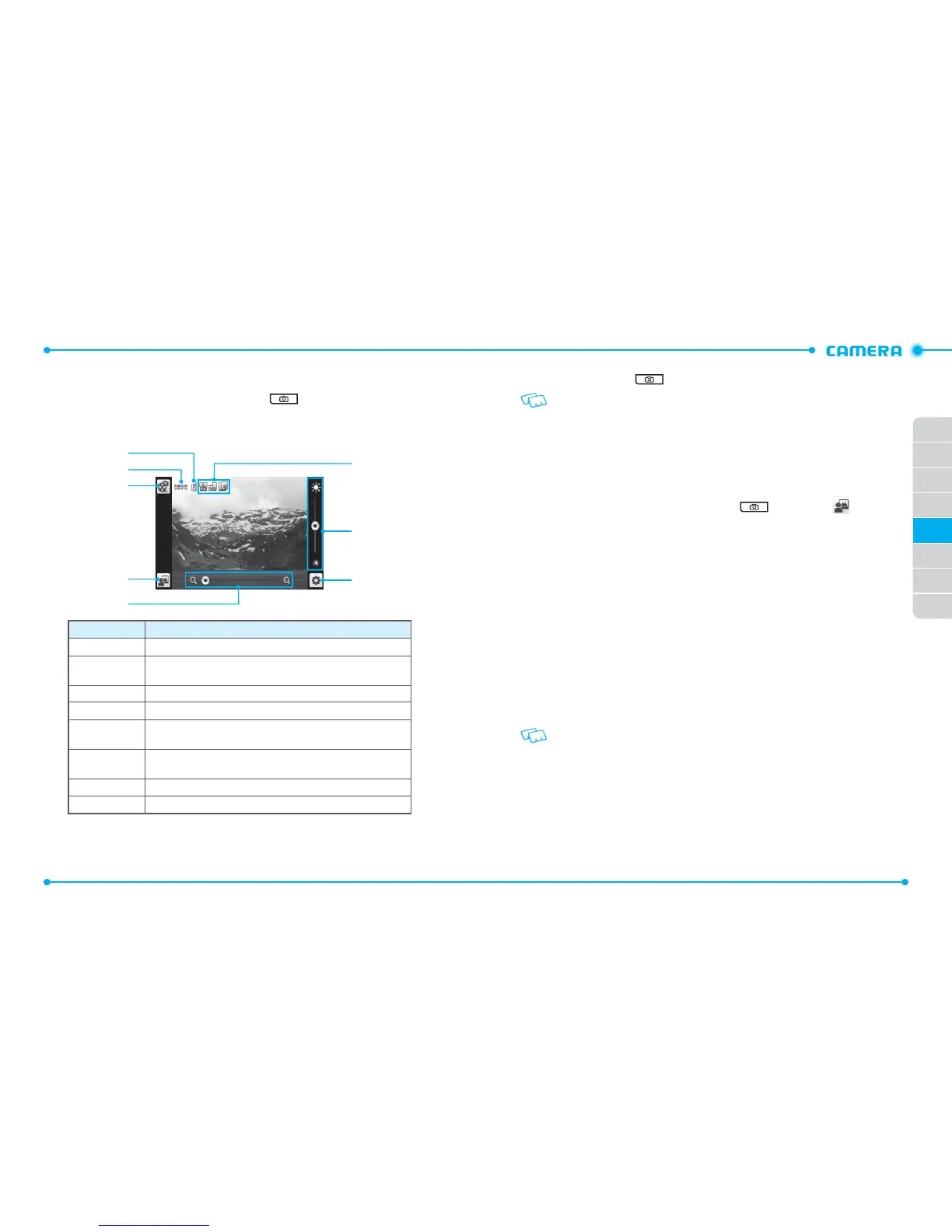
3. Aim the lens at the subject and make any necessary adjustments.
3
2
1
4
5
6
7
8
Number
Function
1 Allows you to view the memory location for saving photos.
2
Allows you to view the number of photos you can take. The number of
photos may differ depending on the picture resolution.
3 Switches to the camcorder.
4 Allows you to view photos in the My Pictures menu.
5
Zooms in or out. This function is only available when the picture
resolution is set under 2048x1536 (1536x2048).
6
Allows you to check the camera status and settings such as
resolution, camera view mode, and multi-shot number.
7 Adjusts the brightness.
8 Allows you to change the camera settings.
4. Press the Camera Key
to take a photo. The photo is automatically saved.
If Auto Save is set to
OFF
, the following options are available after taking a picture:
•
Erase: Deletes the captured photo.
• Save: Saves the captured photo.
• Set As: Sets the captured photo as
Wallpaper
or
Picture ID
image.
• Send: Sends the captured photo.
VIEWING PHOTOS
1. Unlock the screen and press the Camera Key and then tap .
2. Tap the photo you want to view.
3. Drag your finger left or right to view other photos saved recently.
4. To send the photo, tap
Send
.
To set the photo as Wallpaper or Picture ID image, tap
Set As
.
USING PHOTO OPTIONS
While viewing a photo, tap
More
to use the following options:
•
Move To Card
/
Move To Phone
: Moves the photo to the memory card or phone memory.
•
Lock/Unlock
: Locks or unlocks the photo. This option is available only for the photos saved
in phone memory.
•
Erase
: Deletes the photo.
•
Camera
: Switches to the camera.
•
File Info
: Allows you to view the properties of the photo.
These options are different for the pre-loaded images on your phone.



 To Next Page