12
02
03
04
05
06
07
08
01
13
12. Charging/Data Port
: Connects to the USB cable for data transferring or
charging when attached to the Wall/USB Charger.
13. Voice Commands Key
: With the phone unlocked, from Menu mode, press to
launch the Voice Commands menu.
14. Camera/Video Key
: With the phone unlocked, from the Menu mode screen,
press to turn on the camera; Press and hold to turn on the camcorder. In
Camera mode, press to take a photo, or in Camcorder mode, press to record
a video.
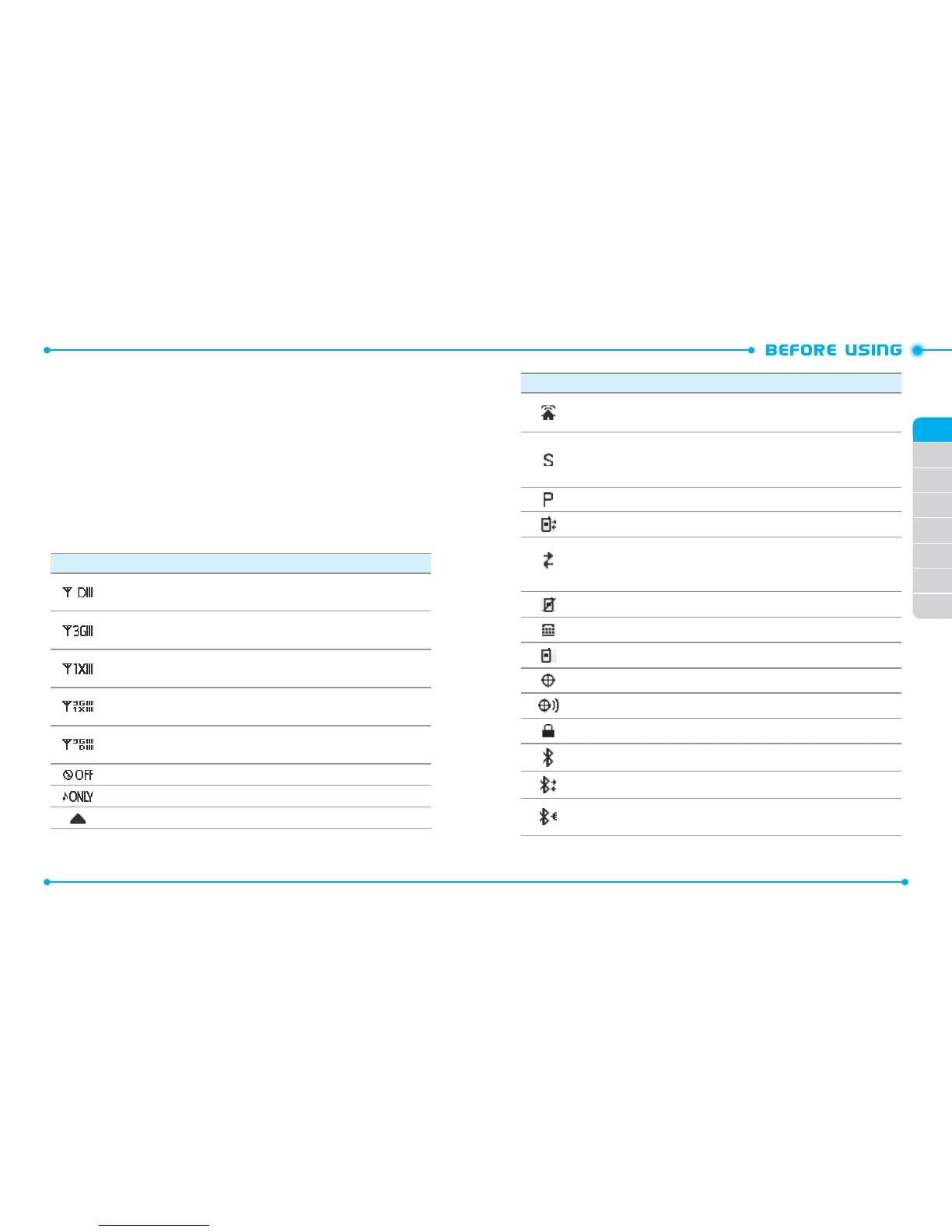
DISPLAY INDICATORS
Icon Icon Descriptions
D Signal Strength
:
Indicates your phone is in the digital network. More
bars indicate a stronger signal.
3G Signal Strength
: Indicates your phone is in the EVDO (3G) network.
More bars indicate a stronger signal.
1X Signal Strength
:
Indicates your phone is in the CDMA 1X network.
More bars indicate a stronger signal.
3G & 1X Signal Strength
:
Indicates your phone is in the EVDO (3G) and
CDMA 1X networks. More bars indicate a stronger signal.
3G & D Signal Strength
:
Indicates your phone is in the EVDO (3G) and
digital networks. More bars indicate a stronger signal.
Airplane Mode
:
Transmitting and receiving information is restricted.
Music Only Mode
: Indicates your phone is in Music Only mode.
Roaming: Indicates your phone is outside of the home service area.
Icon Icon Descriptions
Femto Cell: Indicates that this area has enhanced service coverage
indoors.
SSL (Secured Socket Layer)
: Indicates that secure communication
between client and server has been established during data
communication using encryption.
Voice Privacy
: Indicates Voice Privacy mode is active.
Data Call
: Indicates a data call is in progress.
Dormant
:
Indicates phone is in a dormant state during a data call. Phone
reverts to Dormant mode when there hasn't been activity on a page for
some time - the connection is still active and you can make and receive calls.
No Service
: Indicates no phone service is available.
TTY
: Indicates TTY mode is active.
Voice Call
: Indicates a voice call is in progress.
E911
: Location (GPS) service is set to E911 Only for emergency calls.
Location On
: Location (GPS) service is set to Full Detection.
Phone Lock
: Indicates Phone is locked.
Bluetooth
: Indicates Bluetooth® mode.
Bluetooth Active
: Indicates Bluetooth Active mode.
Bluetooth Connected
: Indicates a Bluetooth device is paired with your
phone.



 To Next Page