EasyManua.ls Logo

Parasound Halo A 23 - User Manual

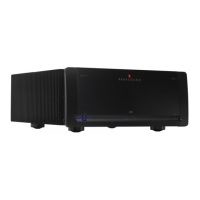
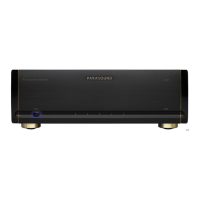
Parasound Halo A 23
23 pages
Print Icon
To Next Page IconTo Next Page
Loading...
A 23 Amplifier
Owner’s Guide

Questions and Answers

  • K
    Kendra HardinAug 12, 2025
    What to do if my Parasound Halo A 23 Amplifier has power but no sound?
    • E
      Emily JohnsonAug 13, 2025
      If your Parasound Amplifier has power but you are not getting any sound, there could be several reasons: * The level controls may be turned too low. Try turning the level controls clockwise. * There may be a bad connection from the preamplifier or controller. Check the input connections or try a different set of cables. * The over-current protection circuitry may have been activated. This is indicated if one or both blue channel LEDs are not illuminated. Check the speaker load impedance and speaker wires and connections. * The A 23 may have overheated, indicated by the red Hi Temp indicator being on. Allow the A 23 to cool and ensure adequate ventilation. Also, make sure the load impedance of each channel is no less than 4 ohms.
  • K
    Kenneth HernandezAug 20, 2025
    Why my Parasound Amplifier has no power?
    • R
      Rachel MendezAug 20, 2025
      If your Parasound Amplifier has no power, consider the following potential causes: * The power cord may be disconnected. Connect the power cord. * The Auto On selector switch may be in the wrong position. Check for the correct position of the Auto On switch. * The AC Voltage selector switch may be in the wrong position. Make sure the switch is in the correct position for your region. * The AC fuse may be blown. Replace it with a fuse of the same value.
  • Z
    zcollinsAug 25, 2025
    What causes hum or buzz through Parasound Amplifier speakers and how to fix it?
    • S
      Sarah MendozaAug 25, 2025
      Hum or buzz through your Parasound Amplifier speakers can be caused by: * A ground loop between the preamplifier and A 23 or at the equipment rack. Move the Ground Lift switch to its Lift position and install nylon shoulder washers on both sides of the panels of all equipment to insulate metal from touching the rack. * A ground loop from cable TV. Move the Ground Lift switch to its Lift position and install a cable isolation device.
  • R
    richard75Aug 27, 2025
    Why is my Parasound A 23 Amplifier overheating?
    • D
      Derek MackAug 27, 2025
      If your Parasound A 23 is overheating, it could be due to: * Load impedance at the speaker terminals being too low. Ensure the speaker or speaker selector load is 4 ohms or higher. * Insufficient ventilation. Ensure the A 23 has adequate ventilation.
  • P
    Patricia MorrisAug 31, 2025
    What to do if Parasound A 23 will not turn on with audio source?
    • J
      Jennifer YatesAug 31, 2025
      If your Parasound A 23 will not turn on with an audio source: * Ensure the Auto On selector switch is in its Audio position. * The sensitivity may be incorrectly adjusted. Turn the Audio trigger Sensitivity knob counterclockwise.
  • M
    Michelle OconnorSep 4, 2025
    What to do if Parasound A 23 will not turn off when audio signal is removed?
    • R
      Ryan KlineSep 4, 2025
      If your Parasound A 23 does not turn off when the audio signal is removed, the sensitivity level may be too high. Turn the Sensitivity knob clockwise toward 200mV.
  • U
    uedwardsSep 7, 2025
    Why Parasound A 23 will not turn on with DC voltage?
    • A
      Andre WilsonSep 8, 2025
      If your Parasound A 23 will not turn on with DC voltage: * The DC trigger source may be wired in reverse or the voltage may be too low. Check the polarity of the DC source with a voltmeter and try connecting a 9 V battery to the 12V DC input. * The Auto On selector switch may be in the wrong position. Ensure the Auto On selector switch is in its 12V position.
  • K
    katherinepatrickNov 15, 2025
    How to troubleshoot distorted sound on Parasound Halo A 23 Amplifier?
    • A
      ashley39Nov 15, 2025
      If you are experiencing distorted sound with your Parasound Amplifier, consider the following: * The speaker may be damaged. To check, connect each speaker to the opposite channel on the A 23. If the same speaker remains distorted, the speaker or its wire is damaged. If the other speaker distorts, the problem may be with the A 23, the preamp, or a source component. * There may be a problem with the preamplifier or source component. Try switching the left and right input cables. If the distortion moves to the other channel, the issue lies with a component other than the A 23. * The Balanced-Unbalanced switch may be in the incorrect position. Move it to the correct position for the jack in use. * The Mono Bridge switch may be in the Mono bridged position. Move the switch to its Ster...

Summary

PLACEMENT GUIDELINES FOR YOUR A 23

Rack Mounting Your Parasound A 23

Guidance for installing the A 23 amplifier into a standard 19-inch equipment rack.

CONNECTING A PREAMPLIFIER OR SURROUND CONTROLLER TO THE BALANCED INPUTS ON THE A 23

Left and Right Balanced Input Jacks

Instructions for connecting audio sources using balanced XLR cables for optimal sound.

CONNECTING A PREAMPLIFIER OR SURROUND CONTROLLER TO THE UNBALANCED INPUTS ON THE A 23

Left and Right Unbalanced Inputs

Steps for connecting audio sources using unbalanced RCA cables.

CONNECTING THE LOOP OUT JACKS ON THE A 23 TO ANOTHER POWER AMPLIFIERS INPUTS

Loop Out Connector

How to use Loop Out jacks to route input signals to an additional power amplifier.

CONNECTING SPEAKERS TO THE A 23

Speaker Terminals

Details on connecting loudspeakers using the five-way binding post terminals.

CONFIGURING THE A 23 FOR BRIDGED MONO OPERATION

IMPORTANT! - Before Trying Bridged Mono

Crucial warning regarding speaker impedance requirements for bridged mono mode.

MANUAL AND AUTOMATIC TURN ON-OFF OPTIONS

Manual On-Off from the Front Panel

How to manually control the amplifier's power using the front panel button.

Connecting an Active Audio Source for Automatic On-Off

Setting up automatic power on/off triggered by an audio signal.

CONNECTING AN EXTERNAL DC SOURCE FOR AUTOMATIC ON-OFF

Connecting an External DC Source

Connecting a DC trigger source for automatic power control of the amplifier.

CONNECTING THE A 23 TO TRIGGER ANOTHER COMPONENT

Connecting to Trigger Another Component

Using the A 23's DC Trigger Out jack to control other components.

UNDERSTANDING THE INDICATORS ON THE A 23

Channel Status Indicators

Details the blue indicators for normal operation and fault conditions.

High-Temp Indicator

Identifies the red indicator that signals channel overheating.

Ground Switch

Explains the function of the Ground Lift switch for reducing hum.

CONNECTING THE AC POWER CORD

AC Power Connections

Guidance on plugging the amplifier into the AC power source for optimal performance.

AC Voltage Selection Switch

Instructions for verifying and setting the correct AC voltage for operation.

MAINTAINING YOUR A 23

Main Power Fuse

Information regarding the main power fuse and when to contact service.

SERVICING YOUR A 23

If All Else Fails - Call Us for Help

Contact information and initial steps for troubleshooting with Parasound support.

Procedure for Returning Your A 23 to Parasound for Service

Detailed steps for packaging and returning the unit for repair or warranty service.

TECHNICALLY SPEAKING

Balanced and Unbalanced Lines

Comparison and benefits of balanced vs. unbalanced audio connections.

Bridged Mono Operation

Technical details on configuring the amplifier for single-speaker bridged mono output.

Eliminating Hum and Buzz - Ground Loops and the A 23 Ground Lift Switch

Troubleshooting guide for system hum and buzz caused by ground loops.

PARASOUND A 23 DESIGN OVERVIEW

The Power Supply

Details on the toroidal power transformer and filtering for stable operation.

Audio Circuit Path Topology

Overview of the hybrid circuit design using JFETs, MOSFETs, and bipolar transistors.

Class A-A;B Operation

Description of the amplifier's hybrid Class A-A/B design for optimal sound and efficiency.

Total Protection

Overview of the amplifier's built-in protection circuits for safety and reliability.

Over-Current Protection

Details on how current-sensing transistors protect against excessive load conditions.

PARASOUND A 23 SPECIFICATIONS

Continuous Power Output

Power output ratings for stereo and mono operation at different impedances.

Frequency Response

The range of audio frequencies the amplifier can reproduce accurately.

Total Harmonic Distortion

Measurement of non-linear distortion introduced by the amplifier at different power levels.

Dimensions

Physical measurements of the amplifier, including height, width, and depth.

Parasound Halo A 23 Specifications

General IconGeneral
TypeStereo Power Amplifier
Channels2
Power Output (8 Ohms Bridged)400 Watts
Input Impedance33 k Ohms
Power Output (8 Ohms)125 Watts
Power Output (4 Ohms)200 Watts
THD< 0.05%

Related product manuals