Need help?
Do you have a question about the Parkmate MCPK-962DVR and is the answer not in the manual?
Important safety and usage warnings for the device.
Guidelines for safe battery handling, charging, and disposal.
Practical advice for mounting and positioning the DVR on the vehicle.
Clarifies the driver's responsibility and the DVR's role as an aid.
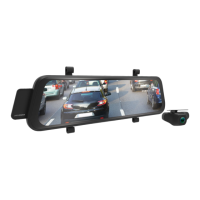
Lists the key features and technical specifications of the DVR.
Details all items included in the product package.
Identifies and describes the physical parts and connection ports of the DVR.
Instructions for inserting, removing, and formatting the memory card.
Step-by-step guide for physically mounting the DVR in the vehicle.
How to connect the DVR to the vehicle's power supply.
Guide for installing and connecting the rear-view camera.
Procedures for manually and automatically powering the DVR on and off.
Steps to transfer and play video files on a computer.
Lists all available voice commands for operating the DVR.
Recommended initial setup steps, including SD card formatting.
How to set the correct date and time for video footage timestamps.
Explains how the DVR operates upon connecting to power.
Details on automatic recording, file saving, and reverse camera assistance.
How to protect important video files from being overwritten.
How the reverse camera aids parking and visibility.
Instructions on how to activate and use voice commands.
Visual explanation of the information displayed on the recording screen.
How to change video resolution and frame rate settings.
Setting the duration for video clips in continuous recording.
Adjusting image contrast for better visibility in low light.
Manual control of light sensitivity for image quality.
Explanation of the lane departure warning feature.
Setting the sensitivity for impact detection and automatic recording.
Enabling and configuring the parking surveillance mode.
Setting the screen timeout duration to save power.
Changing the display language of the DVR interface.
Controlling the volume of system sounds and alerts.
Setting the correct frequency to prevent image interference.
Selecting the default camera view shown on startup.
Setting the date and time for video footage timestamps.
Erasing all data and preparing the memory card for use.
Restoring the DVR to its factory default settings.
How to view the current firmware version of the DVR.
Details of the product warranty, exclusions, and claim process.
 General
| Display Type | LCD |
|---|---|
| Viewing Angle | 120 degrees |
| Loop Recording | Yes |
| G-Sensor | Yes |
| Parking Monitoring | Yes |
| Night Vision | Yes |
| Storage | Supports up to 32GB microSD card |
| Power Supply | 12V car power adapter |

 To Next Page