
 Need help?
Do you have a question about the Parrot MINIKIT NEO and is the answer not in the manual?
Important safety warnings and initial setup considerations before using the device.
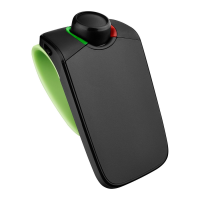
Details the items included in the Parrot MINIKIT Neo package.
Instructions for changing the device language and installing it in your vehicle.
Information on charging, sleep mode, and battery life of the Parrot MINIKIT Neo.
Guide on turning the device on/off, navigating menus, and adjusting volume.
Steps for pairing your phone via Bluetooth and NFC, plus automatic connection.
How to clear the device memory when it reports 'memory full'.
Enabling and managing connections for two phones simultaneously.
Details on how the phonebook is synchronized automatically with your phone.
Instructions on how to record custom voice tags for contacts.
Handling incoming calls, ringtones, magic words, accepting, and rejecting.
Methods for making calls, including voice recognition and phonebook access.
Features like redialing, Siri integration, volume adjustment, call transfer, and managing second calls.
Using the device to listen to music from your phone via Bluetooth A2DP.
Receiving GPS navigation instructions through the device's audio.
How to adjust the volume specifically for music and GPS instructions.
Steps to resolve the 'memory full' message and clear contacts.
Instructions on how to reboot the Parrot MINIKIT Neo if it becomes unresponsive.
Guidance on ensuring phone compatibility and updating device software.
 General
| Bluetooth | Yes |
|---|---|
| Connectivity technology | Wireless |
| Product color | Black |
 Weight and Dimensions
| Weight | 69 g |
|---|---|
| Dimensions (WxDxH) | 94 x 54 x 39 mm |







 To Next Page