
 Need help?
Do you have a question about the Parrot Minikit+ and is the answer not in the manual?
Crucial safety advice for using the device while driving.
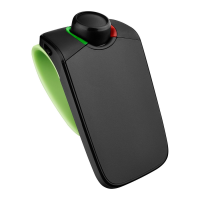
Instructions for charging the Parrot MINIKIT+ via car or PC.
Steps to mount the Parrot MINIKIT+ on a vehicle's sun visor.
Step-by-step guide to connect your phone to the Parrot MINIKIT+ via Bluetooth.
Resolving 'memory full' error and clearing device memory.
Steps to reboot the Parrot MINIKIT+ if it freezes.
Ensuring phone compatibility and updating device software.
 General
| Operating keys | Multi-key |
|---|---|
| Noise reduction | Yes |
| Buttons quantity | 4 |
| Phonebook capacity | 20000 entries |
| Compatible products | Apple iPhone |
| Bluetooth version | 2.0+EDR |
| Connectivity technology | Wireless |
| Charging time | 210 min |
| Product color | Black |
 Weight and Dimensions
| Weight | 83 g |
|---|---|
| Dimensions (WxDxH) | 60 x 110 x 29 mm |







 To Next Page

