Handy Polaris – Instruction Manual
3 Maintenance
A message in the display will inform you when probe renovation is needed, otherwise just
calibrate, and keep the probe clean.
3.1 Battery exchange
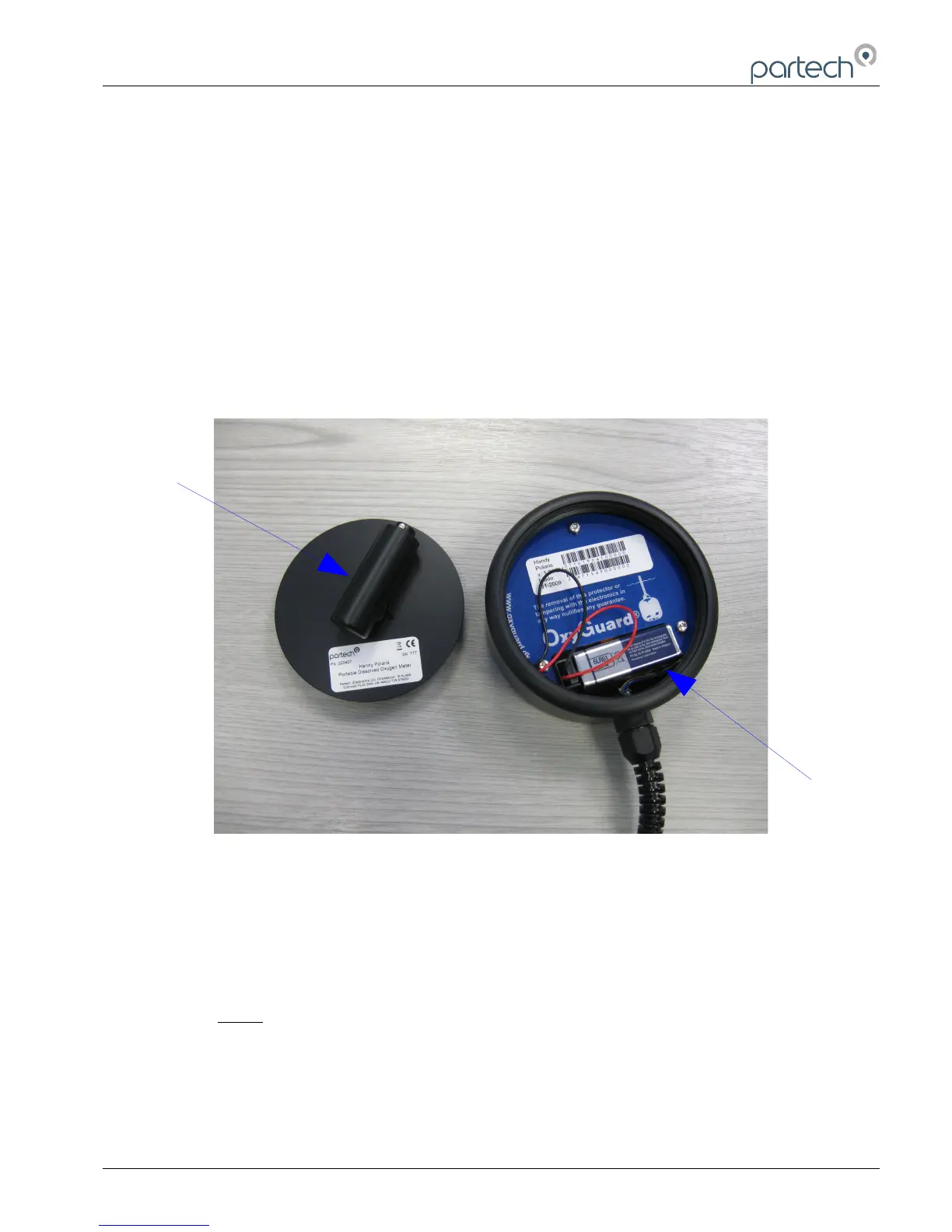
Use the tool to unscrew the rear plate. The battery can then easily be exchanged. Take care
not to disturb the ribbon cables. PLACE THE BATTERY IN THE CUT-OUT IN THE PC
BOARD - do NOT put it on top of the print. Make sure you tighten the rear plate properly!
3.2 Probe Renovation
Do NOT do this unless a message in the display tells you so. See the drawings. NB. treat the
electrolyte as concentrated salt water.
Clean the probe. Pull off the membrane protector and unscrew the cap. Rinse the probe.
Clean off any loose white deposits from the anode with the brown plastic scouring pad
provided. Clean the cathode with the pad if needed. The cathode MUST NOT BE POLISHED.
Unscrew the ring from the cap and discard the used membrane and O-ring. Clean the cap and
ring and dry thoroughly. Place a new O-ring in the cap, then a membrane over the O-ring.
220416IM-Iss03 Issue Date 22/04/2015 Page 7 of 12


 To Next Page
 Loading...