Doc:
MK9-M-04-02
Quick Start
Sidan/ Page:
28
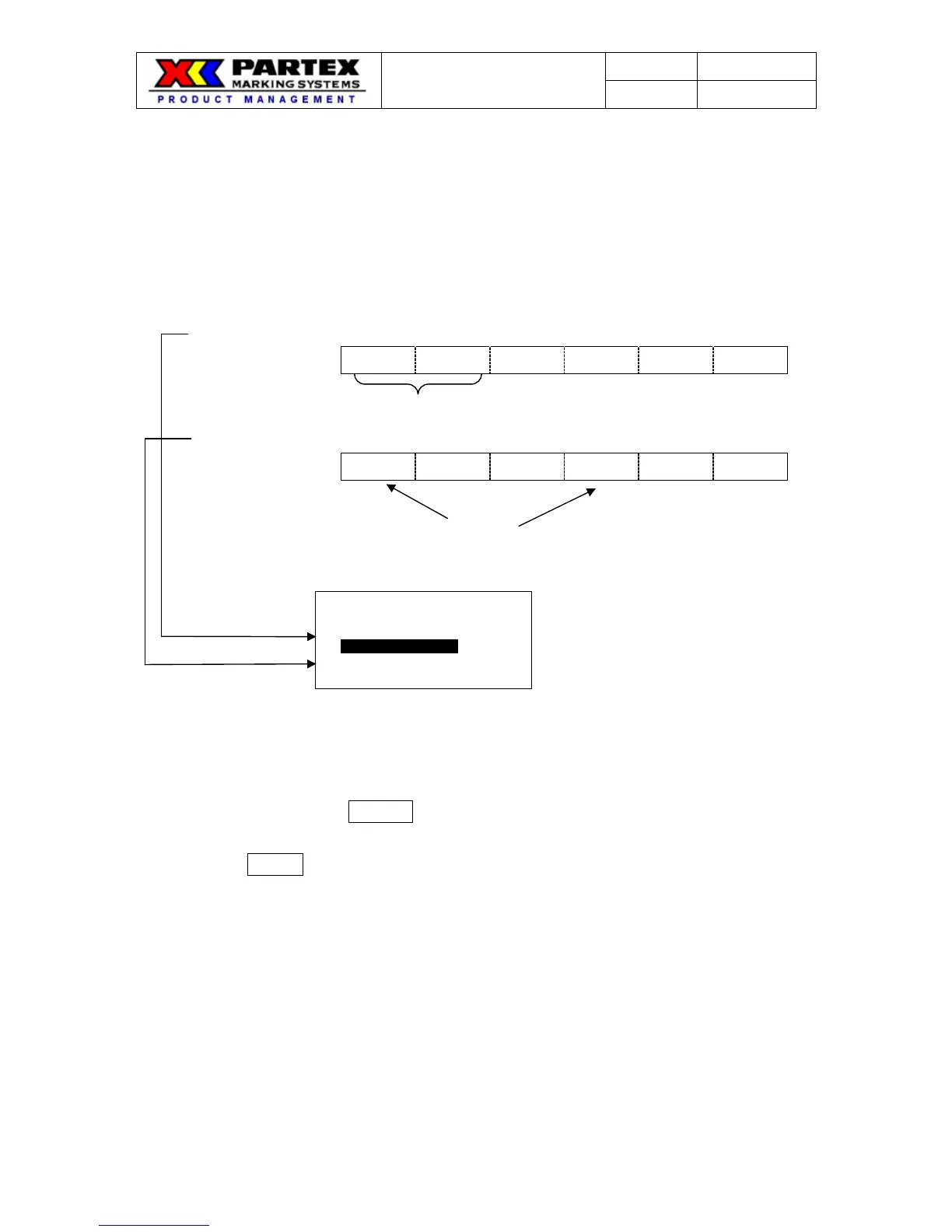
PRINTING STYLE OF 「RPT」 & 「SEQ」
The printing style for the “REPEAT and SEQUENCE” can be selected.
The default value of the “PRINTING STYLE” is “A : 11, 22, 33” at our factory.
When you use the “REPEAT and SEQUENCE” function at the same time, you
can select the printing style from “A : 11, 22, 33” or. “B : 123, 123.”
Ex.) REPEAT :2 pcs. SEQUENCE : 01~03
(A : 11,22,33)
01 01 02 02 03 03
(B : 123,123)
01 02 03 01 02 03
(Operation)
1. Select the “PRINTING STYLE OF 「RPT」 & 「SEQ」” in the “OPTION” menu.
2. Press ▲/▼ to select the printing style.
Note:If you press the DELETE key, the selection is initialized to the factory
default.
3. Press ENTER key to register the new selection
[PRINTING STYLE
OF 「RPT」&「SEQ」]
A:11,22,33
B:123,123
( 2 pcs. )
( 2 pcs.)
Printed result
Printed result


 To Next Page