RP-320 User’s Manual
3
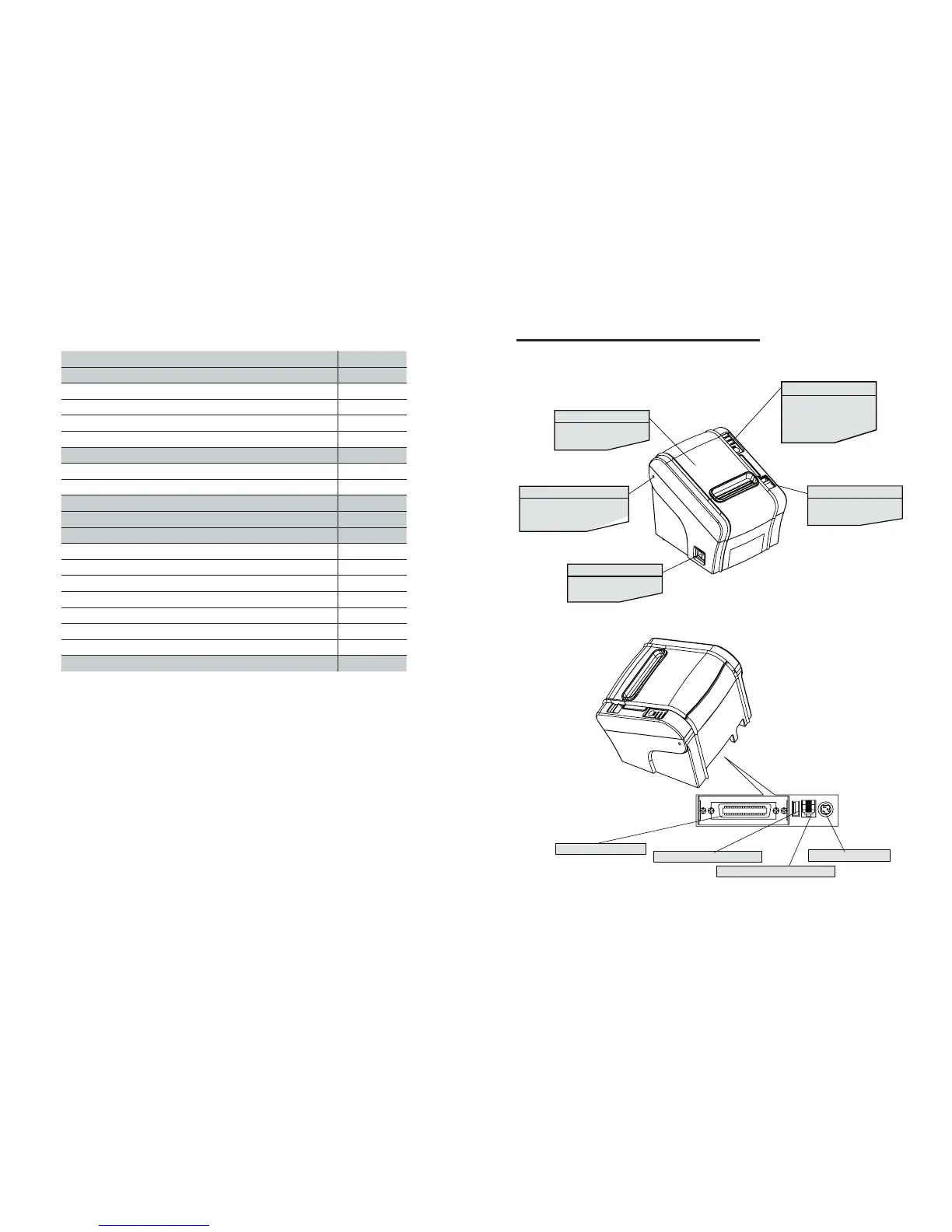
1. Parts Identications
TABLE OF CONTENTS
1. Parts Identifications 3
2. Setting up the printer 4
2.1 Unpacking 4
2.2 Connecting the cables 5
2.3 Loading the roll paper 9
2.4 Dip switch setting 11
3. Control panel and other functions 14
3.1 Control panel 14
3.2 Error Indicating 14
4. Self Test 15
5. Hexadecimal Dump 16
6. Specifications 17
6.1. General Specifications 17
6.2. Auto Cutter Specifications 19
6.3. Interface 19
6.4. Electrical Characteristics 19
6.5. Environmental Requirements 20
6.6. Reliability 20
6.7. Certification 20
7. Command List 21
INTERFACE CONNECTOR
INTERFACE CONNECTOR(USB)
PERIPHERAL DRIVE CONNECTOR
POWER CONNECTOR
PRINTER COVER
Open this cover to load or
replace paper.
HINGE HOLE
Fit the hinge of the Spillproof
Cover
into the hinge hole of
.
POWER SWITCH
Used to turn on/off power
to the printer.
COVER OPEN BUTTON
Push down this button to
open the printer cover.
CONTROL PANEL
Features LED indicators
to indicate printer status
and switches to operate
the printer.
the printer.



 To Next Page