11
S During light duty cutting.
S Near objects around which the line can-
wrap such as small posts, trees or fence
wire.
S For mowing or sweeping, usefull throttlefor
a good clean job.
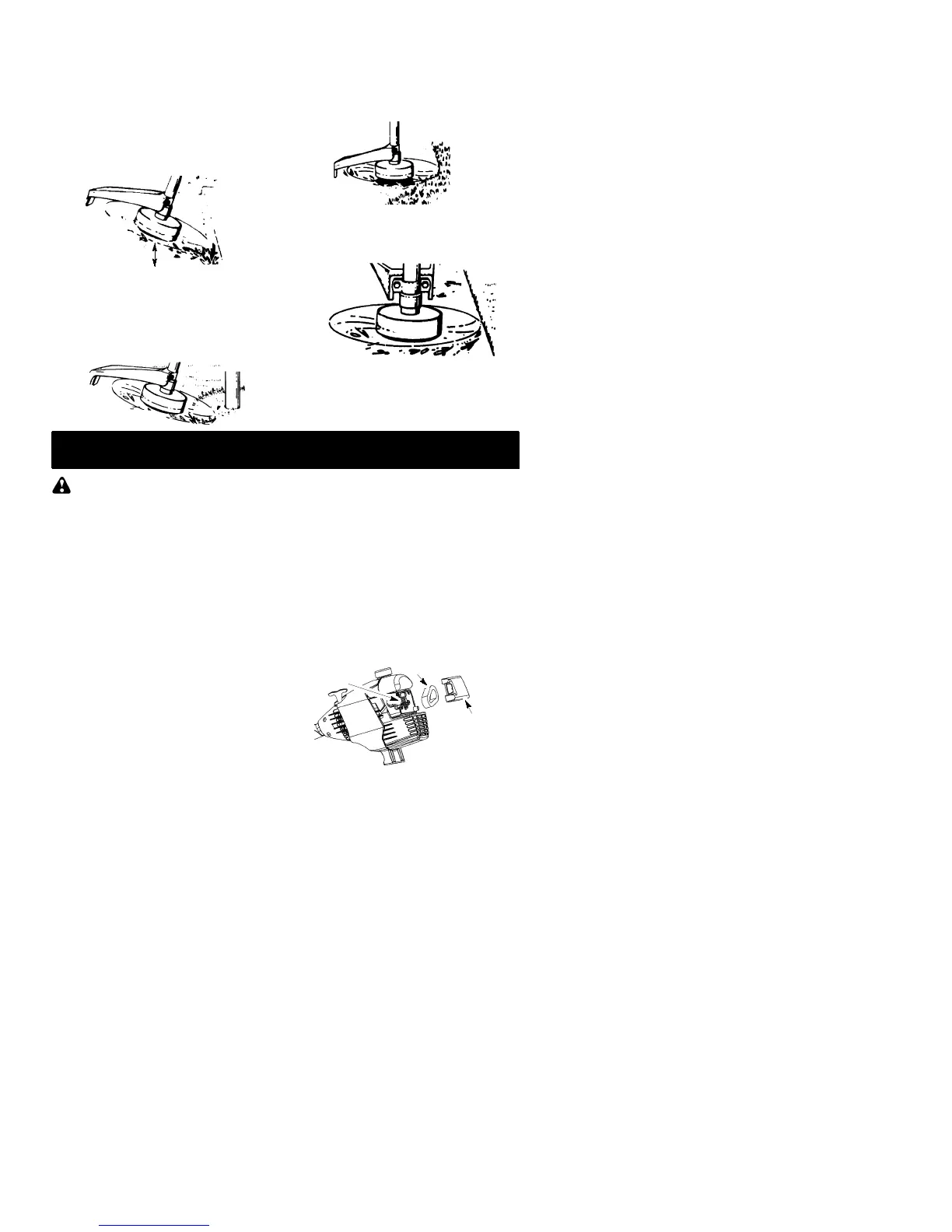
TRIMMING -- Ho ld the bottom of the trimmer
head about 80 mm above the ground and at an
angle. Allow only the tip of the line to make con-
tact. Do not force trimmer line into work area.
Trimming
80 mm above
ground
SCALPING -- The scalping technique re-
moves unwantedvegetation.Hold thebottom
of the trimmer head about 80 mm above the
groundandat anangle.Allow thetipof theline
to strike the ground around trees, posts,
monuments, etc. This technique increases
line wear.
Scalping
MOWING -- Your trimmer is ideal for mowing
in places conventional lawn mowers cannot
reach. In the mowing position, keep the line
parallel to the ground. Avoid pressing the
head into the ground as this can scalp the
ground and damage the tool.
Mowing
SWEEPING -- Thefanning actionof therotat-
ing line can be used for a quick and easy
clean up. Keep the line parallel to and above
the surfaces being swept and move the tool
from side to side.
Sweeping
MAINTENANCE
W ARNING:
Disconnect the spark
plug before performing maintenance except
for carburetor adjustments.
CHECK FOR LOOSE
FASTENERS AND PARTS
S Spark Plug Boot
S Air Filter
S Housing Screws
S Assist Handle Screw
S Debris Shield
CHECK FOR DAMAGED OR
WORN PARTS
Contact an authorized service dealer for re-
placement of damaged or worn parts.
S ON/OFF Switch -- Ensure ON/OFF switch
functions properly by moving the switch to
the OFF position. Make sure engine stops;
then restart engine and continue.
S Fuel Tank -- Discontinue use of unit if fuel
tank shows signs of damage or leaks.
S Debris Shield -- Discontinue use of unit if
debris shield is damaged.
INSPECT AND CLEAN UNIT AND
LABELS
S After each use, inspect complete unit for
loose or damaged parts. Clean the unit and
labels using a damp cloth with a mild deter-
gent.
S Wipe off unit with a clean dry cloth.
CLEAN AIR FILTER
A dirty air filter decreases engine perform-
ance and increases fuel consumption and
harmful emissions. Always clean after every
5 hours of operation.
1. Clean the cover and the area around it to
keep dirt from falling into the carburetor
chamber when the cover is removed.
2. Remove parts as illustrated.
NOTE:
Donotclean filter ingasoline orother
flammablesolventtoavoid creatinga firehaz-
ard or producing harmful evaporative emis-
sions.
3. Wash the filter in soap and water.
4. Allow filter to dry.
5. Replace parts.
Air Filter
Air Filter
Cover
Button


 To Next Page