Need help?
Do you have a question about the PAX A30 and is the answer not in the manual?
Instructions for powering the terminal on and off.
Guide on how to install SAM or SD cards into the device.
Steps for installing the A30 terminal onto its stand.
Instructions for swiping magnetic stripe cards.
How to insert smart cards into the reader slot.
Guidelines for using the contactless card reader.
Warning regarding FCC rules and equipment identification.
Information on radio frequency exposure limits.
Contact information for support and help.
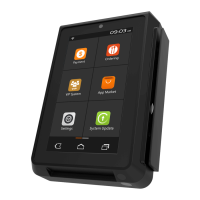
The PAX A30 Smart Payment Terminal is a versatile device designed for various payment processing needs, offering a comprehensive set of features for efficient and secure transactions. This quick setup guide outlines its functions, usage, and maintenance, ensuring users can quickly integrate and operate the terminal effectively.
The A30 serves as a central hub for payment processing, capable of handling multiple card types and transaction methods. Its core function is to facilitate smart payments, making it suitable for a wide range of retail and service environments. The terminal is equipped with a camera, a touch screen, and a physical keyboard, providing multiple input options for both customers and operators.
For card-based transactions, the A30 includes a Magnetic Stripe Reader, a Smart Card Reader (EMV), and a Contactless Card Reader (NFC). This multi-reader capability ensures compatibility with virtually all modern payment cards, including credit, debit, and loyalty cards. The device also features SAM/SD card slots, allowing for secure application modules and expandable storage, which are crucial for enhanced security and operational flexibility.
Connectivity options are robust, with multiple USB ports (including PUSB for powered peripherals), LAN A-POE, LAN B, and an optional RS232 port. These ports enable seamless integration with other point-of-sale (POS) systems, network infrastructure, and various peripherals like barcode scanners or external printers. The inclusion of Power over Ethernet (POE) for LAN A simplifies installation by allowing both data and power to be transmitted over a single cable.
The terminal's design incorporates user-friendly elements such as volume control buttons, a power button, and an audio jack, enhancing its usability in different operational settings. The speaker provides audio feedback for transactions and alerts, while the microphone supports potential voice-activated features or communication functionalities.
Operating the A30 is designed to be straightforward, starting with its power-on sequence. The terminal automatically powers on when plugged into an electric outlet, simplifying initial setup. For powering off, a simple press and hold of the power button for 3 to 5 seconds initiates the shutdown process.
Card installation, specifically for SAM and SD cards, is a key usage feature for customizing the terminal's functionality and security. These slots are conveniently located under the back cover, requiring the user to unscrew the cover, push it to the right, insert the card with contacts facing upwards and the clipped corner forward and to the right, and then replace the cover. This secure placement ensures the cards are protected during daily operation.
The A30 offers flexible installation options, including a stand for countertop use. The stand installation involves aligning and inserting metal stand prongs into designated slots on the underside of the terminal, then sliding the terminal firmly into place. This provides a stable and ergonomic setup for regular use.
For magnetic stripe cards, the terminal supports bidirectional swiping through the card reader slot. Users should ensure the magnetic strip is oriented towards the device's body and the card is fully inserted during the swipe for accurate reading.
Smart card (EMV) transactions require the card to be inserted fully into the reader with the metallic contacts facing up and towards the device. It is crucial to ensure the card is completely inserted while the transaction is being processed.
Contactless (NFC) payments are facilitated by placing the card or device roughly within an inch (2.5 mm) of the indicated area at the back of the terminal. For optimal performance, the card should be centered over this area and held as close as possible to the reader.
The terminal's interface, including the touch screen and keyboard, allows for intuitive navigation and data entry. The volume controls enable adjustment of audio feedback, which can be useful in varying noise environments. The wall hanging hole provides an alternative mounting option for space-saving or specific operational requirements.
Proper maintenance is essential to ensure the longevity and optimal performance of the A30 terminal. The device is designed with durability in mind, but specific cleaning and handling guidelines must be followed.
For cleaning the device, it is crucial to avoid industrial-strength or abrasive cleaners, as these can damage or scratch the screen and other surfaces. The terminal should never be immersed in water or any other liquid. Additionally, users should refrain from spraying water or cleaner directly into the EMV Card Reader or any of the ports to prevent internal damage.
The recommended method for cleaning the screen involves applying distilled water or a mild glass cleaner onto a soft, lint-free cloth, and then gently wiping the terminal. This approach helps maintain screen clarity without causing damage.
Beyond cleaning, several operational tips contribute to the device's maintenance and safe usage. If any cables become damaged, they should be replaced immediately to prevent electrical hazards or functional issues. Before inserting any card, especially into the IC card slot, users should inspect the slot for any suspicious objects. Any anomalies should be reported to the administrator to prevent potential fraud or damage.
It is critical not to insert unknown materials into any port on the A30, as this can cause serious damage to the internal components. If repairs are needed, users should always contact a professional technician rather than attempting to fix the device themselves, which could void warranties or cause further damage.
To protect the device from environmental factors, it should not be exposed to excessively hot, dusty, or strong electromagnetic environments. Such conditions can degrade performance and shorten the device's lifespan. Furthermore, the terminal should not be subjected to vibration, shaking, or dropping, as these can cause internal component damage.
The device also carries important compliance and safety markings, such as the "Do not throw away; Recycle only" icon, indicating its environmental responsibility. The "Class II Equipment" and "For indoor use only" icons provide guidance on its safe operational environment. The "Energy Efficiency Marking" (VI) signifies its adherence to energy consumption standards. Finally, symbols for AC voltage and DC voltage indicate the power requirements and compatibility.
Adhering to these maintenance and usage guidelines ensures the PAX A30 Smart Payment Terminal remains a reliable and efficient tool for payment processing.
 General
| Operating Temperature | 0°C to 50°C (32°F to 122°F) |
|---|---|
| Processor | Quad-core processor |
| Connectivity | Wi-Fi, Bluetooth, 4G LTE, Ethernet |
| Card Reader | Contactless |
| Operating System | Android |
| Security | PCI PTS 5.x |
| Certifications | PCI PTS |


 To Next Page