Need help?
Do you have a question about the PAX A80 and is the answer not in the manual?
Configures Wi-Fi connection using DHCP for automatic network settings.
Configures Wi-Fi connection using static IP address, gateway, and DNS settings.
Manually configures Wi-Fi connection for hidden or secured networks.
Configures Wi-Fi connection through a proxy server for network access.
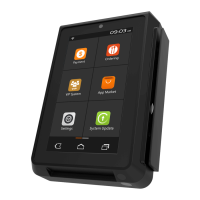
The PAX A80 is a countertop smart terminal designed to serve as a comprehensive payment partner. It integrates advanced technology to facilitate various payment methods and offers a user-friendly interface for efficient operation. This quick setup guide provides an overview of its features, components, and initial configuration steps, focusing on communication setup and power management.
The PAX A80 functions primarily as a countertop payment terminal, enabling businesses to process transactions securely and efficiently. Its core capability lies in accepting multiple forms of payment, including magnetic stripe cards, EMV chip cards, and NFC (Near Field Communication) contactless payments. This versatility ensures compatibility with a wide range of customer payment preferences. Beyond basic payment processing, the A80 is a "smart terminal," implying it runs on an Android operating system, allowing for the potential integration of various business applications. This transforms the device from a simple payment processor into a more versatile business tool capable of handling tasks beyond just transactions, such as inventory management, loyalty programs, or order entry, depending on the installed applications.
The terminal is designed for stationary use on a countertop, connecting to power and network infrastructure to maintain continuous operation. Its robust design suggests suitability for environments with frequent use, such as retail stores, restaurants, and service desks. The inclusion of a printer latch indicates an integrated thermal printer, essential for issuing receipts to customers, further streamlining the transaction process.
Communication is a critical aspect of the PAX A80's functionality. It supports multiple communication methods to ensure reliable connectivity for transaction processing and application updates. These include Dial-up, Ethernet, Wi-Fi, and Bluetooth. Ethernet provides a stable wired connection, ideal for high-volume environments. Wi-Fi offers wireless flexibility, allowing for placement without direct network cable constraints, while Bluetooth enables short-range communication with peripherals. The ability to connect to the internet is crucial for downloading applications, processing online transactions, and receiving software updates, making it a truly "smart" device.
Power management is straightforward, with clear instructions for powering the device on and off. This ensures that users can easily control the terminal's operational status, whether for daily startup, shutdown, or troubleshooting. The optional backup battery feature enhances its reliability, allowing transactions to continue even during temporary power outages, which is a significant advantage for businesses that cannot afford downtime.
The PAX A80 is designed with ease of use in mind, featuring a 4-inch capacitive touch color display that provides a clear and interactive interface. The touch screen allows for intuitive navigation through menus and applications, similar to a smartphone or tablet. This modern interface reduces the learning curve for new users and enhances the overall operational experience.
The physical keypad complements the touch screen, offering tactile feedback for numerical input, such as PIN entry, which is crucial for secure transactions. The keypad includes standard numerical keys (0-9), function keys (F1-F10), and special keys like ALPHA for character input, and clear/cancel/enter keys for transaction control. The presence of a dedicated power on/off button on the keypad ensures quick access to power controls.
For payment acceptance, the terminal incorporates multiple readers. The MagStripe reader is located along the side, allowing for easy swiping of traditional magnetic stripe cards. The EMV chip card insert slot is positioned at the bottom front, accommodating chip cards for enhanced security. The Contactless Area, located at the top of the device, supports NFC payments, enabling customers to simply tap their cards or mobile devices for quick and convenient transactions. These multiple acceptance methods ensure that the terminal can handle virtually any card type presented by a customer.
Setting up communication is a key usage feature, and the guide details the process for Wi-Fi configuration. This includes steps for connecting to a Wi-Fi network using DHCP, Static IP, and Manual Proxy settings. The clear, step-by-step instructions, accompanied by screenshots, guide users through selecting networks, entering passwords, and configuring advanced network parameters like IP addresses, gateways, and DNS servers. This comprehensive approach ensures that users can establish reliable internet connectivity regardless of their network environment. The ability to manually add networks and configure proxy settings provides flexibility for more complex network setups.
The Android operating system allows for a customizable user experience. Users can access settings, manage applications, and configure various device parameters through a familiar Android interface. The "Settings" icon on the home screen serves as the central hub for device configuration, including Wi-Fi settings, password management, and display options. This familiarity with Android makes the device accessible to a broad range of users.
While the guide focuses on initial setup, several aspects hint at the device's maintainability and support. The inclusion of a SAM (Secure Access Module) cover suggests that the device supports SAM cards, which are often used for secure application modules or cryptographic functions, and may require occasional access for updates or replacements. The "Chip Card Insert" at the back, separate from the front EMV slot, might indicate a slot for an internal chip card, possibly for device authentication or secure element management.
The device's modular design, with clearly labeled ports and cable guides on the back, simplifies connectivity and troubleshooting. Ports for LAN (Ethernet), USB-OTG, USB-HOST, PHONE, RS232, and PINPAD allow for various peripheral connections and diagnostic access. This organized layout makes it easier for technicians or users to connect necessary cables and identify specific ports for maintenance or expansion. The serial number, prominently displayed, is crucial for product identification, warranty claims, and support inquiries.
The quick setup guide itself serves as a maintenance feature by providing clear instructions for common tasks. The detailed steps for Wi-Fi configuration, including DHCP, Static, and Manual Proxy setups, empower users to troubleshoot and reconfigure network settings independently. The guide also mentions the ability to change the Android Settings password, which is a basic security maintenance task.
For more complex issues, the document provides explicit customer support information, including email, phone number, and website for PAX Technology Inc. This direct line to support is a critical maintenance feature, ensuring that users can obtain assistance for technical problems, software updates, or hardware issues that cannot be resolved through the manual. The disclaimer about features and specifications being subject to change also implies ongoing product development and potential for future updates or improvements that would be part of the device's maintenance lifecycle.
The robust construction and PCIPTS 5.x certification indicate that the device is built to meet high security and durability standards, reducing the need for frequent physical maintenance. The mention of an optional backup battery also contributes to operational resilience, minimizing service interruptions due to power fluctuations. Overall, the PAX A80 is designed for reliable operation with user-friendly setup and accessible support resources, contributing to its long-term maintainability.
 General
| Security | PCI PTS 5.x approved |
|---|---|
| Display | 480 x 800 pixels |
| Connectivity | Wi-Fi, Bluetooth, 4G |
| Card Readers | Magnetic Stripe |
| Battery | 2600mAh |
| Touch Panel | Capacitive |
| Ports | Ethernet |
| Printer | Thermal printer, 58mm paper roll |
| Certifications | PCI PTS 5.x |


 To Next Page