11
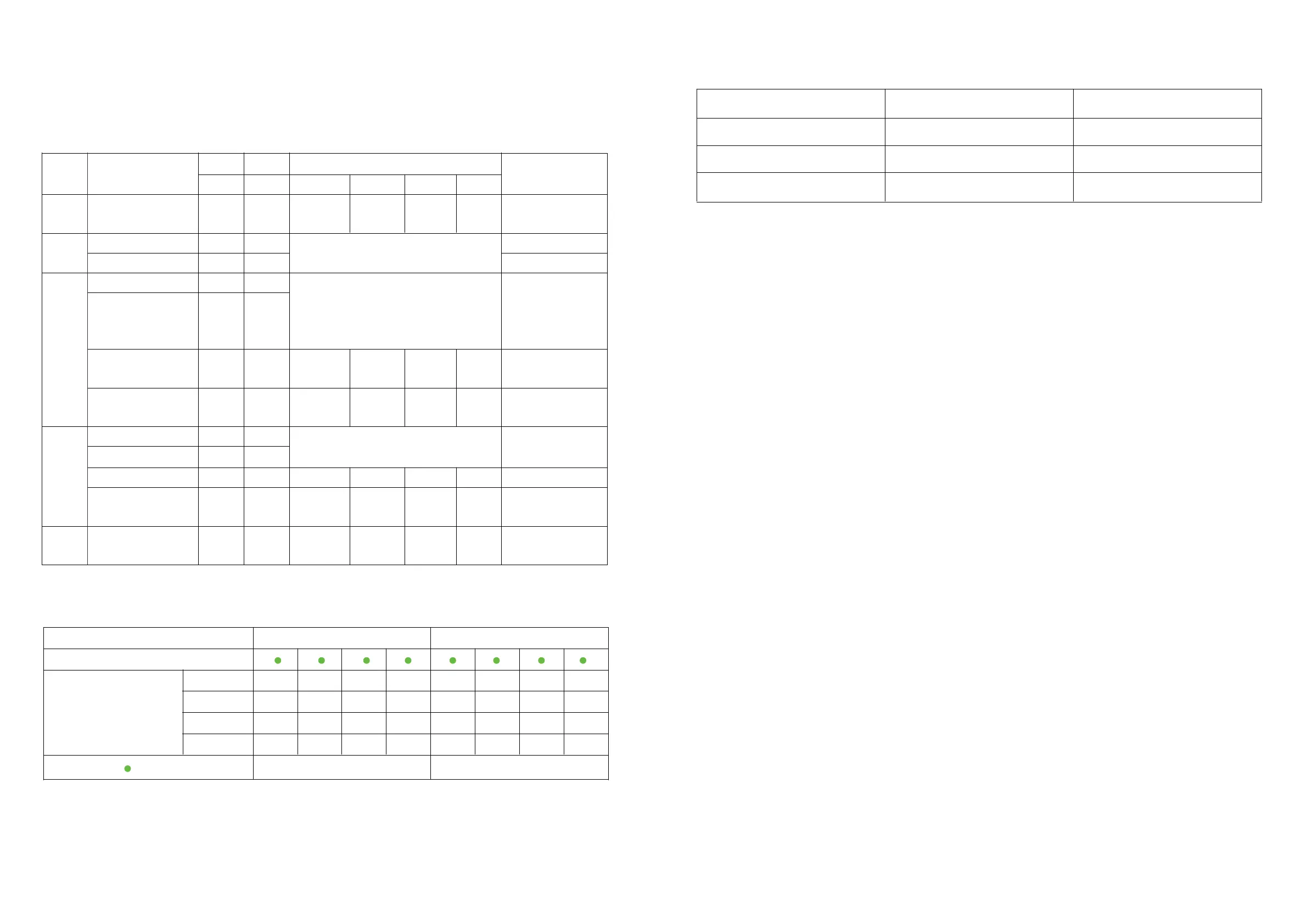
5. LED instructions
Table1 LED working status indication
Table2 Description of capacity indication
Table 3 LED flashing description
state
normal/warning/
protect
shutdown
Standby
hibernate
normal
alert
Charge
discharge
invalid
temperature, overcurrent,
short circuit, Reverse
connection, failsafe
Undervoltage protection
temperature,
overcurrent, Failsafe
Overcharge
protection
RUN ALM Battery indicator LED
extinguish
●●●●● ●
flash 1
flash 1
Always
bright
extinguish
According to the battery indicator
According to the battery indicator
(battery indication maximum
LED flashes 2)
According to the battery indicator
illustrate
annihilate
standby mode
Module low voltage
Maximum battery LED
flashes Move (flashing 2),
overcharge warning
ALM does not flash
during alarm
If there is no utility power,
indicate Light goes to
standby
stop charging
Stop charging and
discharging
capacity indicator
L4
L3 L2 L1 L4 L3 L2 L1
Battery (%)
Running lights
0~25%
25~50%
50~75%
75~100%
constant
Blink (blink 3)
flashing method
0.25S
0.5S
0.5S
Bright
3.75S
0.5S
1.5S
Remarks: The LED indicator alarm can be enabled or disabled through the host computer,
and the factory default is enabled.
1. When the BMS is in sleep state, press the button (3~6S) and release it, the protection
board will be activated, and the LED indicators will light up sequentially from "RUN" for
0.5 seconds.
2. When the BMS is active, press the button (3~6S) and release it, the protection board will
be put to sleep, and the LED indicators will light up sequentially for 0.5 seconds from the
lowest battery indicator.
3. When the BMS is active, press the button (6~10S) and release it, the protection board
will be reset, and all the LED lights will light up at the same time for 1.5 seconds.
4. After the BMS is reset, the parameters and functions set by the host computer are still
retained. If it is necessary to restore the initial parameters, it can be achieved through the "
restore default value" of the host computer, but the relevant operation records and stored
data remain unchanged (such as power, cycle times, etc.).
◆ Key Description
extinguish
normal
alert
normal
alert
extinguish extinguish extinguish extinguish extinguish
flash 3
extinguish
Always
bright
flash 3
Always
bright
extinguish
extinguish
extinguish extinguish
extinguish
extinguish
Always
bright
Always
bright
Always
bright
Always
bright
Always
bright
flash 3
flash 3
flash 3
extinguish extinguish extinguish extinguish extinguish extinguish
extinguish
extinguishextinguish
extinguishextinguish
extinguishextinguish
extinguishextinguish
extinguish
Always bright
Always bright
extinguish
stop charging
stop charging
stop charging
state
Charge discharge
extinguishextinguishextinguishextinguishextinguish extinguishextinguish
constant
constant constant constant
constant constant constant
constant
constant constant constantconstant
constant constant
constant
extinguish
extinguishextinguishextinguish flash 2 flash 2
flash 2flash 2
flash 2
constant
flash 1
flash 2
flash 3
12


 To Next Page