Better Solutions Are Within Reach
®
SW24LEDA, SW32LEDA, SW42LEDA
PD196-210R1
User Manual
PDi International, PTE LTD, Henry Building, 5 Eunos Ave #2-00 8A, Singapore 409459 PH +65-6846-1482 FX 937-743-5664
Hearing Impaired
This will allow the more descriptive settings for use by the hearing impaired.
1. Press ► to enter the SETUP menu.
2. Press ▼ to highlight Hearing Impaired.
3. Press ► to select “Off” or “On”.
4. Press ▼ or “EXIT” to continue setup.
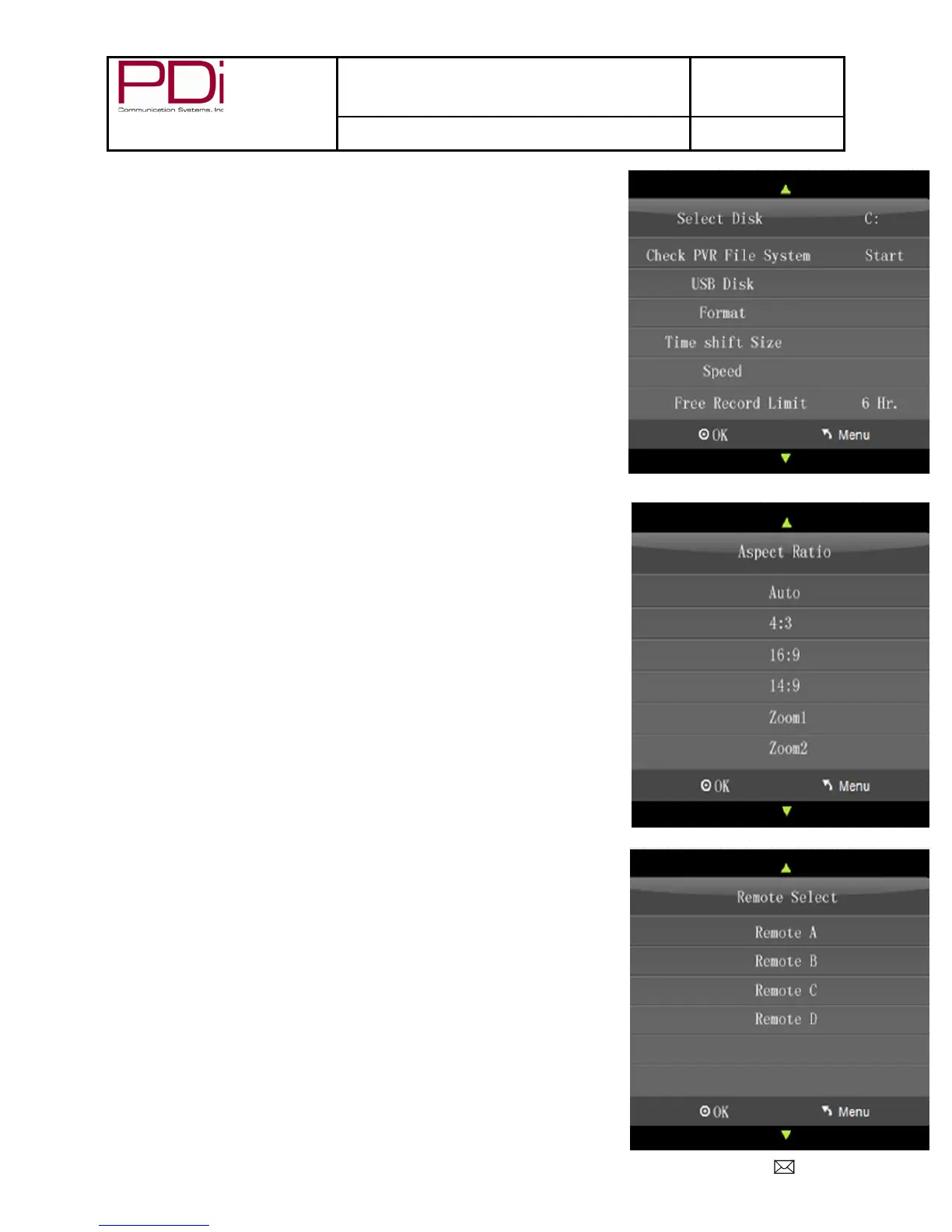
PVR File System (Personal Video Recorder)
This will give you storage information.
1. Press ► to enter the SETUP menu.
2. Press ▼ to highlight PVR File System.
3. Press OK to select.
4. Press ▲ or ▼ to select desired information.
5. Press OK to check.
6. Press EXIT to leave menu.
Aspect Ratio
This will automatically set the aspect ratio for the TV or let you choose from the
menu.
1. Press ► to enter the SETUP menu.
2. Press ▼ to highlight Aspect Ratio.
3. Press ► to enter the Aspect Ratio screen..
4. Press ▼ to choose desired setting..
5. Press “EXIT” to continue setup.
Blue Screen
This allows you to use a blue background screen when no signal is available.
1. Press ► to enter the SETUP menu.
2. Press ▼ to highlight Blue Screen.
3. Press ► to select “Off” or “On”.
1. Press “EXIT” to continue setup.
Remote Select
This allows you to choose which remote controls a TV.
Press ► to enter the SETUP menu.
2. Press ▼ to highlight Remote Select.
3. Press ► to enter the “Remote Select screen.
4. Press ▼ to choose desired remote.
5. Press “EXIT” to continue setup.


 To Next Page