5. Point the remote at the target device and press the PWR key.
6. If the device does not turn on, repeat the process with the remaining codes on the list until programming is
successful.
Learning Function
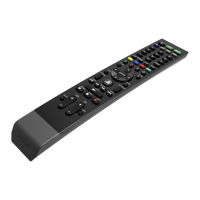
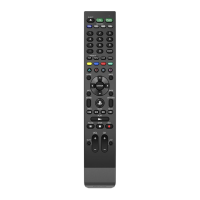
The yellow, blue, red, and green “soft keys” can be used for learning additional IR commands from other remote
control devices. By default, the green soft key controls device INPUT. If desired, this key can be reprogrammed.
1. On the Universal Media Remote, hold down the gray device key that corresponds to the device of the existing
(teaching) remote. At the same time, hold down the colored soft key you wish to program.
2. After 5 seconds, the red LED will light up, indicating the remote is ready to learn.
3. Point the teaching remote directly at the IR window on the front of the Universal Media Remote, and press the
key on the teaching remote that you want to teach.
4. The red LED on the Universal Media Remote will flash 3 times, indicating that learning was successful.
Volume and Channel Punch Through
The volume and channel keys can be set to always control the correct device, regardless of which mode the remote
is in.
Volume Punch Through
1. Hold down the gray device key for the device that should always control volume and the MUTE key at the same
time.
2. The red LED will flash 3 times to indicate Volume Punch Through is successful.
Channel Punch Through
1. Hold down the gray TV and CBL buttons until the red LED turns on, then release the keys.
2. Press the gray device key for the device that should always control channel selections.
3. The red LED will flash 3 times to indicate Channel Punch Through is successful.
PRECAUTIONS
Battery Use
Never throw batteries into a fire.
If you come into contact with material from a leaking battery, take the following actions:
If the material gets into the eyes, do not rub. Immediately flush the eyes with clean water and seek medical
attention.
If the material comes into contact with the skin or clothes, immediately rinse the affected area with clean
water. Consult your physician if inflammation or soreness develops.
Keep the product out of reach of small children. Small children may swallow the batteries or small parts, which
may inflict injury or cause an accident.
Do not use batteries other than those specified, and always replace with the same type of battery. Do not mix
old and new batteries.
Insert batteries with the plus and minus ends in the correct direction.
Remove batteries when they have reached the end of their life, or if the remote is to be stored for an extended
period of time.
Use and handling
1. Do not expose the remote to high temperatures, high humidity, or direct sunlight.
2. Do not allow liquid or small particles to get into the product.
3. Do not put heavy objects on the product.
4. Never disassemble or modify the product.
5. Do not throw or drop the product, or otherwise expose it to strong physical impact.
6. Do not place any rubber or vinyl materials on the product exterior for an extended period of time.



 To Next Page