EasyManua.ls Logo

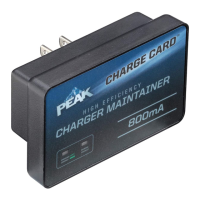
Peak CHARGE CARD - User Manual

Peak CHARGE CARD
12 pages
Print Icon
To Next Page IconTo Next Page
Loading...
Cargador de Baterías/
Mantenedor de 800 mA
No. de Modelo: PKC0C800
Manual del Propietario
e Información de Garantía
Lea completamente estas instrucciones antes de usar este producto.
Conserve este Manual del Propietario para referencia futura.
12/16
© 2016
1
800mA Battery
Charger/Maintainer
Model No.: PKC0C800
Owners Manual
and Warranty Information
Read these instructions completely before using this product.
Retain this Owners Manual for future reference.
1
12/16
© 2016

Questions and Answers

  • C
    Carlos WilsonAug 5, 2025
    What to do if my Peak Battery Charger is not charging?
    • K
      kyle22Aug 5, 2025
      If your Peak Battery Charger isn't charging, the battery may be sulfated or the battery voltage may be too low, or the battery may be damaged. Check if the battery is sulfated or use a multimeter to check the battery voltage. Replace the battery if the voltage is too low.
  • S
    Stephanie WalshAug 11, 2025
    What to do if my Peak CHARGE CARD has no LED lights on?
    • J
      Jonathan TaylorAug 11, 2025
      If no LED lights are illuminated on your Peak Battery Charger, ensure the charger is connected to a working 110/120 volt AC grounded outlet. Verify that the outlet has power.
  • T
    thomas27Aug 17, 2025
    Why is the green 'Battery Charged' LED not turning on after charging with my Peak CHARGE CARD Battery Charger?
    • C
      christina27Aug 17, 2025
      The green 'Battery Charged' LED might not illuminate for a couple of reasons: * The battery may require more charging time. * The battery might be too cold; the charging rate will increase as the battery warms above 32 °F (0 °C).
  • C
    Carol WadeAug 23, 2025
    What to do if my Peak CHARGE CARD shows a short circuit shutdown?
    • T
      Thomas CantuAug 23, 2025
      If your Peak Battery Charger shuts down due to a short circuit, disconnect the charging clamp leads and check the charging clamp leads or the battery for a short. Charging will resume once the short circuit condition is resolved.
  • P
    Paige JacksonAug 29, 2025
    Why is the red reverse polarity LED flashing on my Peak Battery Charger?
    • S
      Susan GarzaAug 29, 2025
      A flashing red reverse polarity LED indicates that the charger cables are not properly connected. Unplug the battery charger and check to ensure that the charger cables are correctly connected. Refer to pages 8 and 9 for instructions on connecting the charger cables to the battery.

Summary

Important Safety Instructions

Safety Warnings and Precautions

Covers warnings on hazards, DEHP, and explanations of safety symbols and signal words.

General Safety Guidelines

Safe Usage Practices

Guidelines on safe use of attachments, extension cords, and handling of damaged equipment.

Battery Hazard Precautions

Crucial precautions for handling batteries, including risk of explosive gases and personal safety.

Preparing for Charging

Battery Preparation Steps

Steps for preparing the battery, including removal, cleaning, water addition, and voltage check.

Charger Location

Optimal Placement Guidelines

Recommendations for positioning the charger to ensure safety and proper operation.

Connection and Charging Procedures

DC Connection Safety

Safety procedures for connecting and disconnecting DC output clips.

Charging with Battery Installed

Detailed steps for charging a battery while it remains installed in the vehicle.

Charging with Battery Removed

Step-by-step instructions for charging a battery that has been removed from the vehicle.

Introduction to the Charger

Product Overview and Modes

Overview of the 800mA Battery Charger/Maintainer and its three charging modes.

LED Indicators and Battery Compatibility

Explanation of LED indicators and a list of compatible battery types.

Product Features and Specifications

Key Features

Highlights key features like LED indicators, corrosion-resistant cables, and winter use suitability.

Technical Specifications

Detailed technical specifications including input, voltage, current, dimensions, and weight.

Operating the Battery Charger

LED Display Panel and Pre-Charge

Explanation of LED indicators and the procedure for pre-charging batteries.

Charging with Battery Installed

Step-by-step guide for charging a battery while it is installed in a vehicle.

Advanced Charging Procedures

Charging Battery Outside Vehicle

Step-by-step instructions for charging a battery removed from the vehicle.

Extension Cord Usage

Safety guidelines and criteria for selecting and using extension cords with the charger.

Charging Time Estimation

Explanation of how to estimate charging time based on battery capacity and a provided table.

Care, Maintenance, and Disposal

Fuse Replacement and Cleaning

Instructions for replacing the fuse and cleaning the charger and its cables.

Battery Water Addition and Storage

Guidelines for adding water to batteries and proper storage of the charger.

Compliance Information

FCC Compliance

Statement regarding the device's compliance with FCC Rules, Part 15.

Troubleshooting Common Issues

LED Indicator Problems

Diagnosing and resolving issues related to LED indicators not lighting or flashing.

Battery Charging Problems

Troubleshooting steps for battery charging failures, including slow charging and short circuits.

IC Information

Industry Canada Compliance

Statement regarding the device's compliance with Industry Canada's license-exempt RSSs.

Limited Warranty and Service

Warranty Coverage

Details of the one-year warranty coverage, exclusions, and limitations.

Obtaining Service

Instructions on how to obtain warranty service, including contact information and return procedures.

Peak CHARGE CARD Specifications

General IconGeneral
Input Voltage5V
Output Voltage5V
Output Current1A
Battery TypeLithium Polymer
Charging Time2-3 hours
Dimensions85.6mm x 54mm x 54mm

Related product manuals