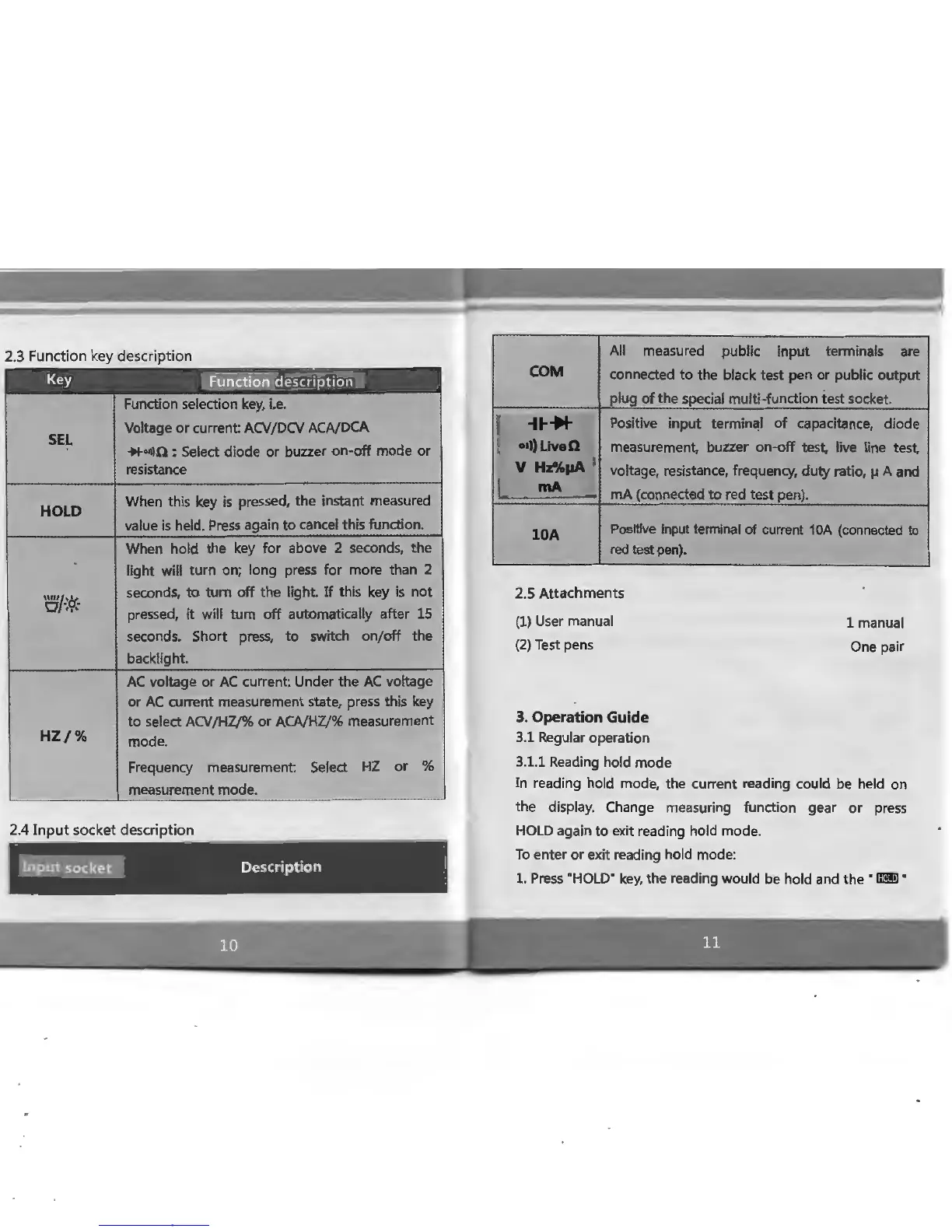
2.3 Function key description
Key
E_ul!_~t
~ nT
de
sfr
iption
Function selection
key,
i.e.
SEL
Voltage
or
current:
ACV/DCV
ACA/DCA
......
,in
: Select diode or buzzer on-off
mode
or
resistance
HOLD
When this key
is
pressed,
the
instant measured
value
is
held. Press again to cancel this function.
When hold the
key
for above 2 seconds,
the
light will turn on; long press for more than 2
0/~cf.·
seconds, to
tum
off
the
light.
If
this key
is
not
pressed,
it
will turn off automatically after 15
seconds. Short
press, to
switch on/off
the
backlight.
AC
voltage or
AC
current: Under
the
AC
voltage
or
AC
current measurement state, press this
key
to select
ACV
/HZ/% or
ACA/HZ/%
measurement
HZ/%
mode.
Frequency
measurement: Select
HZ
or
%
measurement mode.
2.4
Input
socket
description
-=~,..,..
1J.'!e~t
so
c
Ket
_a
Description
'
r
I
I
L
All
measured
public input
terminals are
COM
connected
to
the
black
test
pen or public
output
plug of
the
special multi-function
test
socket.
........
Positive input terminal of capacitance, diode
ol))LlveQ
measurement, buzzer on-off test,
live
line
test
V Hz%pA I
voltage, resistance, frequency, duty ratio, µ A and
mA
mA
(connected
to
red
test
pen).
10A
Positive
)nput
terminal
of
current
10A
(connected to
red
test pen).
2.5
Attachments
(1) User manual
(2)
Test pens
1 manual
One pair
3.
Operation Guide
3.1 Regular operation
3.1.1 Reading hold mode
In
reading hold mode, the current reading could be held on
the
display. Change measuring function gear
or
press
HOLD
again
to
exit reading hold mode.
To
enter
or exit reading hold mode:
1.
Press
"HOLD"
key,
the
reading would be hold and
the·
la·
11
1
.
----
I
!
:.
I
.. ·•·
•
ic:
..
.
,,·
,.
•
. f


 To Next Page