symbol would display on
the
LCD
display
at
the same time.
2. Press
"HOLD"
key
again
to
restore
the
instrument to normal
measurement state.
3
.1
.2 Backlight and lighting function
The instrument
is
configured with backlight and lighting
function,
so
that
users could read measurement results
accurately even
unde;
unsound lighting conditions. The
operation of turning on
or
off backlight
is
as follows:
1.
Long
press
the
a/·:/1
,
key
for above 2 seconds, to turn on the
light; short press the turn on
the
backlight.
2. Long press
the
0
/-
:
/f.
key
for above 2 seconds again, turn off
the
light manually, and short press
to
turn off
the
backligh
t;
or
the
backlight and light
will
turn off automatically after about
15 seconds.
3.1
.3 Automatic shutdown function
If
there's no operation within
about
15 minutes after startup,
the
instrument
will
make a
Di-Di
sound
to
prompt
the
automatic shutdown of power supply, and enter sleep state.
In
automatic shutdown mode, press
SEL
key to restart.
3.2 Measuring
guide
3.2.1 Measu
ri
ng
AC
and
DC
voltage
_&
-
It
is
not allowed
to
measure any voltage higher than
600V
DC
or 600V
AC
rms,
to avoid electric shock
and/
or damaged instrument.
It
is
not allowed to apply a voltage over 600V
DC
Or
600V
AC
r~s
on common port and The ground, to
avoid electric shock andor damaged instrument.
The
DC
voltage range of
the
instrument
is
: 600.
0mV
, 6.
000V,
60.
00V
and 600.0V;
the
AC
voltage range
is
: 6.
000V,
60.
00V
and 600.
0V
.
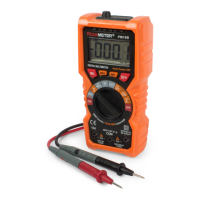
Measure
AC
or
DC
voltage:
1.
Turn
the
rotary switch
to~
and press "
SEL
"
key
to
switch
DC
or
AC
voltage function.
2. Connect the black
test
pen and
the
red
test
pen to
COM
input socket and V input socket.
3.
Use
the
test pen
to
measure
the
voltage of
the
circuit
to
be tested .
(In
parallel connection with
the
circuit
to
be
tested)
4.
Read the measured voltage from
the
LCD
display. When
measuri
ng
DC
voltage,
the
display
will
display the voltage
polarity connected to
the
red pen.
12 l
13
-
-·
(
,.
I
.
,,,
•
.
.,
.
..
..
:~
I


 To Next Page