EasyManua.ls Logo

Peavey BTS 2.2 - User Manual

Peavey BTS 2.2
8 pages
Print Icon
To Next Page IconTo Next Page
Loading...
IMPORTANT SAFETY INSTRUCTIONS
WARNING: When using electrical products, basic cautions should always be followed,
including the following:
1. Read these instructions.
2. Keep these instructions.
3. Heed all warnings.
4. Follow all instructions.
5. Do not use this apparatus near water.
6. Clean only with a dry cloth.
7. Do not install near any heat sources such as radiators, heat registers, stoves or
other apparatus (including amplifiers) that produce heat.
8. Refer all servicing to qualified service personnel. Servicing is required when the
apparatus has been damaged in any way, such as power-supply cord or plug is
damaged, liquid has been spilled or objects have fallen into the apparatus, the
apparatus has been exposed to rain or moisture, does not operate normally, or
has been dropped.
9. This electrical apparatus should not be exposed to dripping or splashing and care
should be taken not to place objects containing liquids, such as vases, upon the
apparatus.
10. Exposure to extremely high noise levels may cause a permanent hearing loss.
Individuals vary considerably in susceptibility to noise-induced hearing loss, but
nearly everyone will lose some hearing if exposed to sufficiently intense noise
for a sufficient time. The U.S. Government’s Occupational Safety and Health
Administration (OSHA) has specified the following permissible noise level
exposures:
Duration Per Day In Hours Sound Level dBA, Slow Response
8 90
6 92
4 95
3 97
2 100
11⁄2 102
1 105
1⁄2 110
1⁄4orless 115
According to OSHA, any exposure in excess of the above permissible limits could
result in some hearing loss. Earplugs or protectors to the ear canals or over the ears
must be worn when operating this amplification system in order to prevent a permanent
hearing loss, if exposure is in excess of the limits as set forth above. To ensure against
potentially dangerous exposure to high sound pressure levels, it is recommended that
all persons exposed to equipment capable of producing high sound pressure levels
such as this amplification system be protected by hearing protectors while this unit is
in operation.
SAVE THESE INSTRUCTIONS!
FCC Compliancy Statement
This device complies with Part 15 of the FCC rules. Operation is subject to the
following two conditions: (1) this device may not cause harmful interference,
and (2) this device must accept any interference received, that may cause
undesired operation.
Warning:ChangesormodicationstotheequipmentnotapprovedbyPeavey
Electronics Corp. can void the users authority to use the equipment.
Note - This equipment has been tested and found to comply with the limits for
a Class B digital device, pursuant to Part 15 of the FCC Rules. These limits
are designed to provide reasonable protection against harmful interference
in a residential installation. This equipment generates, uses and can radiate
radio frequency energy and, if not installed and used in accordance with
the instructions, may cause harmful interference to radio communications.
However, there is no guarantee that interference will not occur in a particular
installation. If this equipment does cause harmful interference to radio or
television reception, which can be determined by turning the equipment off and
on, the user is encouraged to try and correct the interference by one or more
of the following measures.
•Reorientorrelocatethereceivingantenna.
•Increasetheseparationbetweentheequipmentandreceiver.
•Connecttheequipmentintoanoutletonacircuitdifferentfromthatto
which the receiver is connected.
•Consultthedealeroranexperiencedradio/TVtechnicianforhelp.
PeaveyElectronicsCorporation•5022HartleyPeaveyDrive•Meridian,MS•39305
(601)483-5365•FAX(601)486-1278•www.peavey.com•80305782•©2012
BTS 2.2
BLUETOOTH SPEAKER
INTERNAL RECHARGEABLE LITHIUM-ION BATTERY
This device uses an internal rechargeable lithium-ion battery that
should last the lifetime of the device. If you suspect your battery
may be dead, try charging it several times. If the battery does not
recharge, please contact us for repair information.
WARNING/DISPOSAL OF UNIT
Please do NOT attempt to change the battery yourself. If the
battery has died and you do not want us to replace your battery,
you should follow the disposal instruction below:
•Neverdisposeofusedbatteries/electronicswithordinarysolid
wastes, since they contain toxic substances.
•Alwaysdisposeofusedbatteries/electronicsinaccordancewith
the prevailing community regulations that apply to the disposal of
batteries/electronics. If there are no local regulations concerning
battery/ electronics disposal, please dispose of the device in a
waste bin for electronic devices.
•Manyelectronicsretailersnowrecyclebatteriesandother
electronic components at no charge. Check to see which ones in
your area do so.
CAUTION
Thebatteryusedinthisdevicemaypresentariskofre,
explosion or chemical burn if mistreated
•Neveruseorchargethebatteryifitappearstobeleaking,
discolored, deformed, or in any way abnormal.
•Neverdisassembletheunitorattempttoremovebatteryasthat
could cause leakage of alkaline solution or other electrolytic
substance.
•Alwaysconrmthatthetemperatureis5°C-35°C(41°-95°
Fahrenheit). Before you charge the battery. Leakage or
deterioration of the battery may occur if this warning is not
heeded.
•Neverexposethebatterytoanyliquid.
•Neverexposethebatterytoexcessiveheatsuchasdirect
sunlightorre.Neverusethebatterypackinanunventilated
vehicle where excessive internal temperatures may be
encountered.
•Alwayskeepthebatteryoutofthereachofinfantsandsmall
children.
FCC ID - ADXM-11BT
Question and Answer IconNeed help?

Do you have a question about the Peavey BTS 2.2 and is the answer not in the manual?

Summary

Speaker Functions

Volume Control

Controls audio volume up and down.

Playback Control

Controls audio playback, play, pause, and resume.

Power On;Off

Turns the device on or off by holding the button.

Track Navigation

Navigates between audio tracks forward and backward.

AUX Input

Connects external audio devices via 3.5mm jack.

Headphone Output

Provides an output for connecting headphones.

SD;TF Card Slot

Supports playback from SD or TF memory cards.

USB Input

Allows playback from USB drives.

Mini USB Charging Port

Used for charging the device via Mini USB.

Bluetooth Connectivity

Manages Bluetooth pairing and connection.

Operation Modes

Wireless Mode

Connects and plays audio via Bluetooth.

Wired Mode

Connects audio sources via AUX, SD, or USB.

Technical Specifications

Bluetooth Specifications

Details on Bluetooth version, profiles, and device ID.

Power and Battery

Information on charging, battery type, capacity, and charge/play times.

Audio and Connectivity

Specs for audio inputs/outputs, formats, speaker, and working range.

Physical Characteristics

Dimensions and weight of the speaker unit.

Important Safety Instructions

General Safety Precautions

Essential guidelines for safe product usage and handling.

Noise Exposure Guidelines

Permissible noise level exposures to prevent hearing loss.

Internal Battery Information

Unit Disposal Warning

Instructions and warnings regarding battery and unit disposal.

Battery Handling Cautions

Precautions to prevent fire, explosion, or chemical burns from the battery.

Limited Warranty Information

Warranty Coverage

Details what the warranty protects against.

Warranty Exclusions

Lists conditions not covered by the warranty.

Warranty Duration

States the length of the warranty period.

Obtaining Warranty Service

Instructions on how to get the product serviced.

Implied Warranty Limitations

Limits on implied warranties like merchantability and fitness.

Damage Limitations

Limits Peavey's liability for consequential damages.

FCC Compliancy Statement

FCC Regulatory Information

Details compliance with FCC rules and user warnings.

Summary

Speaker Functions

Volume Control

Controls audio volume up and down.

Playback Control

Controls audio playback, play, pause, and resume.

Power On;Off

Turns the device on or off by holding the button.

Track Navigation

Navigates between audio tracks forward and backward.

AUX Input

Connects external audio devices via 3.5mm jack.

Headphone Output

Provides an output for connecting headphones.

SD;TF Card Slot

Supports playback from SD or TF memory cards.

USB Input

Allows playback from USB drives.

Mini USB Charging Port

Used for charging the device via Mini USB.

Bluetooth Connectivity

Manages Bluetooth pairing and connection.

Operation Modes

Wireless Mode

Connects and plays audio via Bluetooth.

Wired Mode

Connects audio sources via AUX, SD, or USB.

Technical Specifications

Bluetooth Specifications

Details on Bluetooth version, profiles, and device ID.

Power and Battery

Information on charging, battery type, capacity, and charge/play times.

Audio and Connectivity

Specs for audio inputs/outputs, formats, speaker, and working range.

Physical Characteristics

Dimensions and weight of the speaker unit.

Important Safety Instructions

General Safety Precautions

Essential guidelines for safe product usage and handling.

Noise Exposure Guidelines

Permissible noise level exposures to prevent hearing loss.

Internal Battery Information

Unit Disposal Warning

Instructions and warnings regarding battery and unit disposal.

Battery Handling Cautions

Precautions to prevent fire, explosion, or chemical burns from the battery.

Limited Warranty Information

Warranty Coverage

Details what the warranty protects against.

Warranty Exclusions

Lists conditions not covered by the warranty.

Warranty Duration

States the length of the warranty period.

Obtaining Warranty Service

Instructions on how to get the product serviced.

Implied Warranty Limitations

Limits on implied warranties like merchantability and fitness.

Damage Limitations

Limits Peavey's liability for consequential damages.

FCC Compliancy Statement

FCC Regulatory Information

Details compliance with FCC rules and user warnings.

Overview

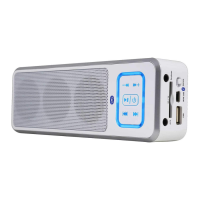
The Peavey BTS 2.2 is a versatile Bluetooth speaker designed for portable audio playback. It offers both wireless and wired connectivity options, making it adaptable to various audio sources.

Function Description:

The primary function of the BTS 2.2 is to amplify and play audio from connected devices. It supports Bluetooth for wireless streaming, allowing users to connect their smartphones, tablets, or other Bluetooth-enabled devices without physical cables. For wired connections, the speaker includes a 3.5 mm AUX-in jack, enabling connection to devices that lack Bluetooth capabilities. Additionally, it features an SD/TF card slot and a USB input, allowing for direct playback of audio files stored on memory cards or USB drives. The speaker is equipped with integrated controls for managing audio playback, including volume adjustment, play/pause, and track navigation (forward and backward). A dedicated 3.5 mm headphone jack is also provided for private listening.

Usage Features:

The BTS 2.2 offers straightforward operation for both its wireless and wired modes.

Wireless Mode:

To use the speaker wirelessly, the Bluetooth switch (labeled as item 10 in the side connections diagram) must be set to the "ON" position. Once activated, users need to enable Bluetooth on their audio device and select the device ID "TL78666" from the list of available Bluetooth devices. If a password is required for pairing, the default password is "0000". A "beep" sound from the speaker confirms a successful Bluetooth connection, indicating that it is ready to receive and play audio wirelessly. A flashing blue light on the speaker signifies that it is in discoverable mode, meaning it is actively searching for and can be seen by other Bluetooth devices.

Wired Mode:

For wired audio playback, the Bluetooth switch (item 10) should be in the "OFF" position. Users can connect an audio source's output to the 3.5 mm AUX-in jack using the provided 3.5 mm audio connector cable. Alternatively, audio files can be played directly from an SD/TF card inserted into the SD/TF slot (item 7) or from a USB drive connected to the USB input (item 8). When an SD card or USB drive is inserted, the unit automatically detects the source and plays the files in order. It's important to note that the Bluetooth switch must be in the "OFF" position when utilizing SD Card or USB inputs to ensure proper functionality.

Controls:

The front panel of the speaker features several intuitive controls:

  1. Volume Control: The "<<" and ">>" buttons, when pressed without holding, function as volume down and volume up, respectively.
  2. Play/Pause: The "►||" button is used to start or pause audio playback.
  3. Power ON/OFF: To power on the device, press and hold the power button (integrated with the play/pause button) for 3 seconds. A blue LED light will illuminate, indicating that the speaker is on. To power off the device, press and hold the power button for 2 seconds.
  4. Forward & Backward: The "<<" and ">>" buttons, when held down, allow users to skip to the previous or next track, respectively.
  5. Bluetooth ON/OFF: This is a physical switch (item 10) located on the side of the speaker, controlling the Bluetooth functionality.

Maintenance Features:

The Peavey BTS 2.2 is designed with user convenience and safety in mind, incorporating features and guidelines for proper maintenance and longevity.

Charging:

To charge the speaker, connect the provided MINI USB/USB cable to the MINI USB 5V input (item 9) on the speaker and the other end to a computer's USB port or a USB AC adapter. A red light will illuminate on the speaker while it is charging, indicating the charging status.

Battery Information:

The device contains an internal rechargeable lithium-ion battery. This battery is designed to last the lifetime of the device. If the battery appears to be dead, it is recommended to try charging it several times. If the battery still does not recharge, users should contact the manufacturer for repair information, as the battery is not user-replaceable.

Cleaning:

The speaker should be cleaned only with a dry cloth to prevent damage to internal components.

Safety Instructions:

The manual emphasizes several important safety instructions to ensure safe operation and prolong the life of the device:

  • Water Exposure: Do not use the apparatus near water, and ensure it is not exposed to dripping or splashing liquids. Objects containing liquids, such as vases, should not be placed on the apparatus.
  • Heat Sources: Avoid installing the speaker near heat sources like radiators, heat registers, stoves, or other heat-producing apparatus (including amplifiers).
  • Servicing: All servicing should be referred to qualified service personnel. Servicing is required if the apparatus has been damaged in any way, including damage to the power-supply cord or plug, liquid spills, objects falling into the apparatus, exposure to rain or moisture, or if it does not operate normally or has been dropped.
  • Modifications: Any changes or modifications to the equipment not expressly approved by Peavey Electronics Corp. could void the user's authority to operate the equipment.

Battery Safety and Disposal:

The manual provides specific warnings regarding the internal rechargeable lithium-ion battery:

  • Battery Replacement: Users should NOT attempt to change the battery themselves. If the battery has died and a replacement is not desired from the manufacturer, disposal instructions must be followed.
  • Disposal: Used batteries/electronics should never be disposed of with ordinary solid wastes due to toxic substances. They must be disposed of in accordance with prevailing community regulations for battery/electronics disposal. If no local regulations exist, the device should be placed in a waste bin for electronic devices. Many electronics retailers offer free recycling for batteries and electronic components.
  • Battery Misuse: The battery may present a risk of fire, explosion, or chemical burn if mistreated.
  • Inspection: Never use or charge the battery if it appears to be leaking, discolored, deformed, or otherwise abnormal.
  • Disassembly: Never disassemble the unit or attempt to remove the battery, as this could cause leakage of alkaline solution or other electrolytic substances.
  • Temperature: Always confirm that the charging temperature is between 5°C and 35°C (41°F and 95°F). Leakage or deterioration of the battery may occur if this warning is not heeded.
  • Liquid Exposure: Never expose the battery to any liquid.
  • Excessive Heat: Never expose the battery to excessive heat, such as direct sunlight or fire. Avoid using the battery pack in an unventilated vehicle where excessive internal temperatures may be encountered.
  • Children: Always keep the battery out of the reach of infants and small children.

These guidelines ensure that the Peavey BTS 2.2 remains a reliable and safe audio companion, with clear instructions for both its operation and care.

Peavey BTS 2.2 Specifications

General IconGeneral
Speaker type-
Driver diameter40 mm
Number of drivers2
Number of speakers1
Audio output channels- channels
Compatible memory cardsmicroSD (TransFlash), SD
Impedance4 Ω
Frequency range- Hz
RMS rated power4 W
On/off switchYes
Product colorWhite
Volume controlDigital
Bluetooth range10 m
Bluetooth profilesA2DP, AVRCP, HFP, HSP
Connectivity technologyWired & Wireless
Battery voltage3.7 V
Battery capacity850 mAh
Power source typeUSB
Battery life (max)8.5 h
Battery technologyLithium
Battery recharge time3.5 h

Related product manuals