EasyManua.ls Logo

Pentair Hydromatic - User Manual

Pentair Hydromatic
12 pages
Print Icon
To Next Page IconTo Next Page
Loading...
NOTE! To the installer: Please make sure you provide this manual to the owner of the equip ment or to the responsible
party who maintains the system.
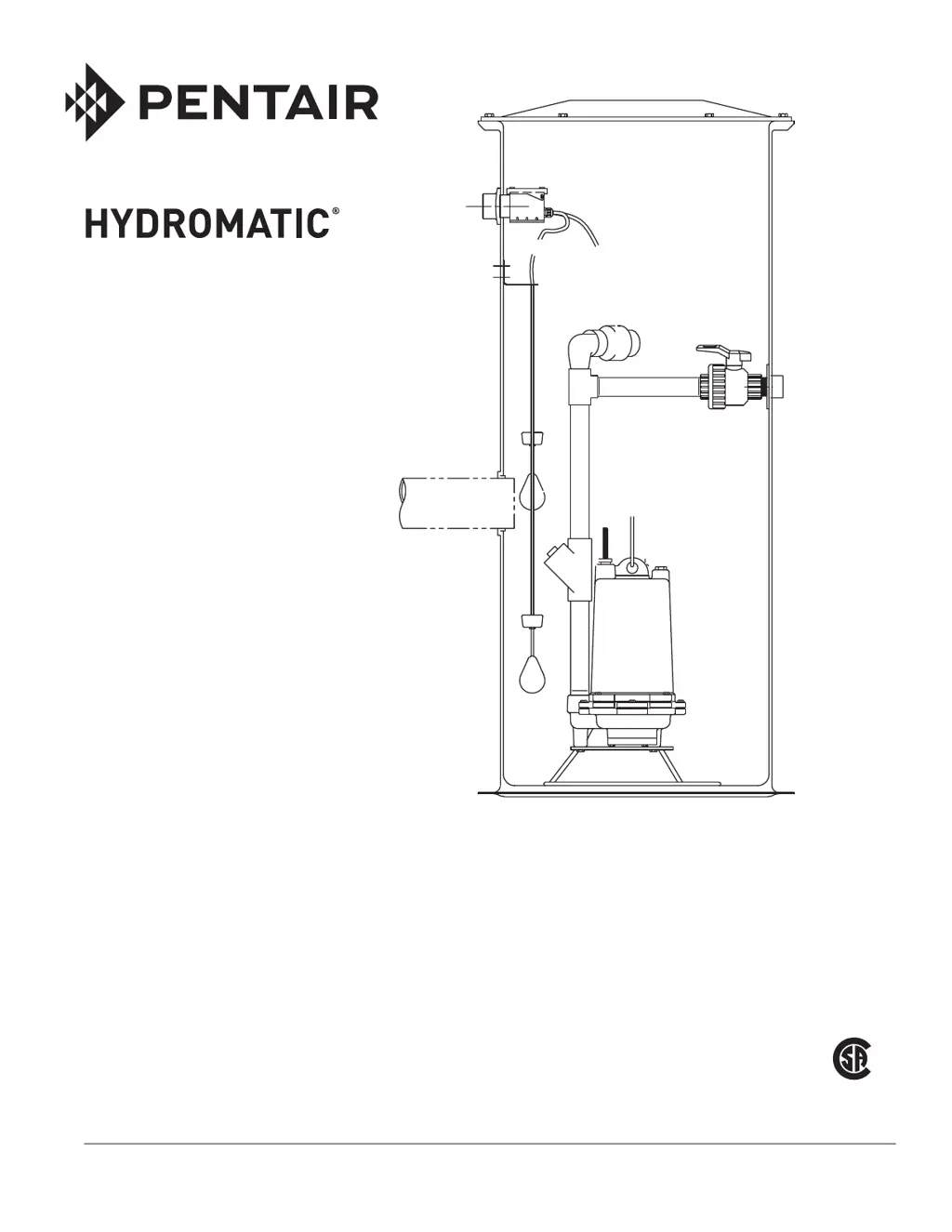
COMPLETE GRINDER
PACKAGE SYSTEM
TH PRO SYSTEM
INSTALLATION AND SERVICE MANUAL
Item # E-03-515 | Part # 5625-515-1 | © 2012 Pentair Pump Group, Inc. | 11/05/12

Questions and Answers

  • L
    Lisa HubbardJul 27, 2025
    Why is the overload tripping on my Pentair Hydromatic Control Panel motor starter?
    • S
      Samuel ScottJul 27, 2025
      If you're experiencing nuisance tripping of the overload on motor starters or circuit breakers of your Pentair Control Panel, several factors could be at play. Start by checking the pump's amp draw with an amp probe and compare it to the nameplate amps on the pump. The impeller might be locked up due to excessive debris or solids. Also, there may be a possible motor failure due to a fault in the windings, or the pump may be miswired to the terminal block. For three-phase systems, check for voltage and current unbalance, and connect leads for the lowest percent of current unbalance. On single-phase units, check connections and start components.
  • T
    Travis ChristianJul 31, 2025
    What to do if Pentair Control Panel pump won't run in Hand position?
    • E
      Edward LawrenceJul 31, 2025
      If your Pentair Control Panel's pump isn't running in the Hand position, begin by inspecting the pump circuit breaker and control fuse for any signs of tripping or a blown condition. Ensure that the incoming power voltage and control circuit voltage are within the correct range. Check the overload relay to see if it has tripped; if so, reset it and check the pump current using an amp meter. With the power off, verify the continuity of the motor heat sensor. Confirm that the pump wiring to the control panel matches the schematic. Lastly, check the contactor coil resistance.
  • P
    patriciafinleyAug 4, 2025
    Why Pentair Control Panel pump not running in Auto?
    • N
      nguyenalexanderAug 4, 2025
      If your Pentair Control Panel's pump isn't running in the Auto position, first, review the checks listed for when the pump doesn't run in Hand position. Ensure the floats are correctly wired to the control panel, verifying the float type (N.O. or N.C.) and connecting them according to the schematic. Confirm that the water level in the system is high enough to activate the floats. If the water level is sufficient, with the power off, disconnect the off and on floats, install jumper wires in their terminal blocks, and turn the power back on to see if the pump runs in Auto. If it runs with the jumpers, the floats are the issue; troubleshoot them with an ohmmeter. If it still doesn't run with jumpers, inspect the Auto circuit wiring in the panel.
  • S
    susan52Aug 9, 2025
    Why is my Pentair Hydromatic humming loudly?
    • T
      Tiffany Wiggins DDSAug 9, 2025
      If you're experiencing severe humming or chattering of contactors and control relays in your Pentair Control Panel, low voltage might be the cause. Use a voltmeter to check the voltage at both the primary and secondary sides of the control transformer. Ensure that the contactor area is free from dust around the magnet of the coil structure; clean if necessary. Verify that the voltage to the control panel meets the minimum requirement of 85% of full voltage for proper contactor pull-in. Ensure the floats are positioned away from turbulence. If a junction box is present, dry it out, as moisture can cause intermittent relay energization.
  • J
    Jack DyerAug 13, 2025
    What causes a Pentair Hydromatic Control Panel pump to run but not pump down the wet well?
    • M
      Michelle CareyAug 13, 2025
      If your Pentair Control Panel's pump runs but fails to pump down the wet well, and if you have a three-phase system, the pump rotation may be incorrect due to reverse sequenced wiring of the pump to the control panel. Additionally, the impeller may be dragging in the volute because of solids; this would be identifiable by a high amperage draw.
  • J
    James LopezAug 17, 2025
    What to do if the run light doesn't turn on when the Pentair Hydromatic pump runs?
    • L
      lopezbrendaAug 17, 2025
      If the pump connected to your Pentair Control Panel is running, but the run light isn't on, remove the light and check it with an ohmmeter. Also, check the run light wiring.
  • L
    lovedesireeAug 22, 2025
    Why does the run light stay on in my Pentair Control Panel?
    • M
      Marie PerezAug 22, 2025
      If the run light on your Pentair Control Panel stays on, the selector switch may be in the Hand position.

Summary

General Information and Safety

Before Installation

Manual contains important safety information for product use. Follow instructions carefully and check local codes.

Electrical Shock Hazard

Risk of serious injury/death/fire. Disconnect all electrical sources. Qualified personnel only. Grounding required.

Biohazard Risk

Risk exists once connected to wastewater. Use proper PPE and handling procedures per OSHA.

Fire and Explosion Hazard

Do not smoke or use open flames. Not intended for hazardous locations.

Cutting Hazard

Serious cutting risk from grinder mechanism. Disconnect power. Use caution.

California Proposition 65 Warning

Product contains chemicals known to cause cancer or birth defects.

Manual Preservation

Keep manual in a safe place for continued safe operation.

Installation Skill Requirements

Specialized skill needed for excavation, pipe fitting, and electrical wiring.

Excavation Safety and Procedures

Locate excavation per local codes, check utilities, avoid buried lines, plan excavation size.

Basin Installation Instructions

Basin System Handling

Avoid dropping, dragging, or using sharp objects to prevent damage to basin or components.

Pad Preparation

Pad requires 4-6 inches fill. Concrete pad with tie-downs ideal. Aggregate must be compacted.

Basin Lifting Procedures

Use nylon/non-damaging slings. Do not use chains/steel cables. Use molded lugs if available.

Installation Electrical Hazard

Improper support of conduit/lines can cause structural failure or expose live wires.

Flooding and Basin Floating Risk

If not tied down, rain/flood may cause basin to float, causing damage.

Positioning and Final Checks

Lower, position, level basin. Mount to anchor bolts. Inspect fiberglass for cuts.

Influent and Discharge Connections

Inlet Connection Procedure

Determine inlet point. Drill hole with piloted hole saw. Seal fiberglass cuts. Insert grommet.

Piloted Hole Saw Warning

Failure to use piloted hole saw can damage basin, causing failure or leaks.

Inlet Pipe Insertion

Lubricate grommet lip. Clean pipe end. Push pipe through. Ensure it doesn't protrude inside.

Discharge Connection

Close shut-off valve. Make discharge connection. Recommend additional shutoff/check valves.

Backfill Instructions

Backfill Material Specifications

Gravel or washed stone/gravel crushings are acceptable.

Backfill Damage Warning

Improper backfill can cause damage, leaks, or structural failure and voids warranty.

Freezing Condition Caution

Backfill must be dry and free of ice in freezing conditions.

Backfill Electrical Hazard

Improper support of conduit/lines can cause structural failure or expose live wires.

Material Acquisition and Use

Obtain proper material providing 90% support. Ensure correct materials are used.

Compaction and Grading

Compact aggregate in layers. Slope cover grade. Protect connections.

Internal Basin Installation

Safety Warnings

Covers electrical shock, cutting hazards, fire/explosion risks. Disconnect power. Use caution.

Pump Unpacking and Inspection

Remove from carton, check for damage, verify contents and specifications.

System Description and Application

Basin sizes, pump types, and operating parameters for effluent/sewage.

Grinder Pump Assembly Steps

Attach foot bracket, apply pipe sealant, screw discharge piping, attach lifting device.

Conduit Connection Warning

Do not connect conduit directly to pump to avoid electrical shock.

Internal Basin Connections

Junction Box Connections

Ensure power off, push cords through grips, make connections inside box to control panel.

Conduit Seal Installation

Install seal outside basin to prevent surface water entry into junction box.

Systems Without Junction Box

Conduit Connection

Use 2" PVC conduit grommet. Drill hole. Seal fiberglass cuts. Insert grommet.

Piloted Hole Saw Warning

Failure to use piloted hole saw can damage basin, causing failure or leaks.

Conduit Insertion

Lubricate grommet lip. Clean conduit end. Push conduit through.

Cord Fishing

Fish pump and float switch cords through conduit to control panel.

Control Panel Connections

Make electrical connections. Seal conduit entrance to prevent sewer gas.

Control Panel Sealing Caution

Improper sealing allows sewer gases to condense, causing premature panel failure.

Panel Wiring

Power Disconnection

Ensure power source is off or disconnected before wiring.

Connecting Pump and Float Cords

Connect cords to panel terminals per schematic. Seal all entries.

Wiring Verification

Verify pump leads (white, black, red) match schematic. Single phase pumps are directional.

Pump Operations and Troubleshooting

Pre-Operation Steps

Fill basin with water. Open shut-off valve. Turn on main breaker.

Starting the Pump

Push the "Push-to-run" button in the control panel.

Amperage Check

Check pump amperage. High readings indicate clogs/miswiring. Low readings suggest air lock.

Float Adjustment (Simplex)

Adjust floats so water is above motor housing and pump shuts off 2" above discharge.

Troubleshooting: Clogged Cutters

High amperage may indicate clogged cutters. Check discharge valve is open.

Troubleshooting: No Water Discharge

Check for clogs, discharge head, or beyond sealing flange issues.

Troubleshooting: Pump Not Pumping Down

Check float position, wiring reversal, or float malfunction.

Troubleshooting: Pump Run Light Stays On

Lower float may have failed, or pump may be air locked or have clogged cutters.

Troubleshooting: Circuit Breaker Trips

Check for short circuits, water in housing, start component failure, or miswiring.

Parts List

Ordering Replacement Parts

Provide pump serial number, model, part description, part number, quantity, and shipping instructions.

Pump Models

Lists HPD200M2-4 (Positive Displacement) and HGRS200M22 (Centrifugal) pumps.

Basin Components

Lists basin models by diameter and depth, and basin cover.

Control Panels

Lists control panels for Positive Displacement and Centrifugal pumps.

Standard Limited Warranty

Warranty Period and Coverage

12 months from shipment or 18 months from manufacture, whichever is first.

Warranty Requirements

Use authorized control panels, functional seal fail/heat sensing devices.

Warranty Exclusions

Excludes defects from improper installation, operation, maintenance, abuse, or unauthorized repair.

Liability Limitation

Excludes consequential, incidental, or special damages. Recommends professional installation.

Pentair Hydromatic Specifications

General IconGeneral
BrandPentair
ModelHydromatic
CategoryControl Panel
LanguageEnglish

Related product manuals