3
4
5
. Package contents
. Description
. Technical data
After unpacking immediately check that the delivery is complete and that
the equipment is undamaged.
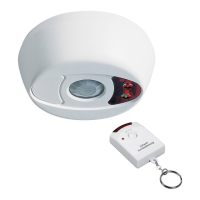
main unit
speaker
range adjuster
power switch and volume adjuster
arm LED
power LED
4 remote control
5 indicator
6 disarm button
7 arm button
8 panic button
9 battery compartment cover
perating voltage: 12 V DC Power consumption:
max. 10 mA(standby)
max. 20 mA (armed)
max. 500 mA (triggered)
ower supply: supplied mains adapter or 8x LR6 (AA)
alkaline batteries (for back up, not
supplied)
Main unit EW01A
Mains adapter (packed in the bottom of the box)
Remote control EW01R with key ring
CR 2032 battery
2x screw, 2x wall plug
Warning sticker
User Manual
1
2
3
4
5
6
1
1
1
1
1
1
O
P
(see Fig. A)
M
R
M
ain unit EW01A
emote control EW01R
ain unit EW01A
#
#
#
#
#
#
#
Contents
1. Introduction .................................Page 18
2. Proper use Page 18
3. Package contents Page 18
4. Description Page 18
5. Technical Data Page 18
6. Safety instructions Page 19
7. Commissioning Page 19
8. Location Page 19
.......................
...................
......................
.....................
...................
....................
........................
9. Use Page 20
10. Adding optional wireleess components Page 20
11. Power LED and battery change Page 20
12. Maintenance + cleaning Page 21
13. Declaration of conformity Page 21
14. Disposal....................................Page 21
15. Fault finding Page 21
..........................
.........
.............
...............
................
.....................
1
2
. Introduction
. Proper use
R
T
W
T
T
T
Theunit is poweredthrough the 12V DC mains adapter which is connected
to230VAC,50Hz.Tomaintainoperationincaseofmainspowerfailure8AA
size batteries (notsupplied) can be installed. The remote control is powered
bya3VCR2032sizebuttoncell.
T
orincorrectoperation.
ead through this user manual completely and carefully. The user manual
is an integral part of the product and contains important information
about operation and handling. Always observe all the safety instructions.
If you have any questions or are unsure about using the equipment, ask a
specialist or obtain information on line at www.pentatech.de. Keep this
manual in a
safe place and pass it on to third parties if necessary.
heElectronic WatchdogEW01consistsofmain unitEW01A, remotecontrol
E 01Randmainsadapter.
heprimaryuseoftheunitisthesimulationofaguarddoginordertodetera
potentialbreak-intoproperty.
he unit is placed inside the property, next to the location to be monitored
(eg. front door, patio door)and it can be armed by pressing a button on the
unitor on the remote control.Thesensor in the unit candetectmovement on
the outside of the wall (eg. somebody approaches the front door) which
triggers the simulation of a barking sound. Alternatively a chime or a siren
sound can begenerated. The siren soundcan also be manually triggered by
pressingthepanicbuttonontheremotecontrol.
he unit can be expanded with optional accessories. Up to 6 wireless
detectors (reed contacts to monitor doors or windows, or PIR-detectors to
monitor movement in rooms) can be enrolled into the unit. A second remote
controlcanalsobeadded.
heelectricwatchdogisintendedforindoorusewithinprivatehouseholds.
Thisapplianceisnotintendedtobeusedbypeople(includingchildren)with
restricted physical, sensory or mental capacities, or a lack of experience
and/orknowledge,unlesstheyaresupervisedby,orreceiveinstructionshow
to use the appliance from, a person responsible for their safety. Children
must be supervised in order to ensure that they do not play with the
appliance.
Anyotheruseorchangeoftheapplianceisimproperuse.Noliabilityshallbe
assumed for consequential damage as well as damage which is caused by
improperuse
GB
GB-18
7
8 LEARN button
9
1
1
1
1
hanging slot
switch
0 arm / disarm button
1 mains adapter connection
2 screw
3 battery compartment cover
2
2
2
2
2
2
0 battery
1 battery compartment
2 wall plug
3 screw
4 warning sticker
5 mains adapter


 To Next Page
 Loading...