b
c
s
Deactivate the EW01 by pressing thebutton [10] or [16] once.The LED
[5]goesout.
Press and hold the "LEARN" button [8] for approximately 20 seconds
untilyouhearalongbeepfirstofallandtwobeeps(onelong,oneshort)
lateronasconfirmation.Allthewirelesscomponentsarenowdeleted.
arkmode: 10sec.bark
himemode: 2x"ding-dong"
irenmode: 20sec.siren
Deletingallthewirelesscomponents(e.g.iftheremotecontrolislost):
!
!
11. PowerLEDandbatterychange
M
R
ainunit
emotecontrol
W
[]
lp /b
lp /n
(
ln /p
(
D/e
I[]
hen the main unit is switched on, the status of the power supply is
indicatedbythecolourofthePowerLED 6 :
ightsgreen: owerviamainsadapter atteriesareOK
ightsorange: ower via mains adapter o batteries fitted or weak
batteries changebatteriesif thesearefitted-batteriesare
optionalforbackup-seeChapter7,point4)
ightsred: o power via mains adapter ower via weak batteries
changebatteries-seeChapter7,point4)
oesnotlight: no power via mains adapter itherpower by batteries, or
ifthebatteriesarenotfittedorareweaknopower.
ftheindicator 15 doesnotilluminateorilluminatesweakwhenabuttonis
pressed and / or the transmitting range becomes shorter then the battery
mustbereplaced(3VbatteryCR2032,seechapter7,points1to3)
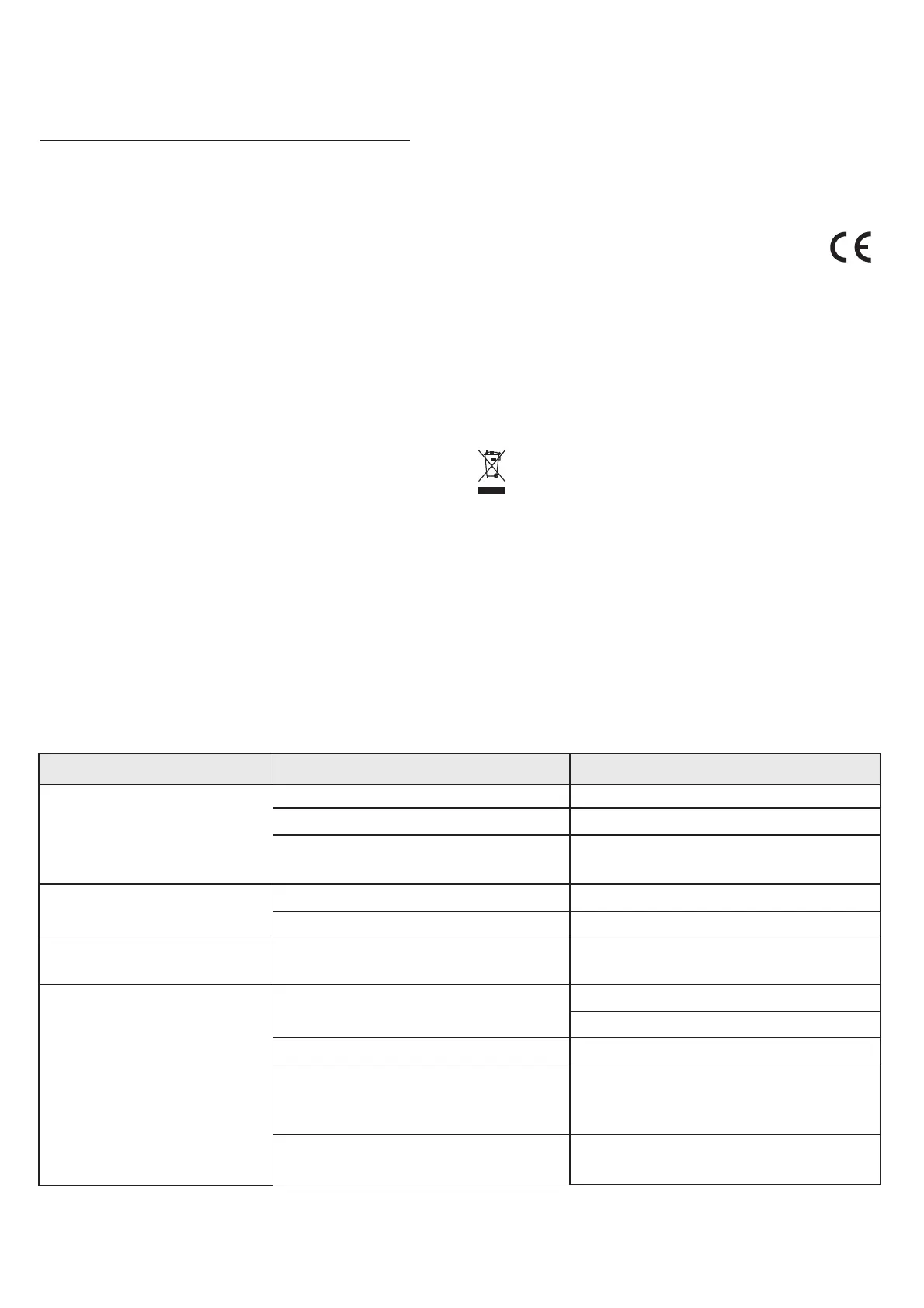
Fault
N
U
T
U
o reaction to movement
nitdoesnotreacttotheremotecontrol
ransmittingdistance of remote control is
veryshort
nwantedtriggeringofmainunit
Cause
Ni
C
H
U [6]
)
S
, glass s
owirelessconnect on
odehasbeenlost
B
ovementofanimalsorpassingcars
eatsourcescantriggertheunit
Electricalwiringinthewallcantriggertheunit,F
nit is operating on weak batteries (power LED
illuminatesred
ensorrangetoolow
Unitisfacinginthewrongdirection
Thick wall or metal object is blocking the sen or
atteryisweak
M
aultsdue
to microwave ovens, wireless surveillance cameras or
WLANrouters
Remedy
R
E
R
R[]
S
R
Setadjuster 3 higher
acksideofunitmustfacetheareatobemonitored
hangethelocation oftheunit orusea radio motiondetector
MA80Pinasuitablelocationoutside
educethedistancebetweenremotecontrolandunit
nrolltheremotecontroltotheunitagain(seechapter10)
eplacethebattery(seechapter10)
educetherangeofthesensorusingadjuster 3
C
witchofftheheatsorcesorchangethelocationoftheunit
Change the location of the unit
enewthebatteries(seechapter7,point4)
[]
B
C
hangethelocationoftheunit
1
1S d c
1
2. Maintenance+cleaning
3. implified EU eclaration of onformity
4. Disposal
#
#
#
#
#
You should regularly check the device to see that it is safe and working
properly.
Before you clean the device, pull the mains adapter out of the mains
socket.
Use a dry or slightly moist cloth for cleaning the device.
Never immerse the device in water.
Do not use solvents to clean the device.
Hereby, r equipment type EW01 is in
compliancewith d
ci
.
P
INDEXA GmbH declares that the adio
Directive2014/53/EU.ThefulltextoftheEU eclarationof
onformity is available at the following nternet address:
ackaging material, used batteriesor electrical products must notbe
disposed of as household waste. Use your recycling system. Details
areavailablefromyourlocalauthority.
Indexa GmbH, Paul-Böhringer-Str. 3, 74229 Oedheim, Germany
www.pentatech.de Subject to change
https://www.indexa.de/ce.htm
GB-21
1 . Fault finding5



 To Next Page
 Loading...