EasyManua.ls Logo

Pentax MZ-50 - Operating the Shutter Release Button; Turning on the Power

Pentax MZ-50
35 pages
Print Icon
To Next Page IconTo Next Page
To Previous Page IconTo Previous Page
Loading...
(4)
OPERATING
THE
SHIJTTER
RELEASE
BIJTTOI{
(5)
TUR}IIIIG
ON
THE
POII|ER
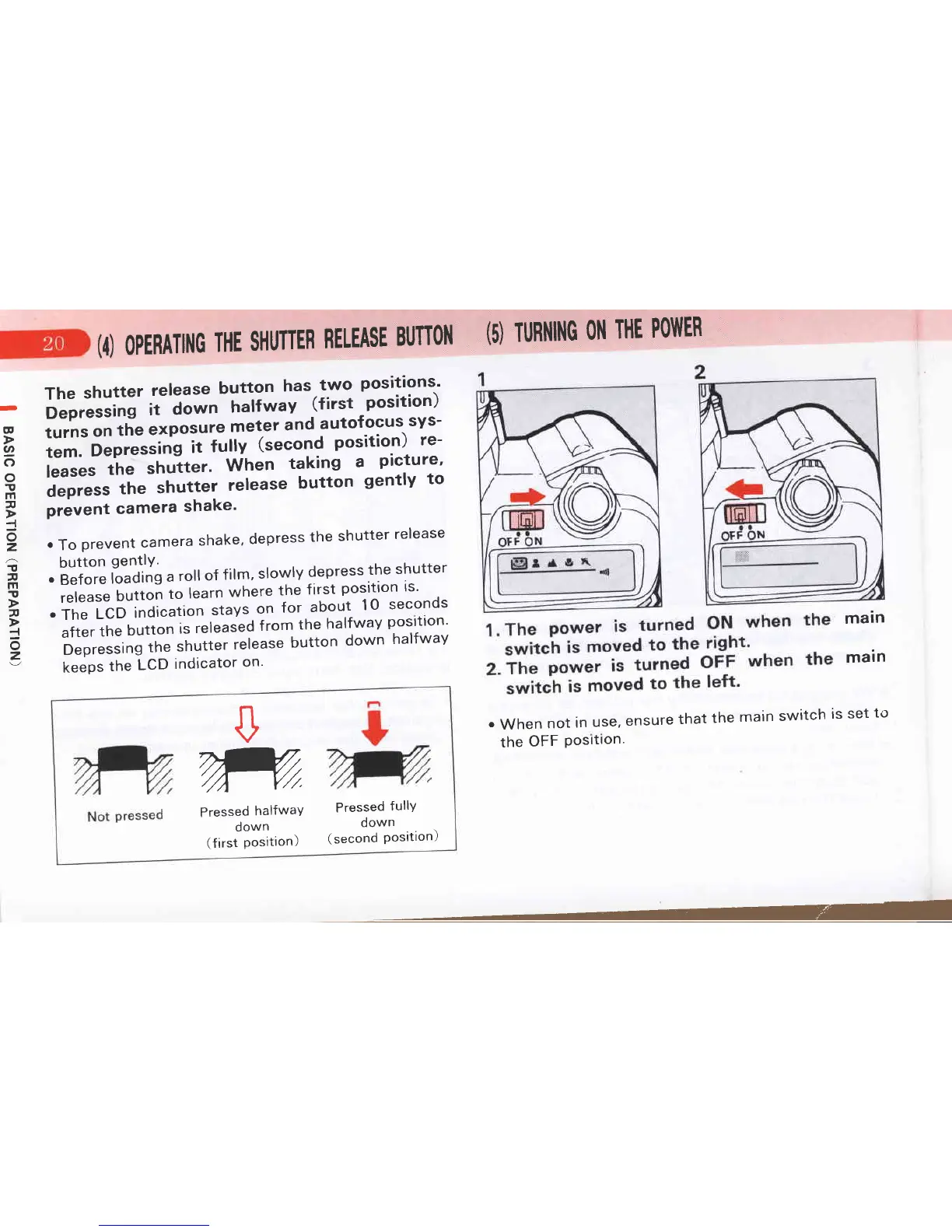
The
shutter
release
button
has.two
positions'
o"o*ttl"n
it
d;;-;;ii*"v
(first
position)
turns
on
the
exposure
meter
and
autofocus
sys-
tem.
Deprt."ing
iitullv
(second
position)
re-
l""t"t
,tt"
shutter'
When
taking
a
picture'
i-Jor"rr
rhe
shutter
release
button
gently
to
prevent
camera
shake'
.
To
prevent
camera
shake'
depress
the
shutter
release
button
gentlY.
.
Before
loading
a
roll
of
film'
slowly
depress
the
shutter
release
button
tol"u'n
where
the
first
position
is'
.
The
LCD
indication
ttuyt
on
for.about
10
seconds
;ii;rlh"
button
is
released
f rom
the
halfwav
posrtron'
Depressing
tfre
shuiter
release
button
down
halfway
keeps
the
LCD
indicator
on'
D
@
2
c)
o
!
m
a
I
o
z
!
v
m
T
a
I
o
z
main
main
.
When
not
in
use,
ensure
that
the
main
switch
is
set
to
the
OFF
Posrtron'
Pressed
fullY
down
(second
Position)
n
v
m
Pressed
halfwaY
down
(first position)

Related product manuals