REPLACING THE BATTERIES
41
BASIC
BASIC OPERATIONS
40
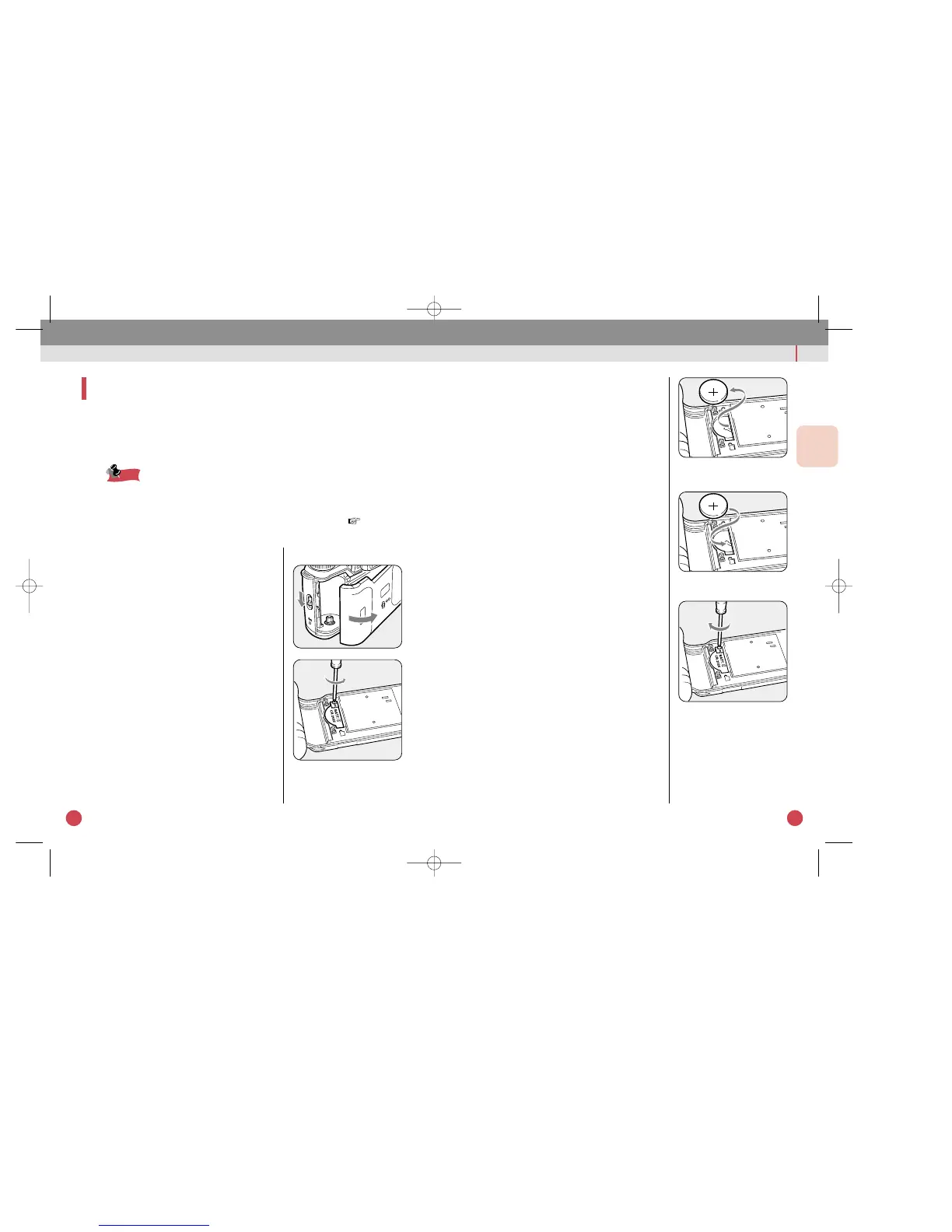
eRemove the old battery.
2 Install a new battery.
qInstall a new battery with the + side
facing up.
wReinstall the battery chamber cover,
and tighten the battery chamber fix-
ing screw.
REPLACE BATTERY FOR DATA BACK FJ (OPTIONAL)
If you have purchased your camera as the Date model
Version, read this section.
If the date/time display or imprinting looks faint,
replace the lithium CR2025 battery.
• Replace the battery when the data information on a picture or the LCD
panel becomes weak or invisible. The battery will last for approximately
3 years. The data back uses one 3V lithium battery, type CR2025.
• After replacing the battery, set the correct date and time. ( p.42)
1 Remove the battery.
qEnsure that a film is not loaded, then
open the back cover.
wLoosen the battery cover fixing
screw (located near the upper left
side of the pressure plate ) with a
Phillips head screwdriver and then
remove the battery chamber cover.



 To Next Page
 Loading...