Need help?
Do you have a question about the Pentax R-423VN and is the answer not in the manual?
Step-by-step guide on how to launch and access the PowerTopoLite software.
Guides on how to create a new job file for data organization.
Details the function to clear all job files and reset the instrument's memory.
Configures the station using rectangular coordinate input methods.
Guides on orienting the instrument at the station point using horizontal angles.
Describes the procedure for performing multiple station orientations for improved accuracy.
Explains the various functions and options available on the MEASURE screen.
Details advanced measurement functions like remote, offset, station, and H. angle.
Configures the station using polar coordinate input methods.
Orients the instrument at the station for polar setup.
Explains the functions of the MEASURE screen, including display and data handling.
Sets up the station using both rectangular and polar coordinate data simultaneously.
Orients the instrument, possibly for multiple orientations or specific settings.
Explains the MEASURE screen functions and display options.
Details the process of free stationing using more than three known points.
Guides on laying out points in the field based on known coordinates.
Introduces the COGO (Coordinate Geometry) calculation functions available.
Guides on initiating a traverse survey by measuring the start point.
Details how to measure corner points during a traverse survey.
Explains how to perform traverse calculations after data collection.
 General
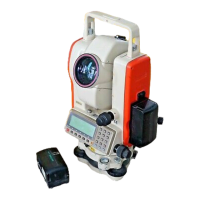
| Type | Total Station |
|---|---|
| Magnification | 30x |
| Distance Measurement | Prism/Reflectorless |
| Accuracy | ±(2mm + 2ppm x D) |
| Measurement Units | Meter/Feet |
| Display | Dual LCD |
| Power Source | Rechargeable NiMH battery |


 To Next Page