G
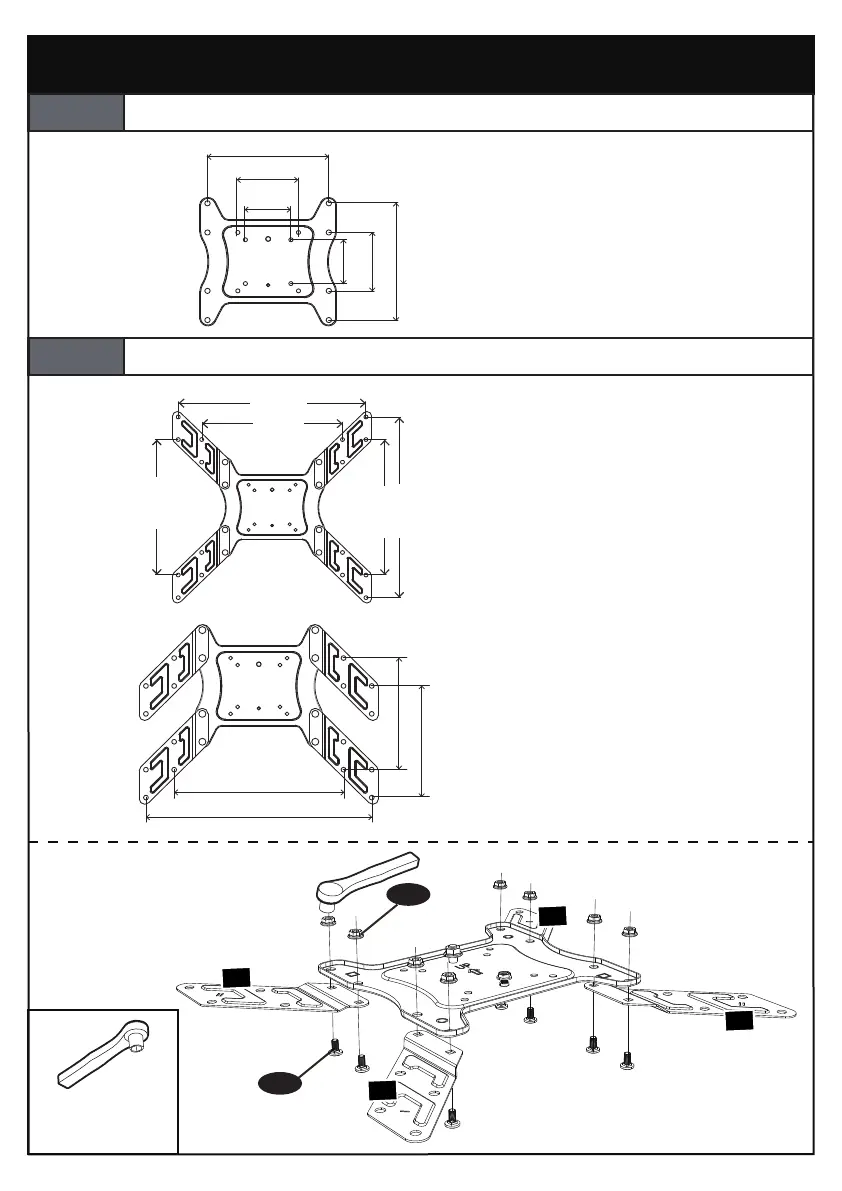
7/16” (11mm)
Socket Wrench
(Not Included)
Step 1
Choose the Combination that Applies to Your VESA Hole
Pattern
200mm
200mm
75mm
75mm
100mm
100mm
For VESA hole pattern:
3 x 3” (75 x 75mm)
3.9 x 3.9” (100 x 100mm)
7.9 x 3.9” (200 x 100mm)
7.9 x 7.9” (200 x 200mm)
400mm
300mm
300mm
300mm
400mm
For VESA hole pattern:
11.8 x 11.8” (300 x 300mm)
15.7 x 11.8” (400 x 300mm)
15.7 x 15.7” (400 x 400mm)
400mm
200mm
300mm
200mm
For VESA hole pattern:
11.8 x 7.9” (300 x 200mm)
15.7 x 7.9” (400 x 200mm)
Option A
No Need to Attach Extender Brackets [02] and [03] to Faceplate
Option B
Need to Attach Extender Brackets [02] and [03] to Faceplate
03
03
02
02
H
01 02 03 04 05 06 07 08 09 10 11
12 13 14 15 16 17 18 19 20 21 22
23 24 25 26 27 28 29 30 31 32 33
34 35 36 37 38 39 40 41 42 43 44
45 46 47 48 49 50 51 52 53 54 55



 To Next Page