7
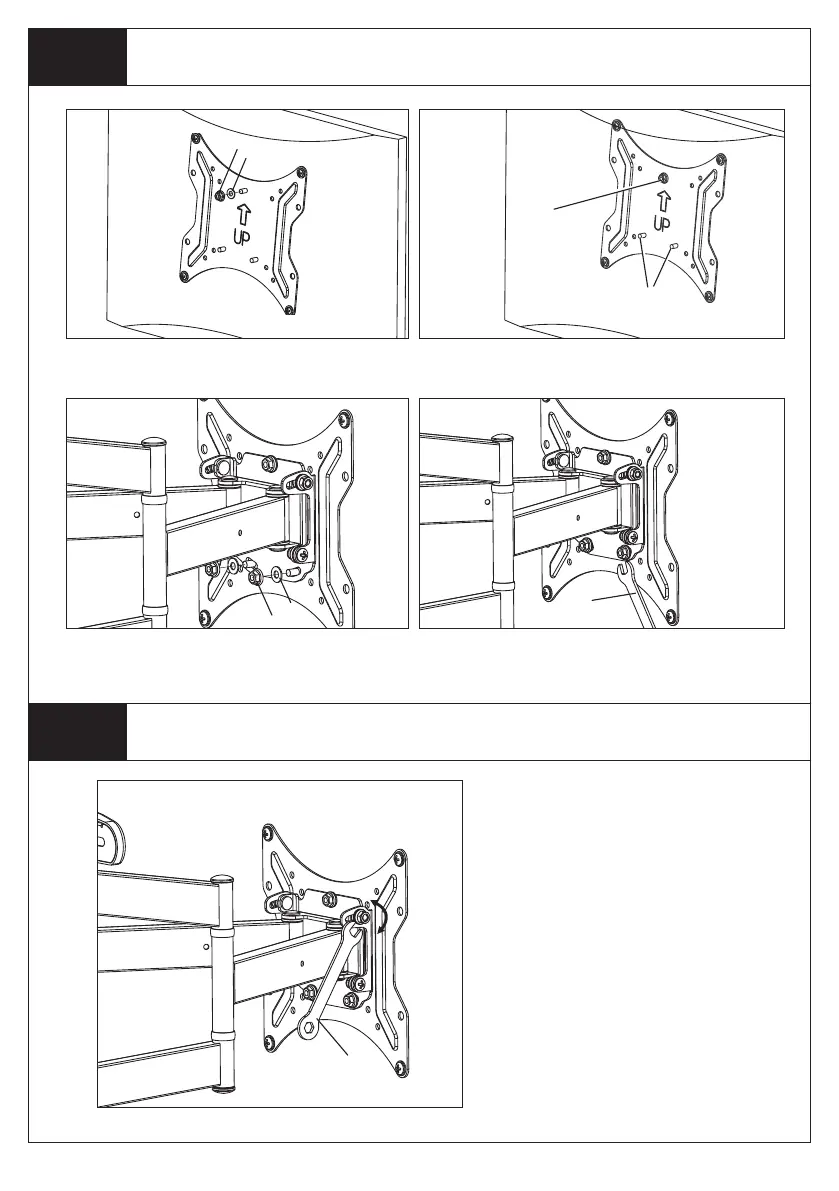
Step 3
Mounting the TV to the Wall Plate
Step 4
Final Installation
3.1 3.2
3.3 3.4
R
S
R
S
F
4.1
F
1. Attach TV Plate Washer (p) and Nut (o) to Upper
Post using included Wrench. Do not tighten Nut.
2. Using an assistant, lift TV, slide TV Plate Nut over
Notch on TV Mount and route Lower Posts through Lower
Post Holes.
3. Attach TV Plate Washers (p) and Nuts (o) to Lower
Posts using included Wrench. Do not tighten Nuts.
4. Level TV, then tighten Nuts on Upper and Lower Posts
securely.
Lower
Posts
TV Plate
Nut
Adjust Tilt if desired:
a. Loosen Tilt Adjustment Nuts on Wall Mount
(behind TV Plate) with included Wrench.
b. Adjust tilt.
c. Tighten Tilt Adjustment Nuts.


 To Next Page