8
SET SET
OK
M
a
u
r
e
d
b
y
:
p
e
r
m
a
-
t
e
c
G
m
b
H
&
C
o
.
K
G
|
H
a
m
m
e
lb
u
r
g
e
r
S
t
r
.
2
1
|
D
O
R
F
|
w
w
w
.
p
e
r
m
a
-
t
e
c
.c
o
m
|
T
e
l
.:
+
4
9
9
7
0
4
6
0
9
-
0
|
M
a
d
e
Next Service Date
ULTRA
Lubricant Cartridge
Installation Date
1000
1000 cm³ / 33.81 .oz. (US)
Art. No. 116190 | UG-2304-373378
perma Multipurpose grease SF01
07/23 | 12/23
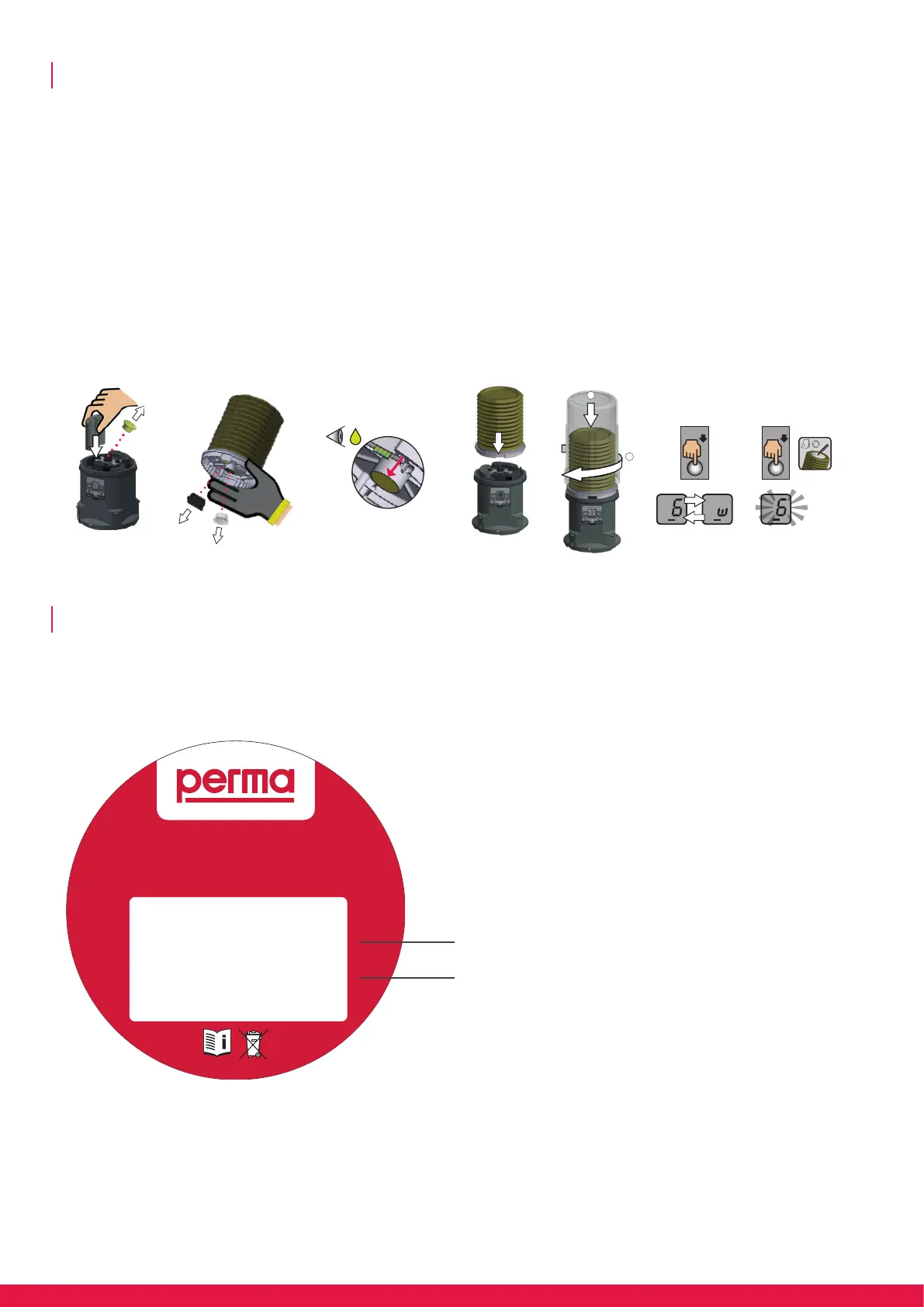
Start up as following (also refer to operating instructions):
1. Insert the battery pack into the drive and click it into place; remove plug from drive and dispose of it.
2. Remove transport protection and plug and dispose of it.
3. Ensure that grease completely lls the LC outlet; there must be no air pocket in the LC.
4. Place LC on center of drive and adjust it with front lug until it catches; system automatically recognizes LC size.
5. Place cover over LC and turn until it catches.
6. Set unit of time (m, w) by pressing the SET button: 1x = m (months) | 2x = w (weeks).
7. Set the discharge period; note activation / exchange date on label
Activation and installation
The label of the lubrication system shows product-code, manufacturing date, traceability number, lubricant code and article number.
Identication of lubrication system
Installation date and exchange date
(to be added by operator)
Art. No. | Serial number
(product designation – year / week of
manufacture – internal no.)
Lubricant designation



 To Next Page