EasyManua.ls Logo

Perma PRO 500 - User Manual

Perma PRO 500
80 pages
Print Icon
To Next Page IconTo Next Page
Loading...
Translation of the
Original Operating Instructions
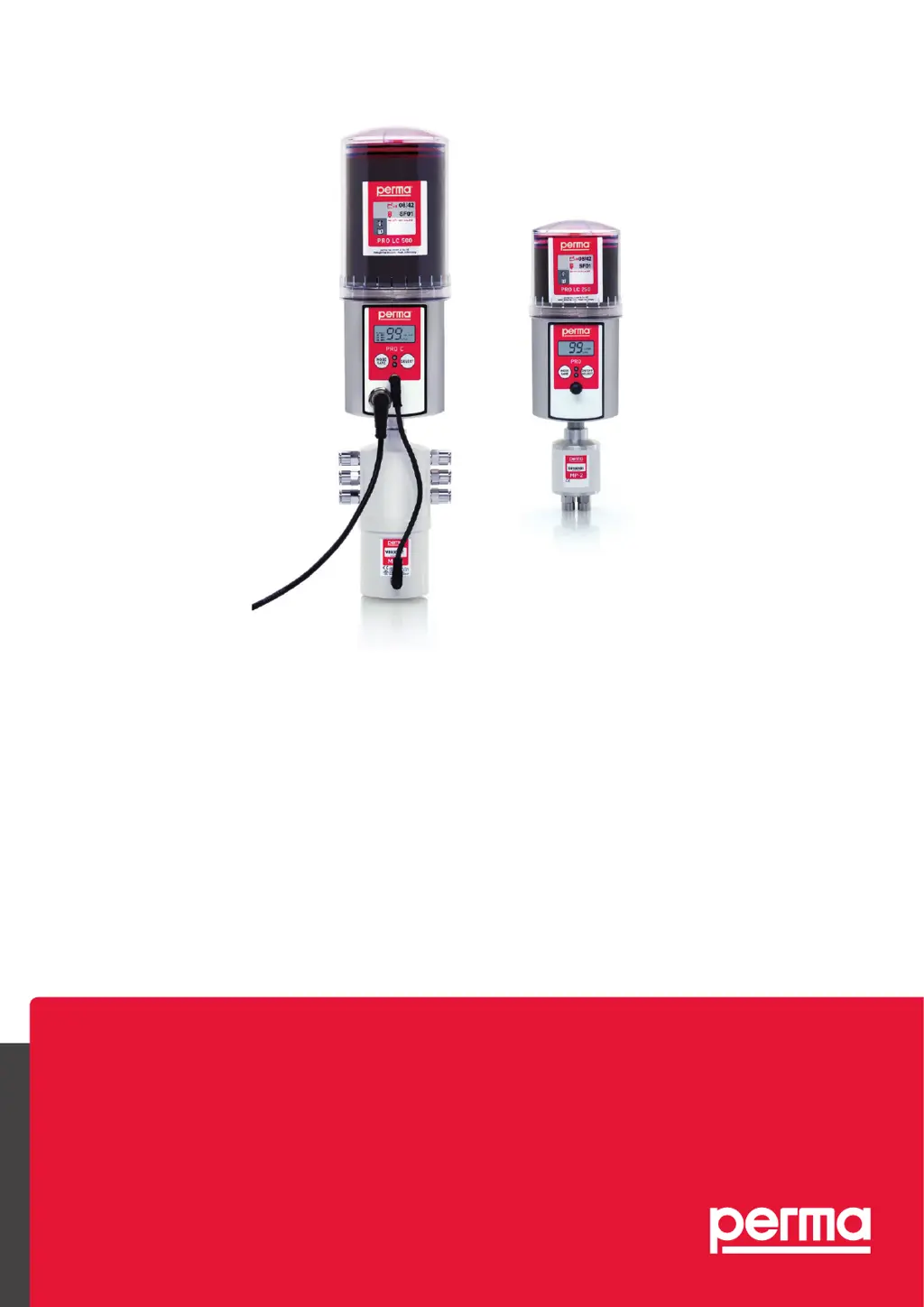
perma
PRO 250 / 500
PRO C 250 / 500
PRO / PRO C LINE 250 / 500
PRO MP-6 Distributor
PRO / PRO C MP-2
The Expert in Lubrications Solutions

Table of Contents

Other manuals for Perma PRO 500

Questions and Answers

  • A
    acarterAug 19, 2025
    What to do if there is an error at the displayed lubrication point in Perma PRO 500 Lubrication systems?
    • L
      Lindsay SimonAug 19, 2025
      If you see an error at the displayed lubrication point on your Perma Lubrication system, it's likely due to excess motor current caused by a blockage in the outlet. To resolve this, clear the blockage and then acknowledge the fault by pushing and holding down the ON/OFF/SELECT button.
  • J
    John ScottAug 21, 2025
    Why has my Perma Lubrication system been switched off?
    • M
      mcknightbrianAug 21, 2025
      If your Perma Lubrication system has switched off, it could be due to excess motor current in the lubricator motor because of a blocked outlet or an empty battery. Clear any blockage, acknowledge the fault by pushing and holding down the ON/OFF/SELECT button. If the battery is empty, insert a new battery set and use a full PRO LC-unit.
  • E
    Edward LopezAug 23, 2025
    Why is there no power supplied to the Perma Lubrication system from the battery?
    • T
      Taylor BeasleyAug 23, 2025
      If your Perma Lubrication system isn't getting power from the battery, it's likely because there's no battery inserted or the battery set is empty. Insert a new battery set and use a full PRO LC-unit to solve this.
  • R
    Regina AllenAug 26, 2025
    What to do if the Perma Lubrication system has been switched off and the outlets are not correctly recognized?
    • E
      Erin FischerAug 27, 2025
      If your Perma Lubrication system has switched off, the outlets of the distributor might not be correctly recognized. Try replacing the distributor to fix this.
  • B
    Benjamin ChavezAug 28, 2025
    What to do if the Perma Lubrication system has been switched off due to a timeout?
    • B
      Benjamin ClineAug 28, 2025
      If your Perma Lubrication system has been switched off, it could be due to a timeout while activating the distributor or a damaged connection cable. Try replacing the distributor and the connection cable.
  • D
    David NielsenAug 30, 2025
    What to do if the Perma Lubrication system does not detect the PRO LC-unit?
    • R
      Rachel Garcia DVMAug 30, 2025
      If your Perma Lubrication system does not detect the PRO LC-unit, ensure that a PRO LC-unit is installed.
  • M
    medinayvonneSep 2, 2025
    What to do if Perma Lubrication system has been switched off and the drive mechanism is defective?
    • S
      Sarah YatesSep 2, 2025
      If your Perma Lubrication system has switched off, the drive mechanism might be defective. Exchange the drive unit to resolve the issue.
  • E
    erin82Sep 4, 2025
    What to do if the outlet configuration is missing in Perma PRO 500 Lubrication systems?
    • J
      Jasmin LyonsSep 4, 2025
      If the outlet configuration is missing in your Perma Lubrication system, it means the outlets were not activated. Activate the desired outlets to resolve this.
  • F
    Frank VasquezSep 6, 2025
    What to do if my Perma Lubrication system displays an error at a lubrication point?
    • T
      Tammy BaldwinSep 6, 2025
      If your Perma Lubrication system displays an error at the lubrication point, it is likely due to excess motor current caused by a blockage at the displayed outlet. The solution is to clear the blockage and then acknowledge the fault by pushing and holding down the ON/ OFF/SELECT button.
  • D
    Dana OconnellSep 8, 2025
    What to do if my Perma Lubrication system has been switched off?
    • S
      Sandra ValenzuelaSep 9, 2025
      Your Perma Lubrication system might be switched off due to several reasons. One potential cause is excess motor current in the perma MP-6. If this is the case, replace the perma MP-6 distributor. Other possible causes include incorrectly recognized distributor outlets, in which case you should replace the distributor. A timeout while activating the distributor or a damaged connection cable could also be the reason; in these cases, replace the distributor or the connection cable, respectively.

Summary

Drilling template

Lubrication System perma PRO

Component Overview

Identifies key components and controls of the lubrication system.

Display and Drive Unit Details

Explains display information and drive unit parts like battery compartment.

Quick Reference Guide

Assembly and LC Unit Exchange

Step-by-step guide for assembly and LC unit exchange.

System Setup and Operation

Guides on system setup, configuration, and basic operation.

Miscellaneous Information

Manual, Terms, and Safety Symbols

Explains manual usage, defines terms, and covers safety symbols.

Delivery, Storage, and Markings

Details delivery content, storage, and product markings.

Legal Requirements

Intended Usage and Liability

Outlines proper use and perma-tec's liability limitations.

Warranty Information

Explains warranty terms and claim procedures.

Safety Instructions

Responsibilities, General Safety, and Specific Precautions

Covers safety responsibilities, general rules, and specific precautions for installation, handling, and batteries.

Technical Data

Model Specifications

Technical specifications for PRO 250 and PRO 500 models.

Application and Lubricant Data

Details on application temperature, lubricants, and grease lines.

Lubricator Design

3.1 Design of the perma PRO Lubricator

Explains the components and assembly of the lubricator.

Mounting and Assembly

4.1 Wall Mounting the Drive Unit

Steps for mounting the drive unit onto a wall fixture.

Lubricator Assembly

4.2 Assembly of the Lubricator

Instructions for assembling the lubricator components.

Display and Control Elements

Display Components and Indications

Identifies display elements, LED signals, and their meanings.

Control Buttons

Explains the function of the control buttons.

Operation and Control

Preparations and Prior Checks

Steps to prepare and checks before operating the system.

System Setup and Basic Operation

Guides for setting up, starting, and stopping the lubrication system.

Discharge Period Determination

6.7 Determining the Discharge Period

How to determine the correct discharge period based on lubricant needs.

Settings and Display

6.8 Settings and Display

Details on navigating the configuration menu and making settings.

Remaining Discharge Period

6.9 Calculation of the Remaining Discharge Period

Formula and example for calculating remaining discharge period.

PRO LC Unit Replacement

LC Unit Replacement Considerations

Key points to consider before replacing the PRO LC unit.

Setting LC Unit Volume

How to set the LC unit size in the system settings.

PRO LC Unit Replacement Procedure

7.2 How to Replace the PRO LC unit

Detailed steps for replacing the PRO LC unit.

Trouble Shooting

Error Messages and Guides

Explains error messages, fault signaling, and provides a troubleshooting guide.

Disposal and Service

Disposal Information

Guidelines for environmentally safe disposal.

Service Information

Information on contacting the supplier for service needs.

Lubrication System perma PRO C

Component Identification and Display Details

Identifies PRO C components, connections, and display information.

Drive Unit and Cable Details

Describes PRO C drive unit parts and connecting cable.

Quick Reference Guide for PRO C

Assembly, Setup, and Operation

Guides for PRO C assembly, setup, configuration, and operation.

Miscellaneous for PRO C

Manual, Terms, and Safety Usage

Manual info, terms, safety symbols for PRO C.

Delivery and Storage Information

Details delivery content and storage for PRO C.

Legal Requirements for PRO C

Intended Usage and Liability

Outlines proper use and liability limitations for PRO C.

Warranty Information

Explains warranty terms for PRO C.

Safety Instructions for PRO C

Responsibilities, General Safety, and Specific Information

Safety for responsibilities, general rules, and specific precautions for PRO C.

Technical Data for PRO C

PRO C Model Specifications

Technical specifications for PRO C 250 and PRO C 500.

Application and Lubricant Data

Details on application temperature, lubricants, and grease lines for PRO C.

PRO C Lubricator Design

3.1 Design of the PRO C Lubricator

Explains components and assembly of the PRO C lubricator.

Mounting and Assembly for PRO C

4.1 Wall Mounting the Drive Unit

Steps for mounting PRO C drive unit onto a wall fixture.

PRO C Lubricator Assembly

4.2 Assembly of the Lubricator

Instructions for assembling PRO C lubricator components.

Connecting the PRO C Lubricator

4.3 Connect the Connecting Cable

How to connect the cable for PRO C.

Display and Control Elements for PRO C

Display Components and Indications

Identifies PRO C display elements, LED signals, and their meanings.

Control Buttons

Explains the function of PRO C control buttons.

Operation and Control for PRO C

Preparations and Prior Checks

Steps to prepare and checks before operating PRO C.

System Setup and Basic Operation

Guides for setting up, starting, and stopping PRO C.

Discharge Period Determination for PRO C

6.7 Determining the Discharge Period

How to determine the correct discharge period based on lubricant needs.

Settings and Display for PRO C

6.8 Settings and Display

Details on navigating the configuration menu and making settings.

Remaining Discharge Period for PRO C

6.9 Calculation of the Remaining Discharge Period

Formula and example for calculating remaining discharge period.

Impulse Mode for PRO C

6.10 Impulse Mode via the Connected Control System

Steps for operating the PRO C in impulse mode.

PRO LC Unit Replacement

LC Unit Replacement Considerations

Key points to consider before replacing the PRO LC unit.

Setting LC Unit Volume

How to set the LC unit size in the system settings.

PRO LC Unit Replacement Procedure

7.2 How to Replace the PRO LC unit

Detailed steps for replacing the PRO LC unit.

Trouble Shooting for PRO C

Error Messages, Fault Signaling, and Guides

Explains error messages, fault signaling, and provides a troubleshooting guide.

Disposal and Service for PRO C

Disposal Information

Guidelines for environmentally safe disposal.

Service Information

Information on contacting the supplier for service needs.

perma PRO; PRO C MP-2 System

System Overview and Technical Data

Explains the PRO/PRO C MP-2 system's function and technical specifications.

Settings and Display for PRO;PRO LINE C

Configuration Menu Overview

Overview of configuration sections like LC, Time, Strokes, Pause time, PIN.

perma MP-6 Distributor Overview

The Distributor perma MP-6

Distributor Components and Accessories

Identifies distributor parts and included accessories.

Activation of Outlets on Lubrication System

How to activate outlets on the PRO/PRO C system using the distributor.

Quick Reference Guide for MP-6 Distributor

Assembly and Connection

Steps for assembling and connecting the MP-6 distributor.

System Setup and Operation

Steps for setting up and operating the system with MP-6.

Miscellaneous for MP-6 Distributor

Manual, Terms, and Safety Usage

Manual info, terms, safety symbols for MP-6.

Delivery and Content Information

Details delivery content and manufacturer info for MP-6.

Legal Requirements for MP-6 Distributor

Intended Usage and Liability

Outlines intended uses and liability limitations for MP-6.

Warranty Information

Explains warranty terms for MP-6.

Safety Instructions for MP-6 Distributor

Responsibilities, General Safety, and Specific Precautions

Safety for responsibilities, general rules, and specific precautions for MP-6.

Technical Data for MP-6 Distributor

MP-6 Distributor Specifications

Technical specifications for the perma MP-6 distributor.

MP-6 Distributor Design and Accessories

3.1 Design of the perma MP-6 Distributor

Explains the design and components of the MP-6 distributor.

3.2 Accessories

Lists and describes accessories for the MP-6 distributor.

Assembly and Mounting of MP-6 Distributor

4.1 Mounting the Connections

Steps for mounting connections and sealing unused outlets.

4.2 Distributor Housing

Warning regarding the distributor housing.

Combination of Distributor and Lubricator

4.3 Combination of Distributor and Lubricator

How to combine the MP-6 distributor with a PRO lubricator.

Separate Mounting of Distributor and Lubricator

Separate Mounting of Distributor and Lubricator

Instructions for mounting the distributor and lubricator separately.

Operation and Control for MP-6 Distributor

Preparations and Prior Checks

Pre-installation steps and checks before operating the MP-6 system.

System Setup and Basic Operation

Steps for setting up and operating the MP-6 system.

Operation and Control for MP-6 Distributor

During Operation

Guidelines for operating the MP-6 system.

Switching System On;Off

Instructions to switch the MP-6 system on and off.

Determining the Discharge Period

How to determine the discharge period for MP-6.

Operation and Control for MP-6 Distributor

Setting the Discharge Period

How to set the discharge period for MP-6.

Calculation of Remaining Discharge Period

Calculation for remaining discharge period with MP-6.

Operation and Control for MP-6 Distributor

5.9 Activation of Outlets

How to activate outlets on the MP-6 distributor.

Operation and Control for MP-6 Distributor

5.10 Initialization of Distributor

Steps for initializing the MP-6 distributor.

Trouble Shooting for MP-6 Distributor

Error Messages and Guides

Explains error messages, fault signaling, and provides a troubleshooting guide.

Disposal and Service for MP-6 Distributor

Disposal Information

Guidelines for environmentally safe disposal.

Service Information

Information on contacting the supplier for service needs.

perma PRO; PRO C MP-2 System

System Overview and Technical Data

Explains the PRO/PRO C MP-2 system's function and technical specifications.

MP-2 System Setup and Content

Determine Discharge Period

How to determine the discharge period for the MP-2 system.

Delivery; Content

Lists items included in the MP-2 basic system and required parts.

MP-2 System Installation and Assembly

Installation Dimensions and Assembly

Shows physical dimensions and assembly overview of the MP-2 system.

Accessories and Spare Parts

LC Units and Covers

Lists PRO LC units and protective covers.

Batteries and Cables

Lists PRO batteries and connection cables.

Accessories and Spare Parts

MP-6 Distributors and Accessories

Lists MP-6 distributors, plugs, and connecting cables.

Mounting Devices and Lubrication Supplies

Lists mounting devices and grease cartridges.

Protection Boxes

Lists available PRO protection boxes.

Declaration of Conformity

EG-Konformitätserklärung and EC Declaration

German and English conformity declarations.

Manufacturer Details and Product Description

Company info and product type designation.

Product Identification and EU Directives

Product identification numbers and relevant EU directives.

Harmonised Standards

List of harmonised standards applied.

Declaration of Conformity for PRO C;PRO LINE

Manufacturer Details and Product Description

Company info and product type designation for PRO C/PRO LINE.

Product Identification and EU Directives

Product identification and EU directives for PRO C/PRO LINE.

Harmonised Standards

List of harmonised standards applied.

Declaration of Conformity for PRO MP-6 Distributor

Manufacturer Details and Product Description

Company info and product type designation for MP-6.

Product Identification and EU Directives

Product identification and EU directives for MP-6.

Harmonised Standards

List of harmonised standards applied.

Drilling Template for MP-6 Distributor

Declaration of Conformity for PRO;PRO C MP-2

Manufacturer Details and Product Description

Company info and product type designation for PRO/PRO C MP-2.

Product Identification and EU Directives

Product identification and EU directives for PRO/PRO C MP-2.

Harmonised Standards

List of harmonised standards applied.

Perma PRO 500 Specifications

General IconGeneral
BrandPerma
ModelPRO 500
CategoryLubrication systems
LanguageEnglish

Related product manuals