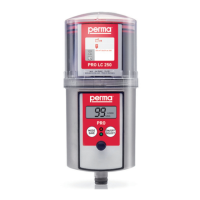
permaPROC-2-
Quick Reference Guide for the Lubrication System perma PRO C
OnthispageyouwillndsomeimportantinformationforquickandeasyoperationandsettingofthepermaPROC
lubricationsystem.BeforetherstinstallationofthepermaPROCandwheneveryouneeddetailedinstructions,
youshouldreadthecompleteOperatingManualwhichcontainsinformationthatmustbeobserved.Makesureto
followtheinstructionsgivinginthechapter“SafetyInstructions”.
1
Assembly of perma PRO C / Exchange of PRO LC unit
(refer to chapter 4 and 7)
♦ Mountthedriveunitonthemountingplateandsecureitwiththethreepre-drilledholes(seeattached
template).
♦ PlacethePROLCunitinsidethecoverandremovetheplugofthePROLCunit.
♦ PushthePROLCunitintothecoveruntillubricantcomesoutoftheopening.
♦ PlacethePROLCunitwithitscoveronthedrive-unit.Makesurethatthecatchlocksandthatthe
teethofPROLCunitanddriveunitinterlock.
♦ Turnthecoverclockwiseuntilthebayonetcatchlocks.
♦ ConnectthepermaPROCtoyourcontrolsystemusingtheconnectingcable.
2
Determine the Discharge Period
(refer to chapter 6.7)
♦ Refertothemanufacturer’sguidelinesaboutthelubricationpointthatyouwanttolubricateinorderto
determinetherequiredlubricantamountincm
3
peronehundredoperatinghours.
♦ Refertochart(chapter6.7,chart5)andndyourrequiredlubricationvolume.Basedonthat,thechartwill
showyoutherequiredPROLCunitsize,thesettingofthedischargeperiod,andthesettingmode.
♦ YoumayalsorefertoourpermaSELECTprogramwhichcanbedownloadedfromourwebpagefreeof
charge.Ithelpsyouinselectingthecorrectsettings.
3
Setting of LC unit Size, Discharge Period, Outlets and PIN
(refer to chapter 6.8)
♦ HolddowntheMODE/SAVEbuttonuntilthesettimeisdisplayed.
♦ HolddowntheMODE/SAVEbuttonagainuntilyoureachthecurrentPIN(PINcannotbechangedhere/
PINsettingatdeliveryis“
”).
♦ HolddowntheMODE/SAVEbuttonagainuntilyoureachtheothersettingmenus:
LCunit,dischargeperiod,outlets(onlywithattachedMP-6),andPINchange.
ChangesettingswithashortpushofMODE/SAVEorSELECT.
4
Impulse Mode via the Connected Control System
(refer to chapter Kap. 6.10)
♦ Tostarttheimpulsemode,setthesettingmode“Days”inthecongurationmenuofthelubricatorto“ ”.
♦ Triggeradischargewithadischargevolumeof0.5cm
3
byswitchingonthesupplyvoltageforthe
permaPROCforaminimumoperatingperiodof14minutes.
♦ Theminimumshutdownperiodbetweentwodischargesis20seconds.
5
Save Settings
(refer to chapter 6.8)
♦ KeeptheMODE/SAVEbuttonpresseduntildisplayshows“ ”.
6
Starting perma PRO C
(refer to chapter 4.3 and Kap. 6.5)
♦ Switchonthesupplyvoltage(DC15Vto30V)forthelubricatorviayourcontrolsystem.Theremaining
volumeisdisplayedandthegreenLEDisblinking.
7
Stopping perma PRO C
(refer to chapter 6.6)
♦ Switchoffthesupplyvoltageforthelubricator.Thedisplayofthelubricatorshows“
”.


 To Next Page