perma PRO -19-
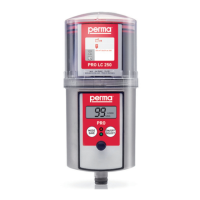
7.2 How to Replace the PRO LC unit
Drivesystemandcircuitboardmustbeprotectedfrommoisture.Exchangesshouldonlybedoneinadryplace
anditmustbeensuredthatnomoistureentersthedriveunit.
a) Turntheprotectioncoveronthedriveunitcounter-clockwiseandremoveit.
b) RemovetheemptyPROLCunit.Thedisplayindicates“ ”andtheredLEDisblinking.
c) Removetheusedbatterysetfromthedriveunit.
d) Insertthenewbatterysetintothedriveunit.Followthedirectionsofthearrows.
e) RemovetheplugofthePROLCunit(refertogure5,chapter4.2).
f) PushthePROLCunitintotheprotectioncoveruntillubricantcomesoutoftheopening(refertogure6,
chapter4.2).
g) PlacethenewPROLCunitonthedriveunit,turnituntilthecatchlocksandtheteethofthePROLCunit
andthedriveunitinterlock.ThecontrolsystemautomaticallyrecognizesthenewPROLCunit.
Thedisplayindicates“ ”,ifthepermaPROwasswitched offpriortothereplacementofthePROLCunit.
Oritindicates“ %Vol.”,ifthepermaPROwasswitched onbeforethereplacement.
Youshouldonlyusecompletelyfullperma-tecPROLCunits,inordertoguaranteeatrouble-freeoperation.
h) Thelubricationsystemcontinuestooperatewiththeprevioussettingofthedischargeperiod.
i) Ifrequired,changelubricatorsettings(seechapter6.8).
If the lubricator was ON before changing the LC unit, it will automatically resume operation with existing
settings. If the lubricator was OFF, it must be turned ON (refer to gure 13, chapter 6.5).


 To Next Page