permaPROMP-6Distributor-16-
Indication
of the
display
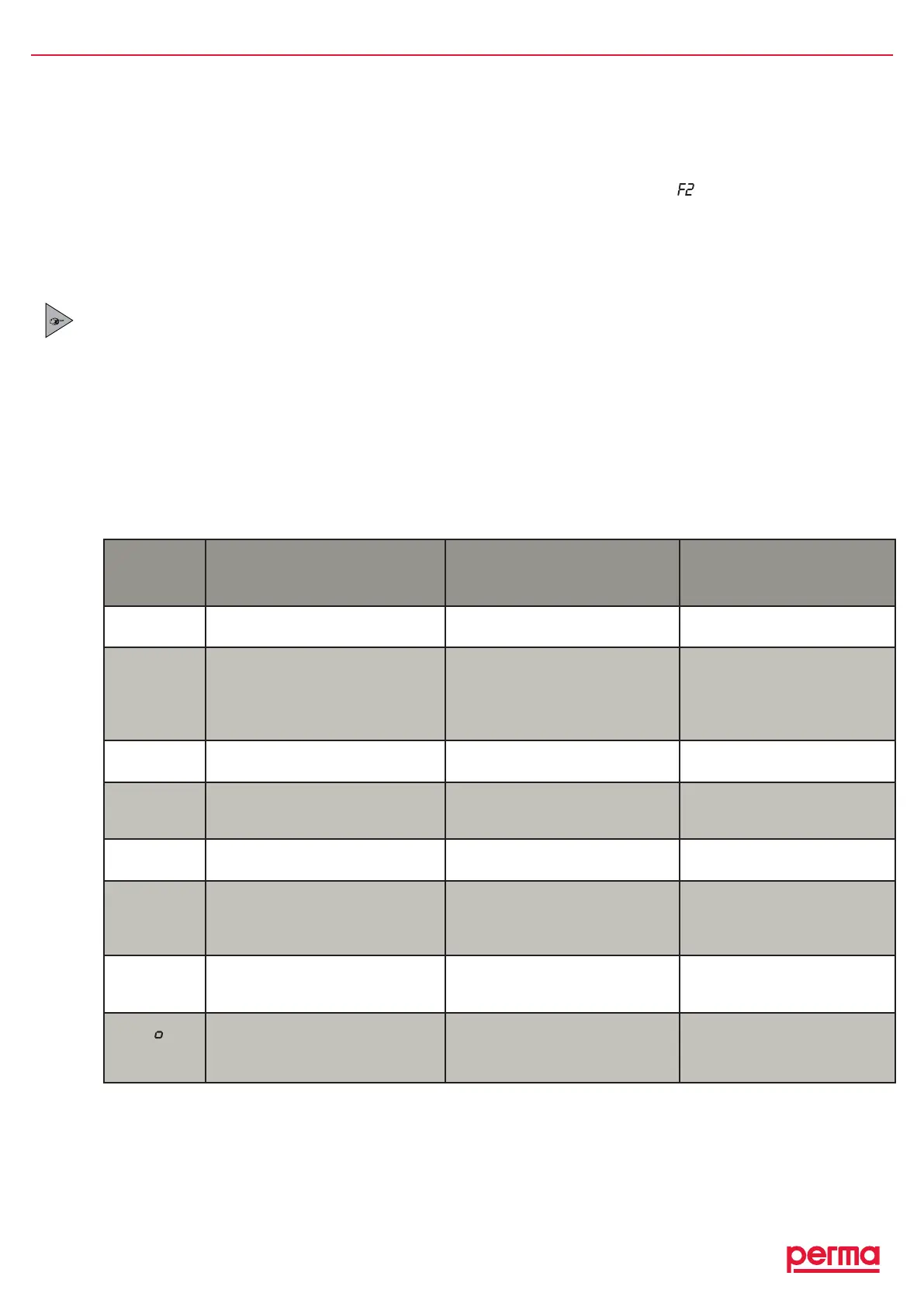
Error Possible cause Remedial measures
E0
Lubricationsystemhasbeen
switchedoff
Excessmotorcurrentoftheperma
MP-6
ReplacepermaMP-6distributor
F I tof6
Erroratthedisplayed
lubricationpoint
Excessmotorcurrentofthe
lubricatormotorcausedbya
blockingofthedisplayedoutlet
Cleartheblockageand
acknowledgethefaultby
pushingandholdingdownthe
ON/OFF/SELECTorSELECT
button
E2
Lubricationsystemhasbeen
switchedoff
Outletsofdistributornotcorrectly
recognized
Replacedistributor
E3
Lubricationsystemhasbeen
switchedoff
Timeoutwhileactivatingdistributor
Connectioncabledamaged
Replacedistributor
Replaceconnectioncable
e4
Lubricationsystemhasbeen
switchedoff
Drivemechanismofthelubricator
isdefective
Replacethedriveunitofthe
lubricator
E5
Outletcongurationmissing Outletswerenotactivated
Activatedesiredoutlets
(Turnoffpowersupplyon
PROCbeforeyouacknowledge
errormessages)
LC
Lubricationsystemdoesnotdetect
thePROLCunit
NoPROLCunitinstalled
InstallanPROLCunit
(ObservetheOperating
Instructionsofthelubricator)
L
(Onlywith
PRO)
Nopowersuppliedtothe
lubricationsystem
Nopowersuppliedtothelubricator
Establishapowersupply
(ObservetheOperating
Instructionsofthelubricator)
chart3
6. Trouble Shooting
6.1 Error Messages of the Distributor on the Display of the Lubricator
Possibleerrorsofthedistributorandthecompletelubricationsystemaredetectedbytheelectroniccontrolunit
andareindicatedonthedisplayofthelubricator.Forexample,iftheerrormessage isshownonthedisplay,
therequiredpressureatthesecondconnectedlubricationpointexceeds25bar(360psi).
Thismeansthatthislubricationpointisnolongersuppliedwithlubricant.Thedistributorstillprovideslubricant
toallotheractivatedlubricationpoints.Correctthemalfunctionofthesecondlubricationpoint(e.g.greaseline
bentorblocked)andacknowledgeitbypushingtheON/OFF/SELECTbuttononthelubricatorPROorthe
SELECTbuttononlubricatorPROC.
Error messages are acknowledged and reset by pushing the ON/OFF/SELECT or SELECT button.
6.2 Trouble Shooting Guide
Iftherearemalfunctionsduringtheoperationofthedistributororthelubricationsystem,pleasecheckforpos-
siblecausesusingthefollowingchart(refertochart3).Ifyouhavetodealwithamalfunctionthatisnotlisted
inthechartbelow,pleasecontactyourlocalsupplierfortechnicalsupport.
Every time that an error message is shown on the display of the lubricator, the red LED at the lubricator
is also blinking.


 To Next Page