permaPROC -19-
Config.
LC250
Config.
LC 500
7.1 Setting the Volume of the PRO LC unit
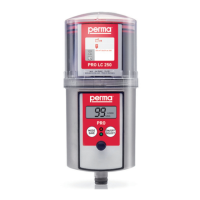
ThesizeofthePROLCunitmustbesetinthecongurationmenuwiththetwobuttonsonthedriveunit(referto
gure19).Pleasealsorefertotheoperatingchart(chart6,chapter6.8).
ATTENTION!
If the displayed setting does not correspond with the attached PRO LC unit size it will result in incorrect
discharge amounts and wrong signals in the display (Display, LEDs).
or
gure19
ATTENTION!
WheneveraPROLCunitisremovedfromthelubricatorandisreplacedbyanotherLCunit,thecontrolsystem
assumesthatanew,completelylledPROLCunitwasattached.
Therefore NEVER attach a PRO LC unit that is not completely full!
7.2 How to Replace the PRO LC unit
Drivesystemandcircuitboardmustbeprotectedfrommoisture.Exchangesshouldonlybedoneinadryplace
anditmustbeensuredthatnomoistureentersthedriveunit.
a) Turntheprotectioncoveronthedriveunitcounter-clockwiseandtakeitoff.
b) RemovetheemptyPROLCunit.Thedisplayindicates“ ”andtheredLEDisblinking.
c) RemovetheplugofthePROLCunit(refertogure4,chapter4.2).
d) PushthePROLCunitintotheprotectioncoveruntillubricantcomesoutoftheopening
(refertogure5,chapter4.2).
e) PlaceanewPROLCunitonthedriveunit,turnituntilthecatchlocksandtheteethofthePROLCunit
andthedriveunitinterlock.
ThecontrolsystemofthepermaPROCautomaticallyrecognizesthenewPROLCunitandthedisplay
indicates“ ”,ifthepermaPROCwasswitched offpriortothereplacementofthePROLCunit.
Oritindicates“ %Vol.”,ifthepermaPROCwasswitched onbeforethereplacement.
YoushouldonlyusecompletelyfullpermaPROLCunitsinordertoguaranteeatrouble-freeoperation.
f) Thelubricationsystemcontinuestooperatewiththeprevioussettingofthedischargeperiod.
g) Ifrequired,changelubricatorsettings.Refertochapter6.8ortochapter6.10incaseofanimpulsemodeof
thelubricator.
If the lubricator was ON before changing the LC unit, it will automatically resume operation with existing
settings. If the lubricator was turned Off, it must be turned On again by supplying voltage (refer to
chapter 6.5).


 To Next Page