permaPROC-16-
Caption for Chart on Left Side
Instructionsshouldbefollowedfromtoptobottomandfromlefttoright(alsorefertochart4).Theinstructions
correspondtotheoperatingsequenceontheturnedofflubricationsystempermaPROC.Congurationisalso
possibleifpermaPROCisOn.
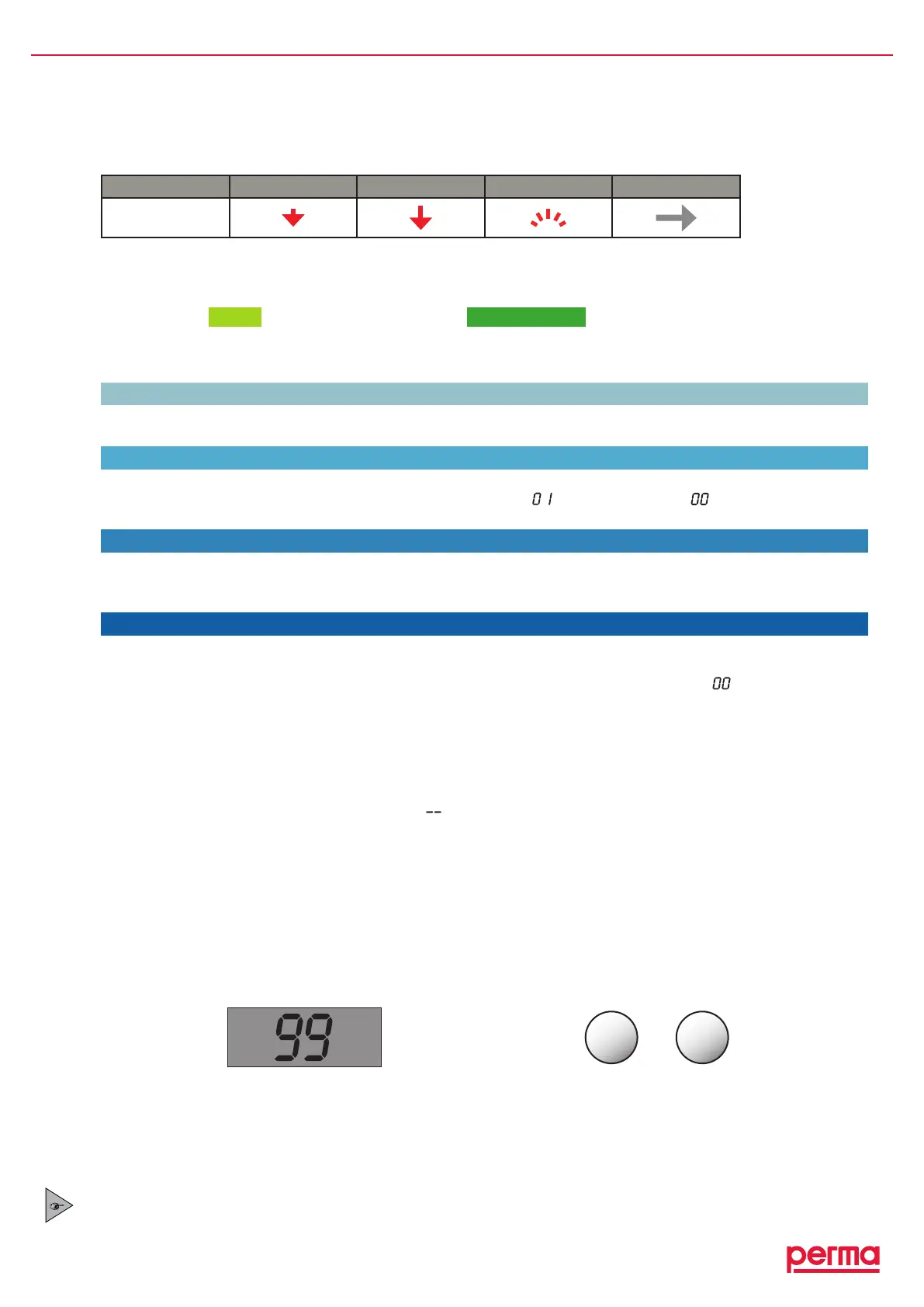
chart7
Function shortpush longpush blinkingdisplay goto
Symbol
CONFIGURATION SECTIONS (see vertical bar, chart 6)
I N T R O
INTROinforms
Info
andasksforthecurrentPIN.
PINEntry
C O N F I G U R A T I O N M E N U E
Settingscanbechangedinthecongurationmenuwithitsdifferentsections(LC,Time,Outlets,PIN).
LC
YoucanchangethePROLCunitsizefromLC250toLC500andbackbypushingtheSELECTbutton(referto
chapter7.1and7.2).
Time
Thedischargeperiodcanonlybesetin one typeofcalendarunit(i.e.eitherMonths,Weeks,orDays).When
thehighestunitisreached,countingstartsagainwithnumber“
”(exceptwithdays“ ”=ImpulseMode,
refertochapter6.10).
Outlets
Theactivatedoutlets1-6aredisplayedwithalledinsquareinthedisplay(pleaserefertotheoperating
instructionoftheMP-6distributorformoredetails).Ifnodistributorisconnected,congurationofoutletshas
noeffect.
PIN
WestronglysuggesttoenterapersonalPINinordertoprotectyoursettingsfromunauthorizedaccess.The
PINcanonly be changed during initial conguration or after a PIN-reset.APIN-reset(shortpushofbut-
tons:left-left-right-right-leftintheINTRO-Info-menu)changesyourpersonalPINbackto“
”.ThePIN-reset
wassuccessfulwhenthedisplayedtimedisappearsforasecondandthencomesbackon.Allothersettings
remainunchanged.
Save or Reject Changed Settings
ThedisplaysettingscanbesavedwithalongpushoftheMODE/SAVEbutton.Ifyoudonotwanttosaveyour
changestosettingthatarecurrentlydisplayedinthecongurationmenu(LC,Time,Outlets,PIN),pressthe
SELECTbuttonuntilthedisplayshowseither(“
”)forOffortheremainingvolumeofthePROLCunitin%
VOL.Allothersettingsandalreadysavedchangesremainvalid.
Automatic Termination of the Conguration Mode
Ifyoudonotpressabuttoninthecongurationmodefor180seconds,thecontrolsystemisautomatically
switchingbacktothepreviouslysetmode(“On”or“Off”)withoutsavingthechanges.
Thesettingsexistingpriortothechangeremainvalid.
Additional Discharge
Withanadditionaldischarge,alubricationpointcanbesuppliedwithanadditionalamountofthelubricant.
Foranadditionaldischarge,thelubricationsystemmustbeswitchedon(displayshowstheremainingvolume)
andbothbuttonsmustbehelddownsimultaneously(refertogure15).
gure15 LubricatorOn Foranadditionaldischarge,pressbothbuttonsatthe
sametimeandholdthemdown(>4sec.)
Anadditionaldischargeisonlypossibleattemperaturesabove0°C/32°F(gure16,icecrystalisnotvisible)
andwhenthelubricationsystemisnotcurrentlyconductingaregulardischarge.
Everyadditionaldischargereducestheremainingdischargeperiodsinceanincreasedamountofthelubricant
hasbeensupplied.Thismustbetakenintoaccountinyourlubricationandmaintenanceschedule.
The time between two additional discharges is at least 30 seconds. Each additional long push of
both buttons (simultaneously) (gure 15) during this time is being registered and will lead to even
more additional discharges. The system remembers a max. of 5 additional discharges.
MODE
SAVE
SELECT
%Vol.
LC 500


 To Next Page